Best tools
AI character turnaround sheet: 5 tools that turn one image into front, side and back views
If you have one image or a description of a character and want a turnaround sheet whose front, side and back views match, the fastest route is a tool built for it. The Characters page in Sky Studio draws four views on one image, splits them into separate pictures and saves the character for your images and videos. CharacterGen and FlexClip also start from a reference image; Midjourney, ChatGPT and Gemini do it with a prompt. In our test, with one clear front-view image, all four models we tried kept the details; with text alone, left-right details such as which shoulder the braid falls on or which ear has the earring went wrong most often. Whatever tool you use, check every view.
Sky Studio wrote this page, and Sky Studio is one of the tools on it. What this page says about other tools is as of September 2026.
| Tool | Best for | Billing | How it makes the sheet |
|---|---|---|---|
| Sky Studio | Turning one image or a description into a character you can reuse | No subscription: pay as you go, and credits never expire | A dedicated Characters page: four views at once, split and saved as a character |
| CharacterGen | People who want many art styles | Monthly or yearly subscription; credits reset every month and don't carry over | From a text description or an uploaded character image |
| FlexClip | Using the character while you edit video | Subscription; subscription AI credits expire | Upload a reference image and ask for the views |
| Midjourney | Style and artistic finish | Subscription only; unused Fast time doesn't roll over | A turnaround prompt, with optional reference images |
| ChatGPT and Gemini | Trying it now and then | Free tier with limits; paid plans are monthly | Upload an image in the chat and ask for the views |
What is a character turnaround sheet, and why make one?
A character turnaround sheet (also called a character sheet, model sheet or reference sheet) shows the same character from the front, the side and the back. Comics, games, animation and 3D modeling have used it for a long time: whoever draws, and in whatever scene, follows the same reference, so the character doesn't drift.
With AI image and video tools it matters even more. A model only sees the reference you give it: if you only have a front view, then when the character turns around, the hair, clothes and accessories on the back are left to the model's guess, and it guesses differently in every shot. If you make a sheet with every angle first and use it as the reference, keeping the same character across shots gets much easier.
Four things to check when choosing a tool
- Whether the views match: the same face, hair, patterns and accessories from the front, side and back. This matters most, and it is where AI slips most often.
- Whether it can start from an image: if you already have a picture of the character (hand-drawn or made with another tool), it should draw the other angles from it instead of inventing a new character.
- Whether the resolution is enough: with three or four views on one image, each view gets fewer pixels. If the image is small, the face and details blur when you zoom in.
- Whether you can use it right away: whether splitting the views, saving the character and using it in images and videos happens automatically, or you crop and organize the files yourself.
5 AI tools for character turnaround sheets
-
1 Sky Studio Our tool
Best for: Turning one image or a description into a character you can reuse
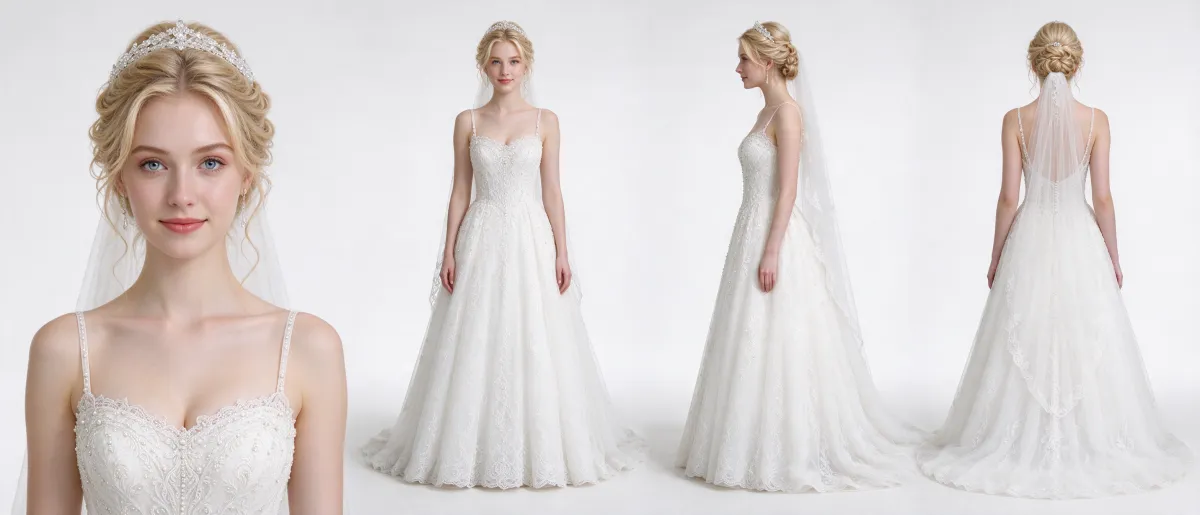
Sky Studio has a dedicated Characters page. Write a description or upload an image of the character, and it draws a front close-up, a full-body front view, a side view and a back view on one 21:9 image. It then splits them automatically into four pictures (front, side, back and headshot) and saves them as one character.
- Five models: Nano Banana 2, Nano Banana Pro, GPT Image 2, Seedream 5.0 Flash and Seedream 5.0 Pro. Pick several at once, get one sheet from each, and keep the most consistent.
- Resolution: Nano Banana 2, Nano Banana Pro and GPT Image 2 offer 2K or 4K; Seedream 5.0 Flash and Seedream 5.0 Pro are 2K only.
- No layout prompt to write: the arrangement of the four views, the white background and keeping text off the image are built in; you only describe the character. It works in realistic, 3D, anime and watercolor styles.
- Ready to use: download the character or use it as a reference for image and video generation, and in the Cinematic Canvas the same character appears across many shots.
- Billing: no subscription; you pay as you go, and your credits never expire.
- Your data: we never sell your data, and we never use your prompts, uploads or creations to train AI models.
If a view isn't right, regenerate it or replace it with an image you fixed. See 16 example sheets
-
2 CharacterGen
Best for: People who want many art styles
CharacterGen is a character sheet generator: describe the character, pick a style, and get a sheet with front, side and back views. You can also upload an image of the character, and it generates matching side and back views to complete the sheet. It offers over 20 styles, from anime to realistic.
- Pros: it is built only for character sheets and has many styles.
- Keep in mind: the side and back views are the AI's guess; check each one.
- Billing: monthly or yearly subscription with credits. Credits reset on the 1st of each month and unused ones don't carry over; one-time credit packs expire at the end of their validity period.
-
3 FlexClip
Best for: Using the character while you edit video
FlexClip is an online video editor with an AI turnaround sheet generator: upload a clear image of the character, ask for front, side and back views, and download the sheet to use as a reference.
- Pros: you can keep editing your video in the same place.
- Keep in mind: FlexClip itself recommends a front-facing, full-body image in a neutral pose; even so, check the details in every view.
- Billing: subscription (the free plan includes a limited trial of the AI features). Subscription AI credits last for the current month plus one more on a monthly plan, or plus two more on a yearly plan, and then expire. One-time packs last 365 days.
-
4 Midjourney
Best for: People who care most about style and artistic finish
Midjourney is known for its image quality and is widely used for concept art. A turnaround sheet usually comes from a prompt with words like character turnaround sheet, front view, side view and back view; to follow an existing character, add reference images: in V8.2, the current default version, the Edit model accepts up to four.
- Pros: strong control over style and finish, useful for exploring a character's design.
- Keep in mind: the number and order of the views depend on the prompt and don't always come out as you want; to use one view on its own, you have to crop it.
- Billing: all plans are subscriptions. Fast time you don't use in a month doesn't roll over to the next.
-
5 ChatGPT, Gemini and other AI assistants
Best for: Trying it now and then
ChatGPT and Gemini generate images right in the chat: upload an image of the character and ask to "draw this same character from the front, side and back on a white background". You get a sheet in one image and can fix it by typing.
- Pros: no new tool to learn; you adjust details in conversation.
- Keep in mind: the result is a single image, so you have to crop it to use one view. After many rounds of edits the character's details can drift; compare it with the original.
- Billing: the free tier generates images with limits; for more, you need a monthly paid plan.
Test: the same reference image in four models
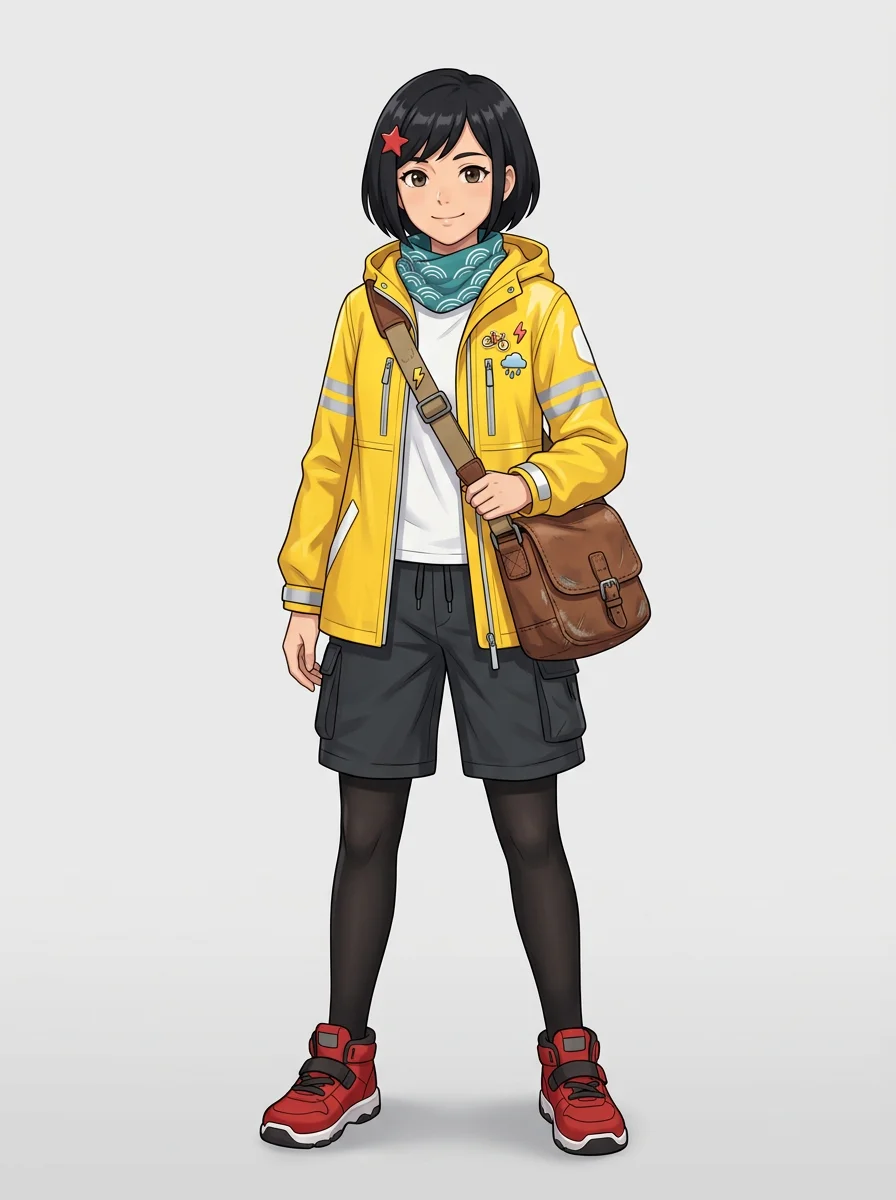
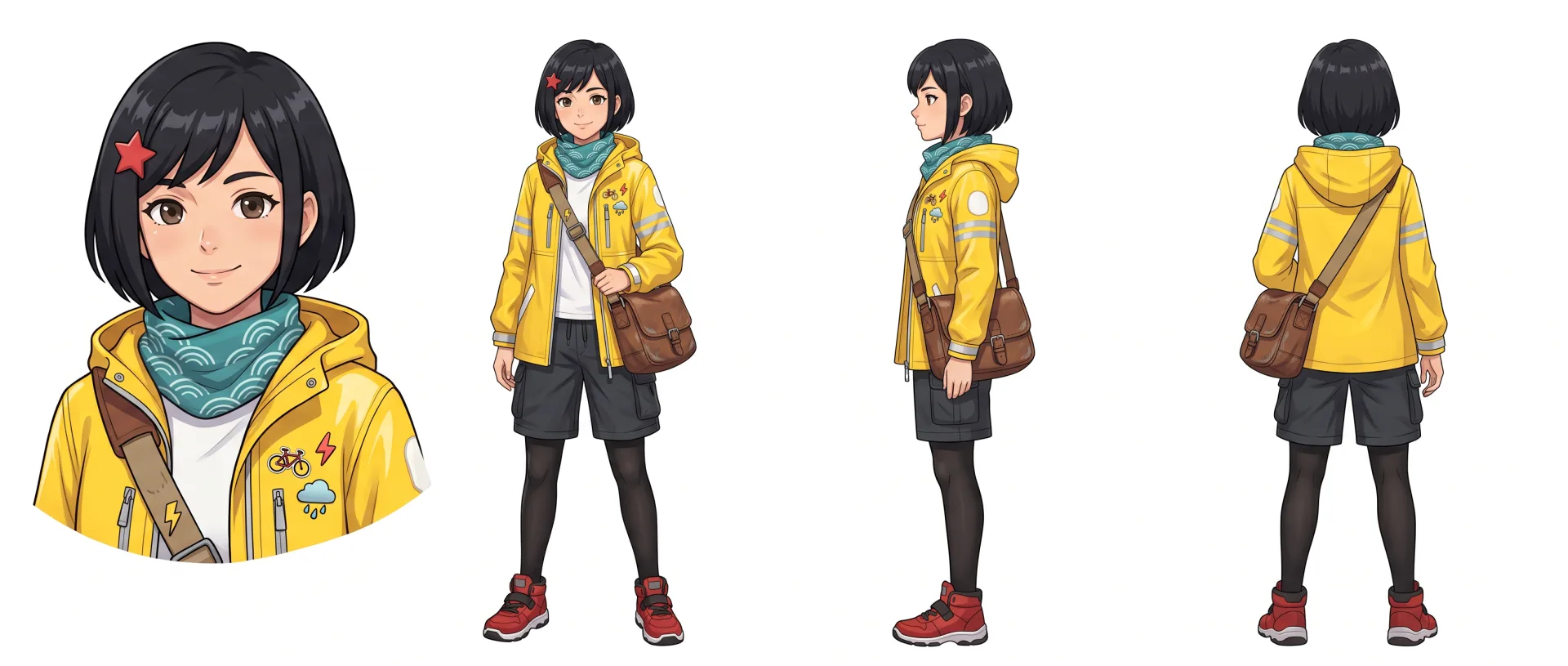
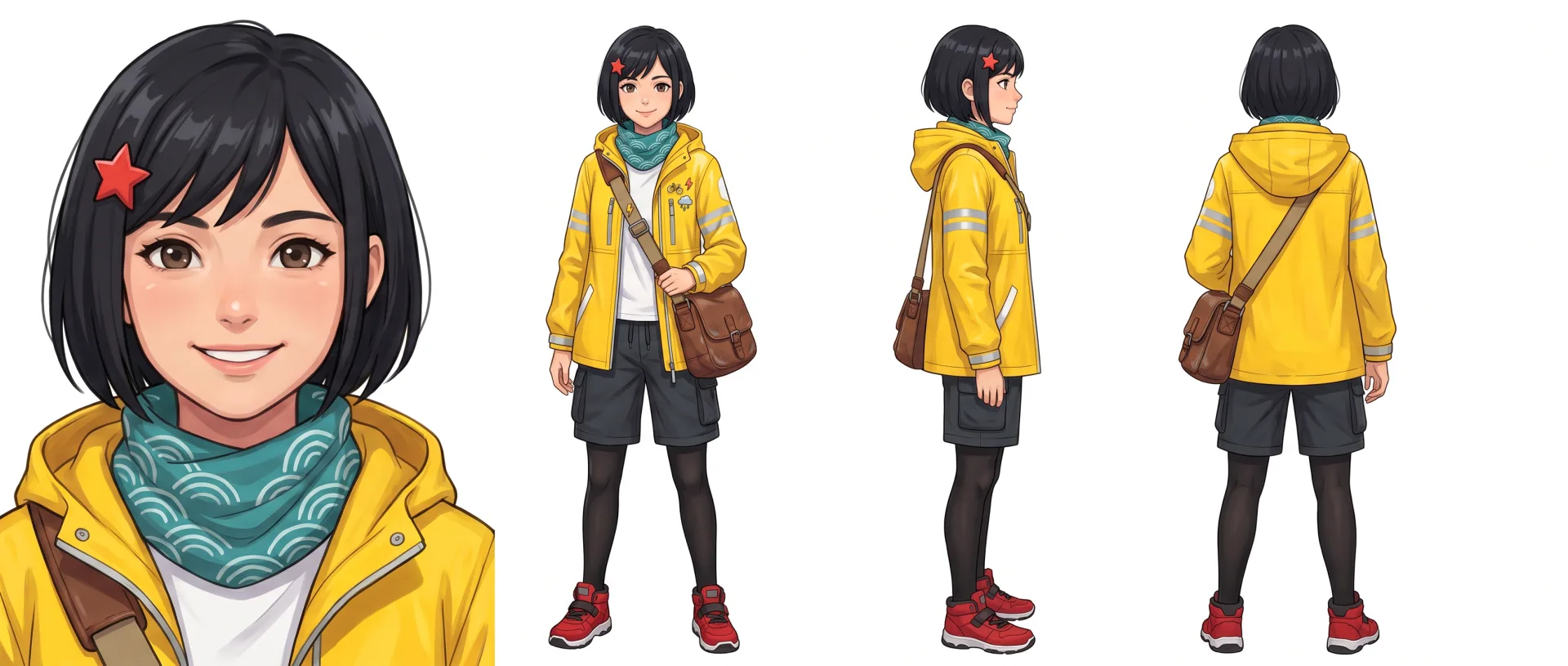
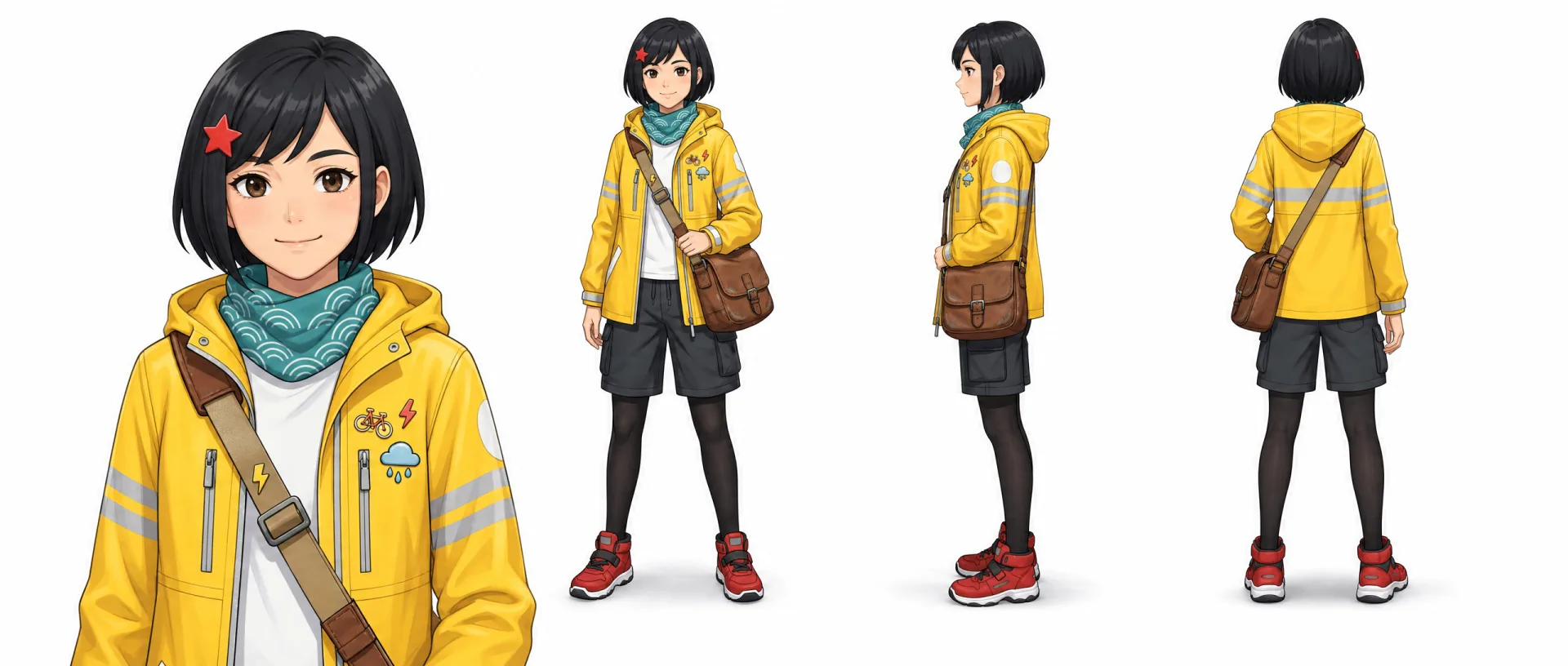
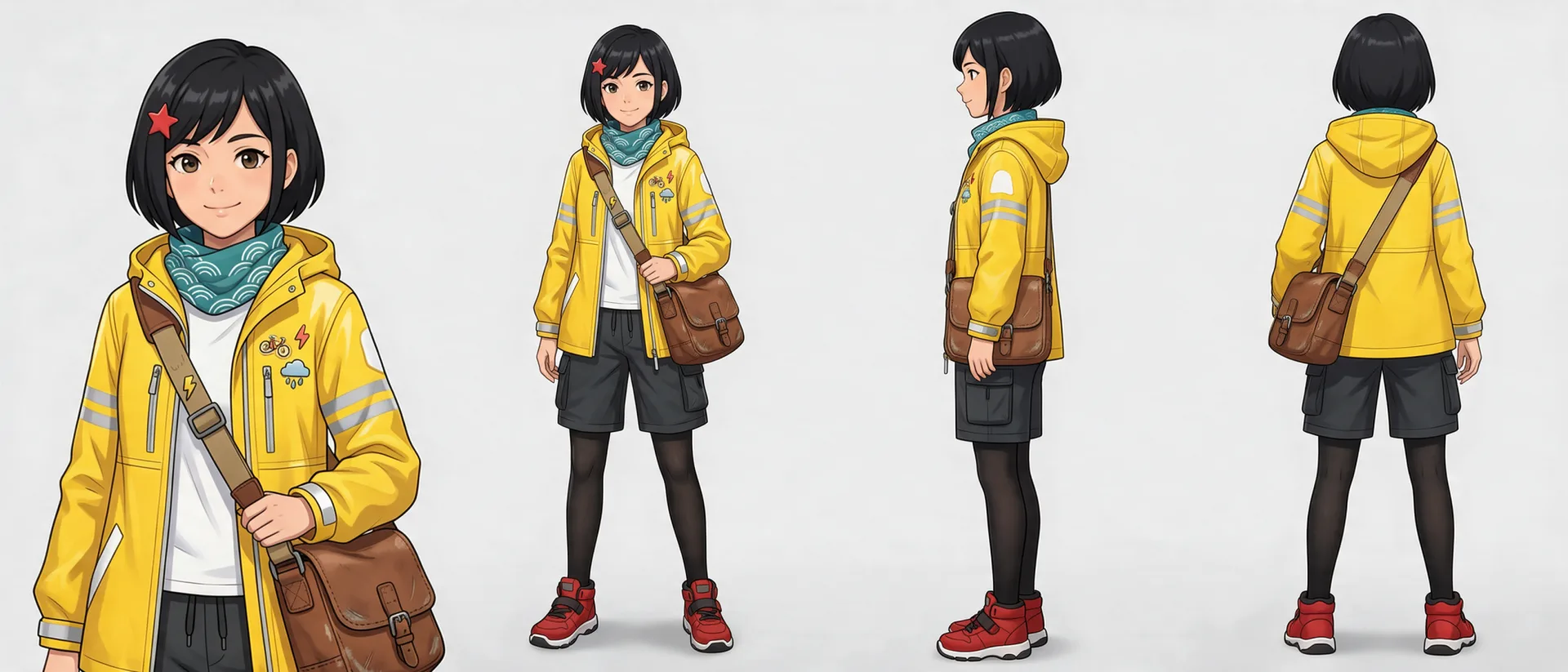
First we drew a full-body front view of an original character with AI, then uploaded it as the only reference, with no description at all. With four of the five models on the Characters page (Nano Banana 2, Nano Banana Pro, GPT Image 2 and Seedream 5.0 Pro), we generated one four-view sheet each (21:9, 2K). Each model generated once; these are the original images, not picked or retouched.
Result: all four models kept the style, the face, the hair and the whole outfit, and carried the small details into every view: the red star hair clip, the teal wave-pattern scarf, the three pins on the jacket, the reflective strips and the crossbody bag. In the back view, every model ran the bag strap from the right shoulder to the left hip, as in the front view, and the hair clip appears only on its own side.
The differences are in the details:
- Seedream 5.0 Pro kept the light gray background of the reference instead of switching to white.
- GPT Image 2 returns a smaller image at 2K (2560×1088; the other three are around 3100×1344).
- Nano Banana Pro drew the close-up with a toothy smile, an expression that differs from the reference.
Test: a description only, in the same four models
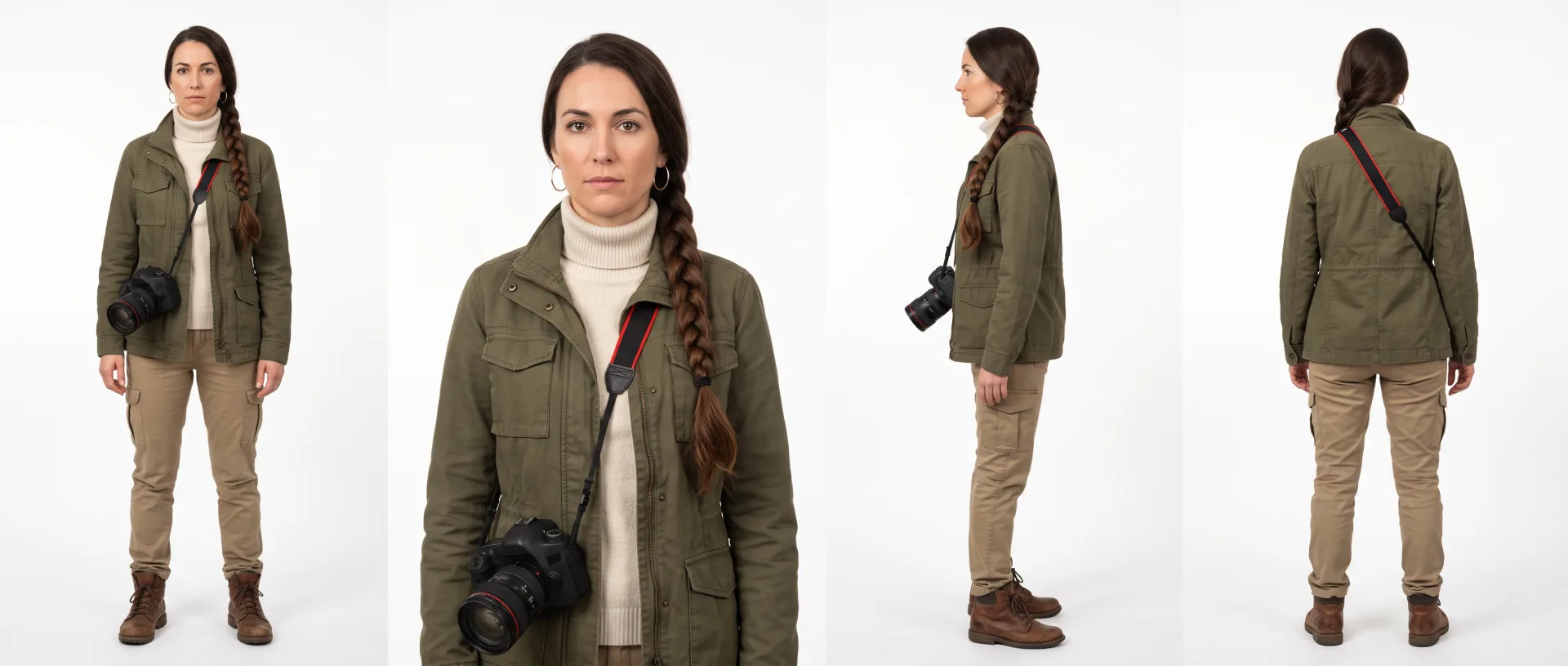
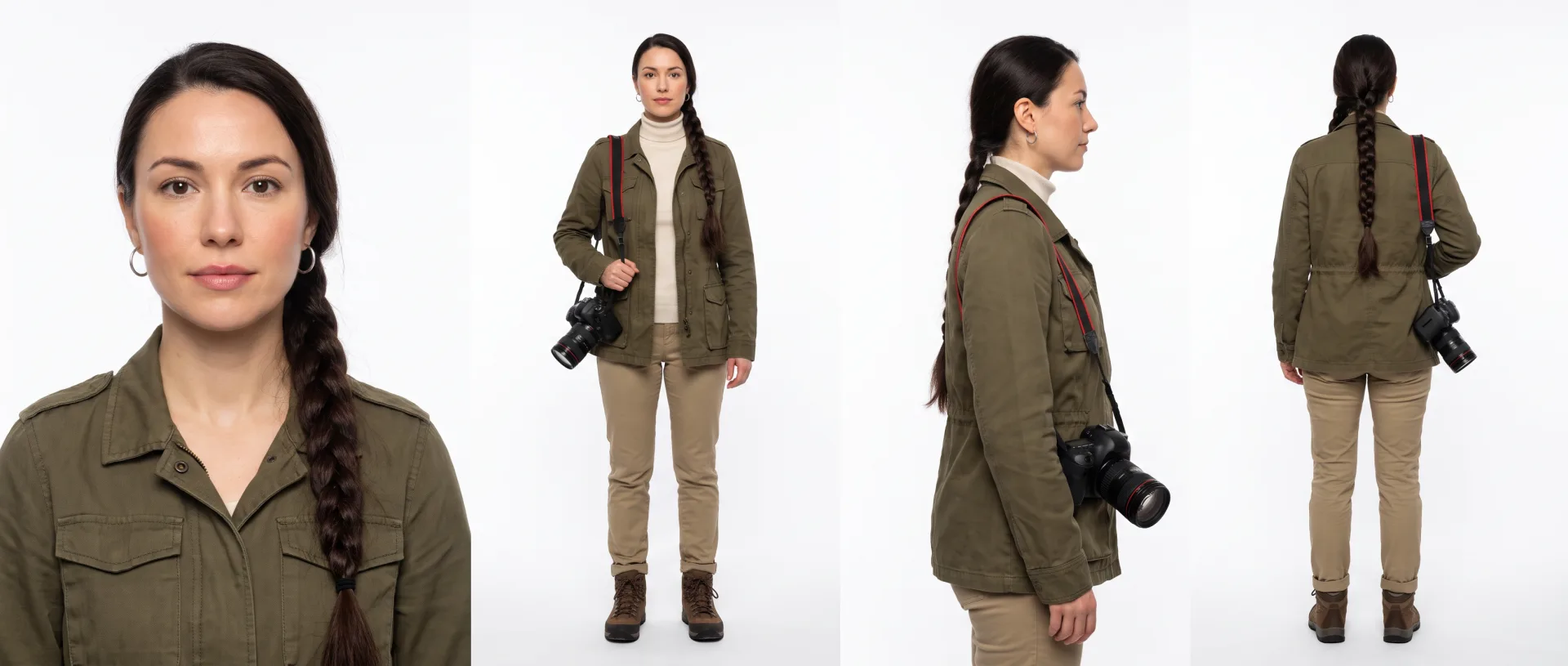
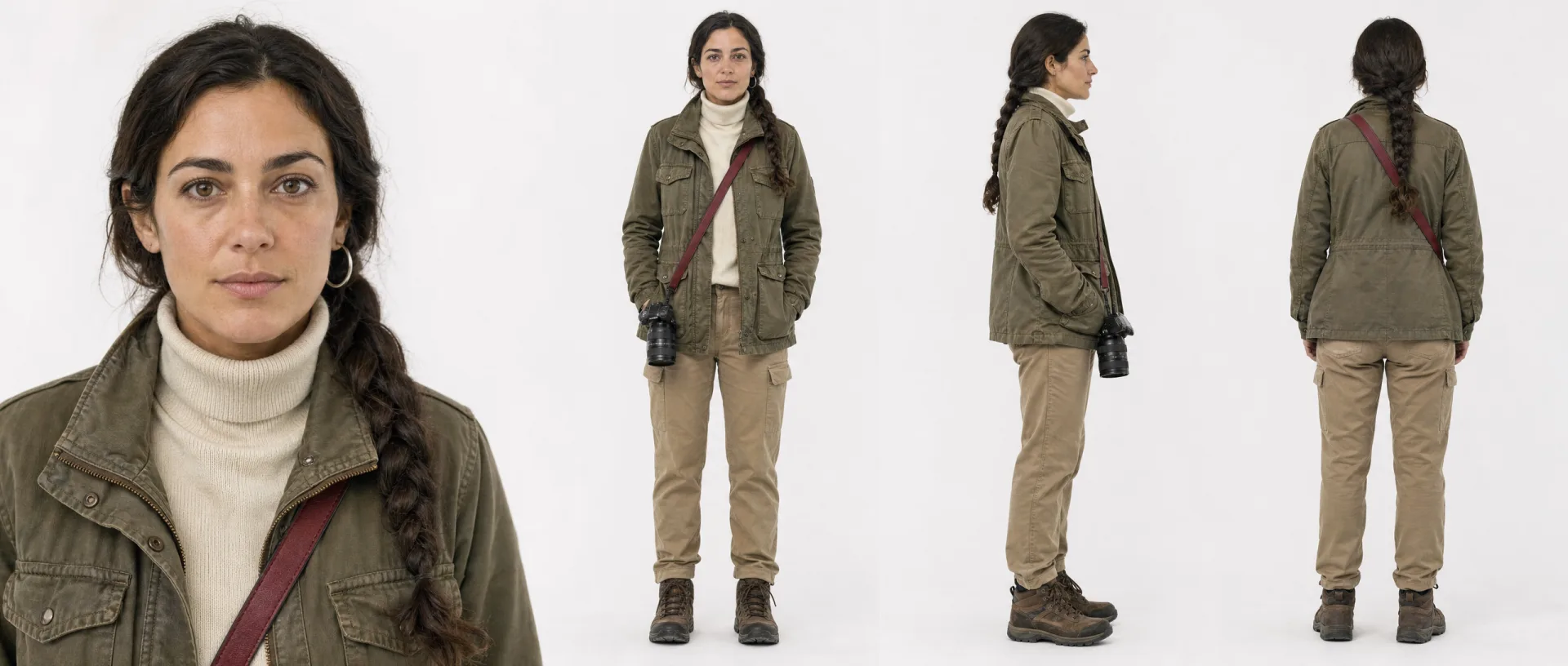
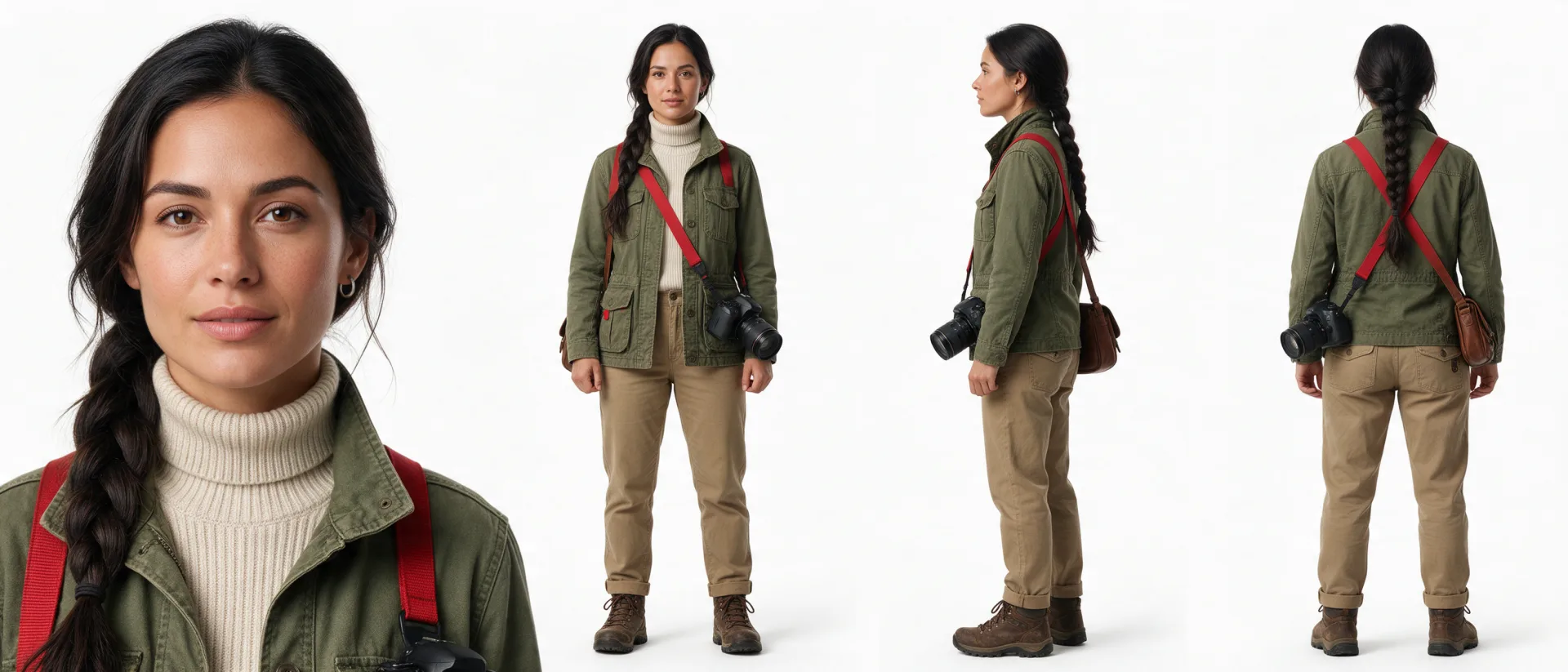
This time there was no reference image, only a description of the character, with one generation per model (same settings). We deliberately wrote three left-right details into it: the braid over the right shoulder, a single silver hoop earring in the left ear only, and a red camera strap.
Result: every model drew the same person in all four views, with the right jacket, turtleneck, khaki pants, boots and camera. But none got every left-right detail:
- Braid over the right shoulder: only Seedream 5.0 Pro got it right; the other three put it over the left shoulder.
- Earring in the left ear only: GPT Image 2 and Seedream 5.0 Pro followed it; both Nano Banana models gave her hoops in both ears.
- Red strap: GPT Image 2 and Seedream 5.0 Pro made it red; both Nano Banana models drew a black strap with red edges.
- Consistency across views: Nano Banana Pro, GPT Image 2 and Seedream 5.0 Pro put the braid in the middle of her back in the back view, which doesn't match the front view; only Nano Banana 2 kept the braid on the same side in all four views.
- Extra or missing items: the Nano Banana Pro close-up has no turtleneck, although its full-body view does, and Seedream 5.0 Pro added a brown bag that wasn't in the description.
So if your character has details that must stay put, prepare a clear front view first and make the sheet from it: that is far more stable than text alone. Each model ran only once and results vary, but this time the difference was clear.
Prompt: “An original character: a woman in her early thirties who works as a wildlife photographer, with a long dark braid over her right shoulder, a silver hoop earring in her left ear only, an olive field jacket with many pockets over a cream turtleneck, khaki trousers, brown hiking boots, and a camera with a red strap slung across her body. Photorealistic.”
More character sheets made with Sky Studio
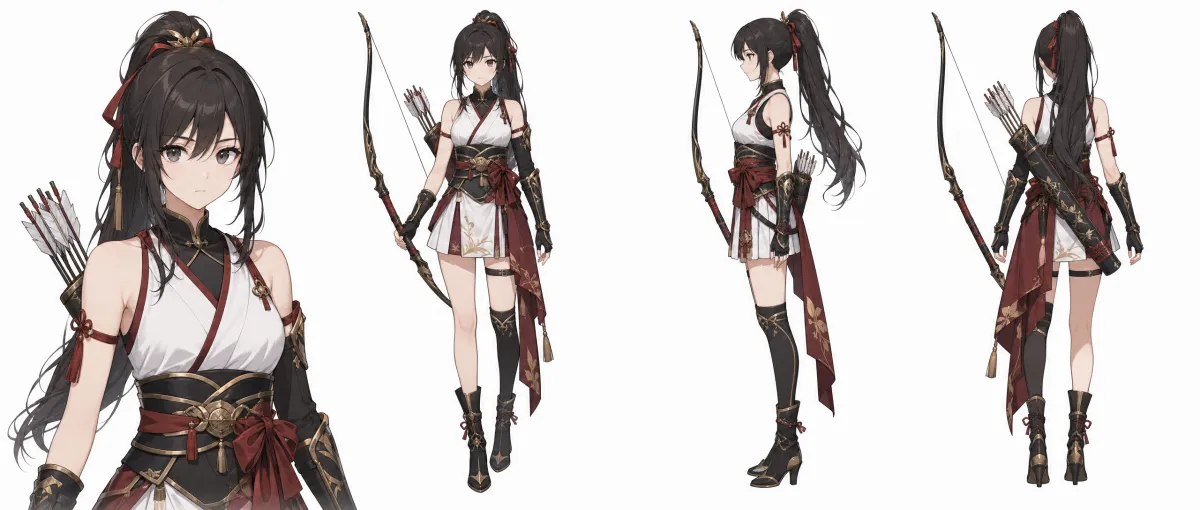
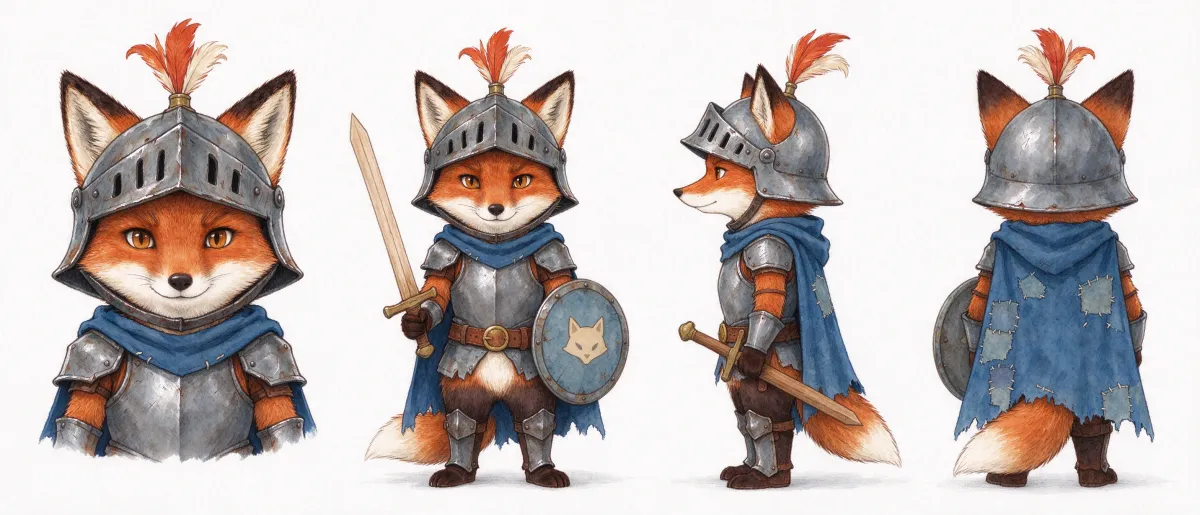
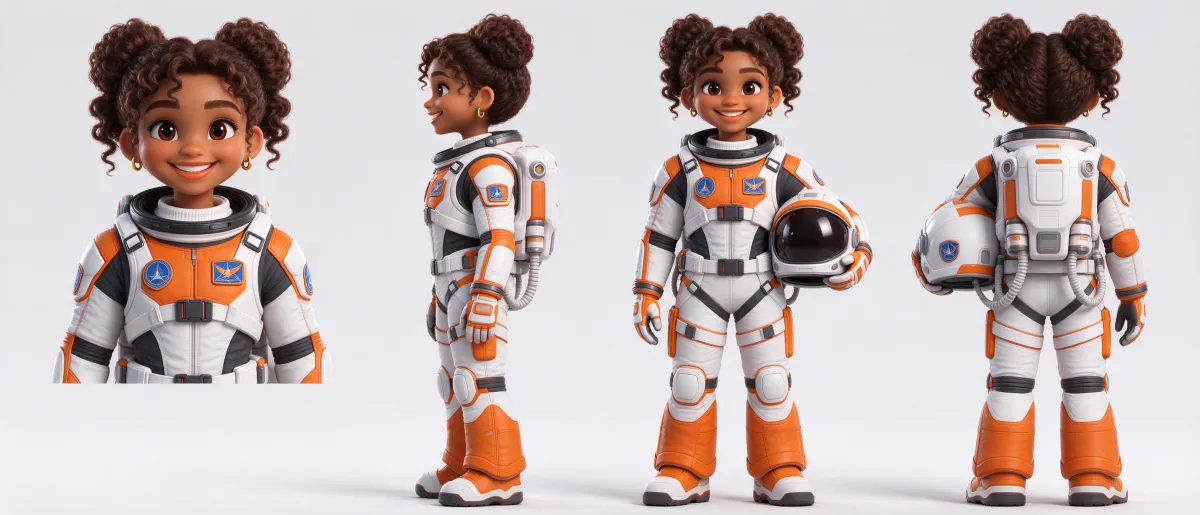
Realistic, 3D, anime and watercolor styles all work, and so do animals. All of these images came straight out of Sky Studio. See all 16.
How to make a character turnaround sheet in Sky Studio: 3 steps
- Open Characters and write a description or upload an image of the character.
- Choose the models and the resolution. You can pick several models at once to compare. For more detail, choose 4K: Nano Banana 2, Nano Banana Pro and GPT Image 2 support it, and the two Seedream models go up to 2K. Before you generate, you see how many credits it will use.
- Compare the four split images with the original sheet; if a view doesn't match, regenerate it or upload a replacement. Once it is saved, you can use the character in images, videos and the Cinematic Canvas.
Frequently asked questions
What is the difference between a three-view and a four-view sheet?
A three-view sheet usually shows the front, the side and the back. Sky Studio adds a front close-up so the face is drawn clearly, which makes it a four-view sheet; the headshot it splits out is useful for shots where the face needs to read clearly.
Can I make a turnaround sheet from a single image?
Yes. Upload an image of the character, and Sky Studio draws the front close-up, the full-body front view, the side and the back from it. Anything the original image doesn't show (the back of the outfit, for example) is the model's guess, so check the back view most carefully. The clearer the image and the closer it is to a full-body front view, the more stable the result.
Which model is best for turnaround sheets?
It depends on whether you have a reference image. With a clear reference, the four models we tested (Nano Banana 2, Nano Banana Pro, GPT Image 2 and Seedream 5.0 Pro) all kept the details, and the differences were small. With text alone, Seedream 5.0 Pro followed the left-right details most closely but added a bag that wasn't in the description, and Nano Banana 2 was the most consistent across the four views. In Sky Studio you can generate with several models at once and keep the best.
Can I use a hand-drawn character?
Yes. You can upload a sketch, an illustration or an image made with another tool as the reference. If you have already drawn every angle, you can also import them directly and save them as a character.
Do AI-generated views always match exactly?
No, with any tool. AI results vary, and hair, patterns and accessories go wrong most often in the side and back views. Compare every view and regenerate the ones that don't match. In Sky Studio you can generate with several models at once and pick the most consistent.
Can I use the character sheets commercially?
Under Sky Studio's Terms, the output is yours, subject to the rights of model providers and third parties. You need to make sure you have the right to use the reference image you upload, including any people, brands and works in it. We also never use what you upload or create to train AI models.
Do I need a subscription to make character sheets in Sky Studio?
No. Sky Studio has no subscription: credits are deducted for what you generate, and you see how many before you generate. Credits don't reset at the end of the month and never expire.
How do I use the character in a video?
A saved character works as a reference for image and video generation. In the Cinematic Canvas you can put the same character into many shots and go from story to storyboard to video.