Best tools
AI storyboard generators: from script to storyboard, with consistent characters, all the way to video
Pick an AI storyboard tool by what the storyboard is for. To show clients and get approval, Boords and Storyboarder.ai are the easiest: both split scripts into frames, keep characters consistent and export PDFs and animatics. For a finished video, look at Sky Studio: on the Cinematic Canvas you write the story and split it into Movie Scenes; each shot has its own video prompt and carries the character reference automatically, ready for Grok Imagine, Seedance 2.0 Pro, MiniMax H3 or Gemini Omni Flash. No subscription, credits never expire, and it never sells your data or trains AI on it. LTX Studio goes from a script to storyboards and video; Higgsfield's Popcorn makes storyboard images first.

Sky Studio wrote this page, and Sky Studio is one of the tools on it. What this page says about other tools is as of September 2026.
| Tool | Best for | Billing | How it storyboards |
|---|---|---|---|
| Sky Studio | Going from storyboard straight to video with one character in every shot | No subscription: pay as you go, and credits never expire | Chat Story → Story Detail → Movie Scenes; each shot has a video prompt and carries the character reference automatically |
| Boords | Agencies and brand teams that show storyboards to clients for approval | Subscription with plans by number of users and a monthly number of AI images; free trial | Paste a script and it splits into frames; save cast, locations and props once and put them in every frame with @ |
| Storyboarder.ai | Pre-production for indie films and ads, with shot lists and pitch decks | Free plan plus three paid plans, monthly or yearly; paid plans have unlimited image generation | Upload a script to generate a shot list, storyboard and animatic; characters, locations and props stay consistent |
| LTX Studio | Teams going from script to storyboard to timeline editing | Subscription; the free plan gives credits once, paid plans every month | Upload a script to generate scenes and storyboards; Elements saves characters, objects and locations |
| Higgsfield | Seeing a storyboard before generating, with camera presets | Auto-renewing subscription; credits expire at the end of each cycle | Popcorn makes storyboard images guided by up to 4 images; then Cinema Studio generates by scene |
What AI storyboard generators do, and how to choose one
A storyboard splits a script into shots, and each frame says what is on screen: the characters, the action, the framing and the lines. AI storyboard generators replace drawing by hand with generation. When you choose one, look at four things:
- Whether it splits the script for you: paste a script or an idea and it breaks it into shots, so you don't describe every frame yourself.
- Whether characters stay consistent: the same character should look the same in every frame; it is safest to save the character first and call it in each one.
- Whether the camera is easy to change: change the angle or framing without redrawing the whole frame.
- What you will use it for: to show and approve, it should export PDFs and animatics; to reach a finished video, it should generate each shot with the same character references.
Storyboards in Sky Studio: from the story to each shot's video
On the Sky Studio Cinematic Canvas, the storyboard is a step toward the finished video, not the end point:
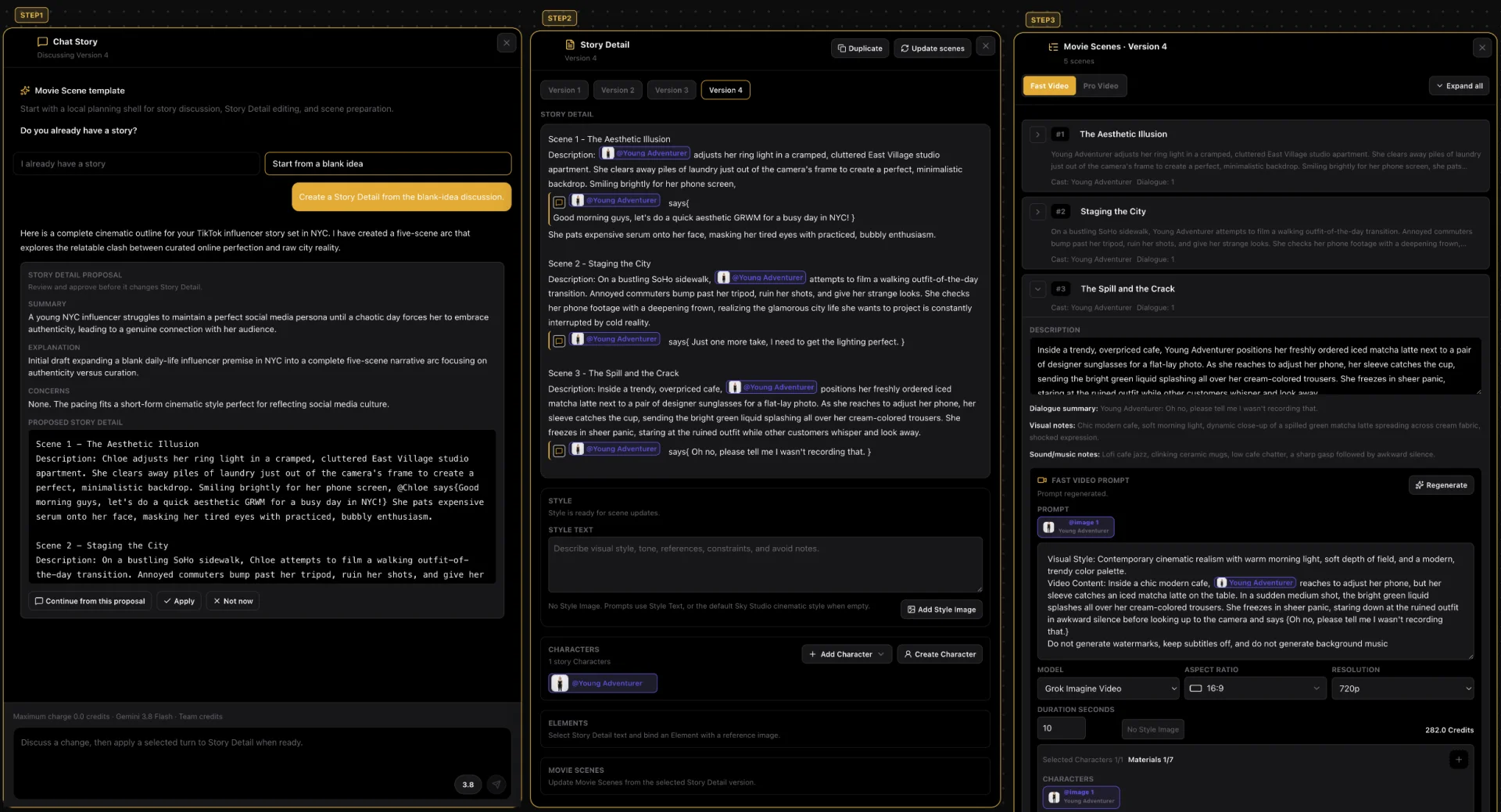
- Chat Story: describe your idea or paste a script, and the AI writes the outline.
- Story Detail: each scene gets its characters, actions and dialogue; the character is tagged with @.
- Movie Scenes: then it is split into scenes; each one has its own video prompt and carries the character's reference image automatically.
- Generate the video: each shot is generated with Grok Imagine, Seedance 2.0 Pro, MiniMax H3 or Gemini Omni Flash.
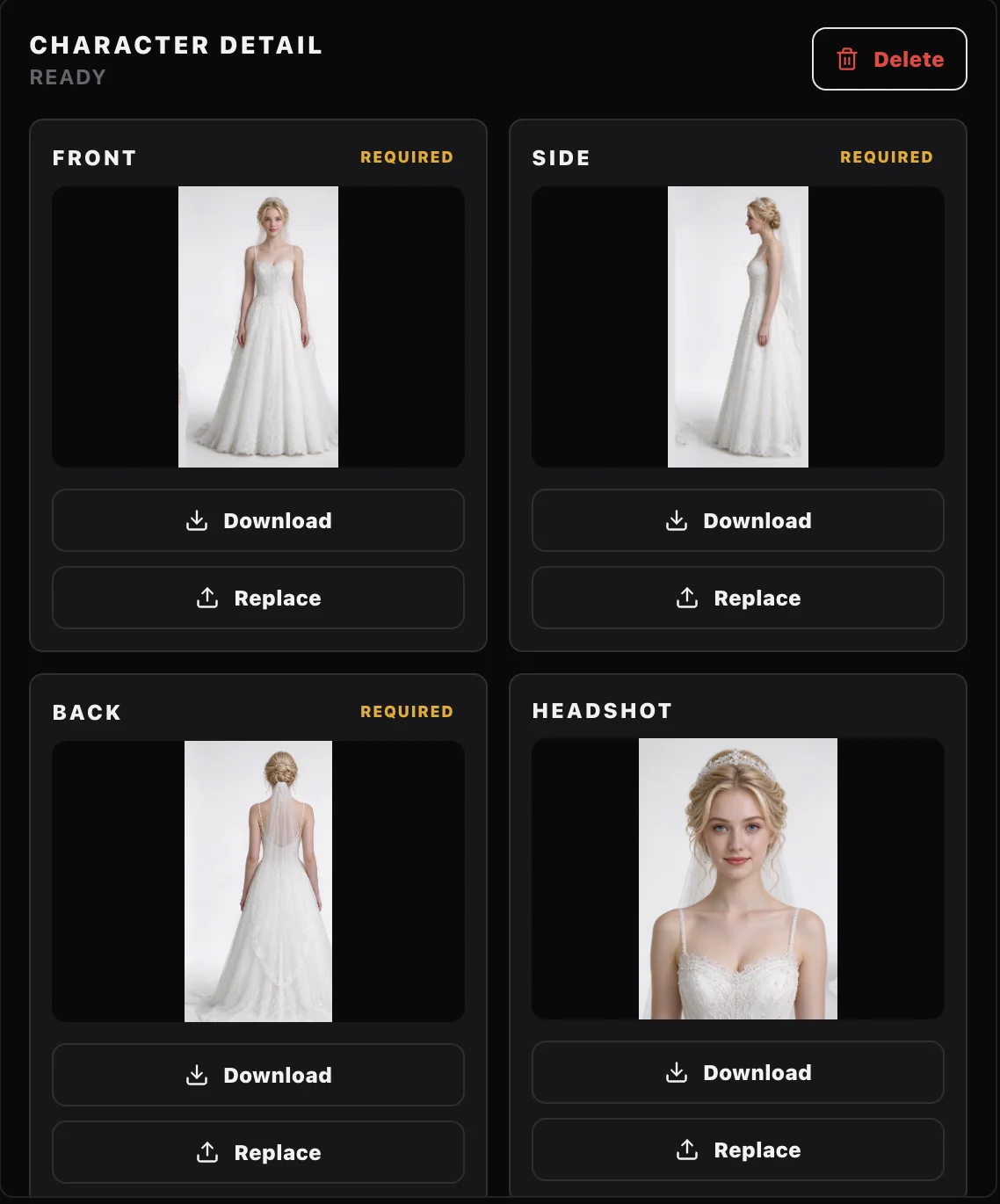
You make the character on the Characters page from a short description as a four-view sheet, and every shot uses that same set. Two real shots made this way are in AI Story to Video: 6 Tools Compared.
5 AI storyboard generators
-
1 Sky Studio Our tool
Best for: Going from storyboard straight to video with one character in every shot
Sky Studio puts the story, the characters, the scenes and the video generation on one Cinematic Canvas: once the story is split into scenes, you can generate each shot's video.
- From story to storyboard to finished video: you write the story in Chat Story, create the Story Detail and split it into Movie Scenes; each shot has its own video prompt, carries the character reference automatically and is generated with Grok Imagine, Seedance 2.0 Pro, MiniMax H3 or Gemini Omni Flash.
- Characters: a short description such as "a man in his early 20s" is enough for the Characters page to draw a front close-up (so the model keeps the face right in video) and full-body front, side and back views, split them into single images and save them as a character you call with @ in the story.
- Clone and share projects: on the Market you can clone a whole project someone shared (story, scenes and assets) into your account and keep working; you can share your own for free or at a price, and you earn credits when others clone it.
- AI music: describe what you want and get original music, with lyrics or instrumental, from 10 seconds to 5 minutes. The music model runs on our own servers.
- Free teams: creating a team and adding members costs nothing, with no seat fees. The owner sets a credit cap for each member and can see their usage and what they generated.
- A clean interface: simple, with no ads; open it and start creating. Available in English, Spanish, Chinese and Japanese.
- Billing: no subscription; pay as you go, and credits never reset at month end or expire. You see the credit cost before you generate. If a generation fails on our side, or the model provider blocks it before a result, the credits come back automatically.
- Your data: we never sell your data or use it for ads, and we never use your prompts, uploads or creations to train AI models.
- Learn: founder Sky Lu teaches an AI filmmaking course, if you want to learn to make short films with AI step by step.
-
2 Boords
Best for: Agencies and brand teams that show storyboards to clients for approval
Boords is a storyboard tool for agencies and brand teams: paste a script or brief and its AI splits it into frames and a shot list; name your cast, locations and props once and type @ to put them in every frame. You can change just part of a frame or switch the camera angle, then export PDFs, images or MP4 animatics with audio, and clients comment on and approve each frame.
- Versus Sky Studio: Boords focuses on pre-production, with storyboards, scripts, animatics and client approval in one place; in Sky Studio the scenes go straight on to each shot's video.
- Keep in mind: each plan has a monthly limit on AI images.
- Billing: a subscription, monthly or yearly, with plans by number of users and a monthly number of AI images; there is a free trial, and you can cancel or switch plans anytime.
-
3 Storyboarder.ai
Best for: Pre-production for indie films and ads, with shot lists and pitch decks
Storyboarder.ai is an AI pre-production platform from The FilmAI, based in Germany: upload a script (PDF, FDX, Fountain, Word and more) or write an idea, and it generates the scene breakdown, shot list, storyboard and animatic, and exports a pitch deck. Characters are defined by a reference image or a description, and characters, locations and props stay consistent across frames; a 3D camera tool turns the angle inside a frame.
- Versus Sky Studio: both go from a script to a storyboard with consistent characters; Storyboarder.ai focuses on pre-production deliverables (shot lists, PDFs, animatics, pitch decks).
- Keep in mind: paid plans include only a few video generations, and more need an add-on.
- Billing: a free plan and three paid plans, monthly or yearly, cancel anytime; paid plans have unlimited image generation. Its site says it doesn't use users' scripts, storyboards or input and output data to train AI models.
-
4 LTX Studio
Best for: Teams going from script to storyboard to timeline editing
LTX Studio is Lightricks' web-based AI video production platform: upload a script and it generates scenes and storyboards; Elements saves characters, objects and locations so they stay consistent across scenes, and then you edit on a timeline, add sound and export a pitch deck.
- Versus Sky Studio: both go from script to storyboard to video; LTX organizes a project by scenes and storyboards, while Sky Studio starts in Chat Story and keeps the story, the scenes and each shot's video on one canvas.
- Keep in mind: AI storyboards and saving Elements start on the Standard plan; it is built for desktop and has no mobile version.
- Billing: subscription, monthly or yearly. The free plan gives credits once and comes with a personal-use license only; paid plans add credits every month, and the commercial license starts on Standard.
-
5 Higgsfield (Popcorn)
Best for: Seeing a storyboard before generating, with camera presets
Higgsfield's Popcorn builds storyboard images so you can plan the picture before you generate video, and you can upload up to 4 images to guide or extend the storyboard. Then, in Cinema Studio, you describe the scene, add characters and locations with @ and generate; there are dozens of camera movement presets.
- Versus Sky Studio: Higgsfield builds storyboard images first and generates by scene; in Sky Studio the storyboard comes from the Story Detail, and each shot carries its video prompt and the character reference.
- Keep in mind: the free plan doesn't include commercial use.
- Billing: a subscription that renews automatically; subscription credits don't roll over and expire at the end of each credit cycle.
How to choose
- You want to go from storyboard straight to video, with the character in every shot: Sky Studio.
- You show storyboards to clients for approval and revise them as a team: Boords.
- You need shot lists, PDFs and pitch decks for pre-production: Storyboarder.ai.
- After the storyboard you want timeline editing and sound: LTX Studio.
- You want to see a storyboard first and use camera presets: Higgsfield's Popcorn with Cinema Studio.
From script to each shot's video in Sky Studio: 4 steps
- Make the character on Characters: generate the four-view sheet from a description, or import front, side and back images you already have.
- Open the Cinematic Canvas, describe your idea or paste a script in Chat Story and, once you confirm it, create the Story Detail.
- In the Story Detail, tag the character with @ and split the story into Movie Scenes; each scene's video prompt carries the character's reference image.
- Generate each shot's video; before you generate, you see how many credits it will use. Why characters drift and how to prevent it is covered in Consistent Characters in AI Video.
Frequently asked questions
What is the best AI storyboard generator?
It depends on what the storyboard is for. To show clients and get approval, Boords and Storyboarder.ai are the easiest; to turn it into video, Sky Studio splits the story into scenes on one canvas and generates each shot with the character reference; LTX Studio goes from a script to storyboards and then to timeline editing; Higgsfield's Popcorn builds storyboard images first, then you generate in Cinema Studio.
Can AI make a storyboard straight from a script?
Yes. Boords, Storyboarder.ai and LTX Studio split a script you upload or paste into frames. In Sky Studio, you put the idea or script into Chat Story, create the Story Detail and split it into Movie Scenes, each with its own video prompt.
How do I keep characters consistent in a storyboard?
Save the character first and call the same one in every frame. Boords and Storyboarder.ai save characters to put in each frame, and LTX Studio uses Elements. In Sky Studio, the Characters page makes four images from a description (front, side, back and a close-up); save it as a character, tag it with @ in the Story Detail, and every scene carries the reference automatically.
What is the difference between a storyboard and an animatic?
A storyboard is a set of still frames showing what each shot films; an animatic lays those frames out in time, with camera moves and sound, to check the pacing first. Boords and Storyboarder.ai export animatics; in Sky Studio, the scenes generate each shot's video directly.
How do I turn a storyboard into video?
On the Sky Studio Cinematic Canvas, each scene generates its video directly: pick Grok Imagine, Seedance 2.0 Pro, MiniMax H3 or Gemini Omni Flash, and the character reference is already in the prompt. Two real shots are in AI Story to Video: 6 Tools Compared.
Do AI storyboard generators need a subscription?
Sky Studio has no subscription: credits are deducted for what you generate, and they never reset at month end or expire. Boords, Storyboarder.ai, LTX Studio and Higgsfield run on subscriptions; Higgsfield's subscription credits expire at the end of each cycle.
What does storyboarding as a team cost?
In Sky Studio, creating a team and adding members is free, with no seat fees, and members share team credits; the owner sets a credit cap for each member and sees their usage and what they generated. Boords plans are tiered by number of users.
Can I use the storyboards and videos commercially?
Under Sky Studio's Terms, the outputs are yours (except for rights held by model providers and third parties); make sure you have the right to use any people, brands and works in what you upload. We also never use your uploads or creations to train AI models.