
Best tools
How to keep a character consistent in AI video, from the first shot to the last
To keep a character from changing faces between shots, give every shot the same character references: first a sheet with every angle, then generate the storyboard shot by shot with a video model that accepts reference images. The Cinematic Canvas in Sky Studio connects those steps: you write the story in a chat, it is split into scenes, and each scene is generated with the same character's reference. Kling's Elements, the references in Vidu and Runway, and Filmora's AI Idea to Video also lock the character with reference images. Even so, AI can't guarantee a perfect match: compare every shot with the character sheet.
Sky Studio wrote this page, and Sky Studio is one of the tools on it. What this page says about other tools is as of September 2026.
| Tool | Best for | Billing | How it keeps the character |
|---|---|---|---|
| Sky Studio | Several shots of one story with the same character from start to finish | No subscription: pay as you go, and credits never expire | A four-view sheet on the Characters page; in the Cinematic Canvas every shot carries the character reference |
| Kling AI | Reusing the same characters, props and places | Subscription; monthly credits last one month | Element Library: multi-angle references you reuse |
| Vidu | Keeping several characters or props consistent at once | Auto-renewing subscription; plan credits last 30 days | Reference to video; your most-used references can be saved |
| Runway | Using images, video and audio as references | Subscription; monthly credits reset on the billing date (except the Max plan) | References: images, video and audio, saved for reuse |
| Filmora | People who already edit in Filmora and want AI there | Subscription or one-time purchase; subscription AI credits last 30 days | AI Idea to Video: references for each storyboard scene |
Why the character's face changes
A video model redraws everything each time and only knows what you give it at that moment. A text description is read a little differently every time, and a front photo doesn't say what the character looks like from the side or back. So in the next shot, the face, hair, clothes or accessories can change.
The more shots and angle changes, the more it shows. To keep the character consistent, every shot needs the same, complete set of references.
Three ways to keep a character consistent
- Reference images: make a character sheet first (front, side and back, ideally with a close-up of the face) and give it to the video model as a reference in every shot. This is the most universal method: it works with any model that accepts references.
- Start and end frames: generate or pick the shot's first frame (and last frame) first, then let the model generate the motion in between. With the starting point fixed, the character drifts less; it suits shots with little movement.
- Extending a clip: when a scene needs to run longer, generate a continuation of the previous clip instead of a new one. In Sky Studio, for example, Gemini Omni Flash extends a clip up to 40 seconds in total.
In practice they are combined: the sheet makes sure the same person is in every shot, the frames control the key moments, and extending keeps a scene connected.
Example: from one conversation to two shots
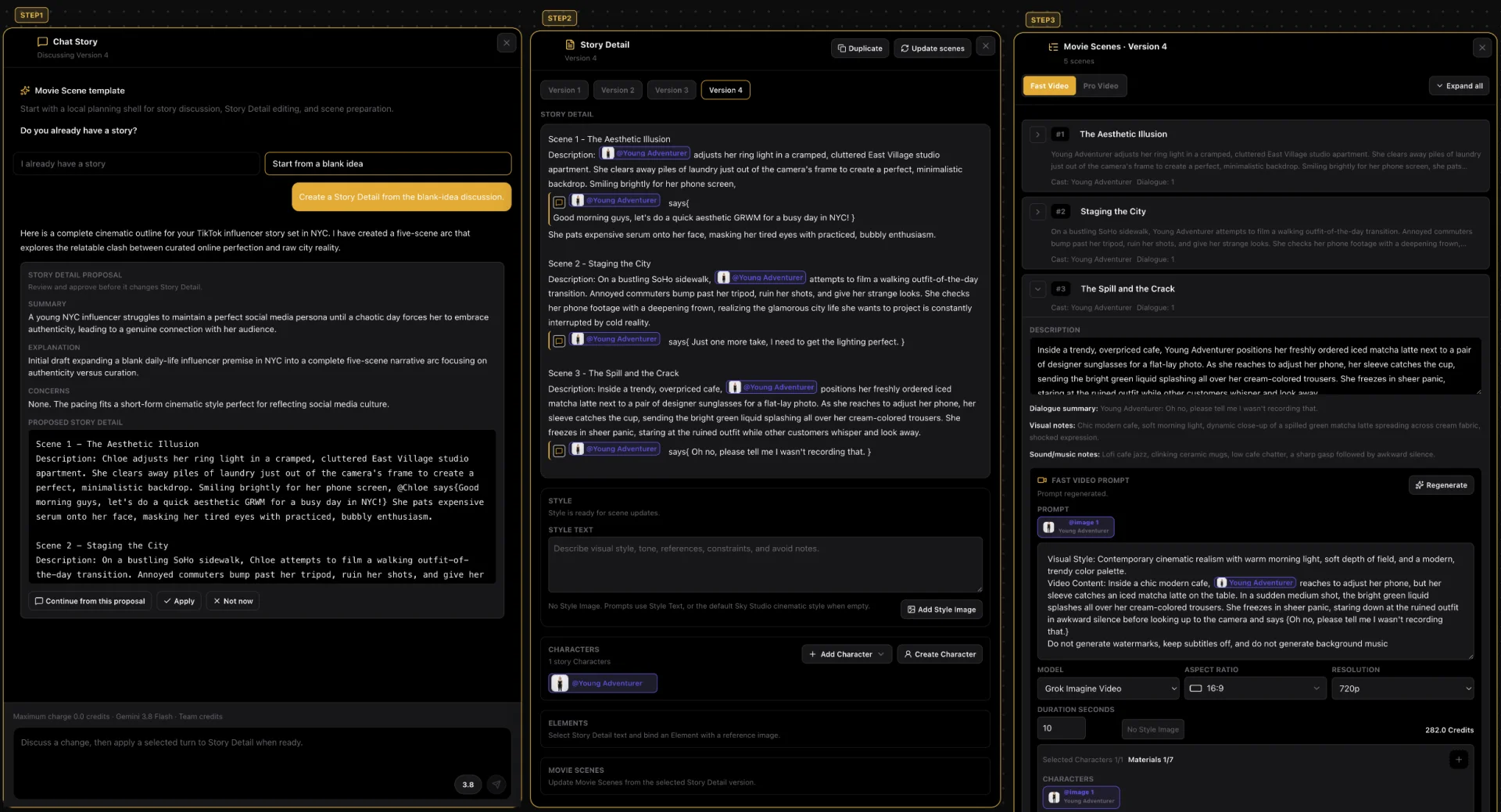
This is a short story made in the Sky Studio Cinematic Canvas: a New York influencer tries to film a perfect life, and everything goes wrong.
- Chat Story: the conversation starts from a blank idea, and the AI writes a five-scene outline.
- Story Detail: once you confirm, it writes out each scene with its characters, actions and dialogue; the character is tagged with @.
- Movie Scenes: then it is split into scenes; each one has its own video prompt and automatically carries the character's reference image.
What stayed the same and what changed
- Stayed the same: the face, the long blonde hair with a middle part and a thin gold necklace. They match in both shots, and it is clearly the same person.
- Changed with the story: the clothes. On the sidewalk she wears a black camisole, and in the café a black blouse with beige pants, as the story said.
- Some differences: in the café, her hair is a little longer and wavier.
Both shots were generated with MiniMax H3; these are the original videos, not retouched.
5 AI video tools that keep your character consistent
-
1 Sky Studio Our tool
Best for: Several shots of one story with the same character from start to finish
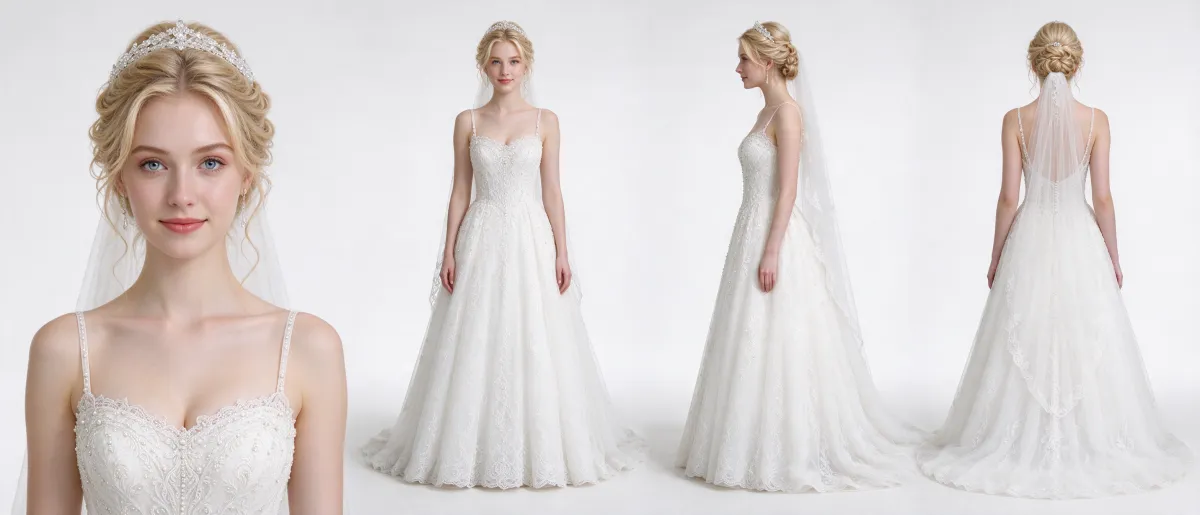
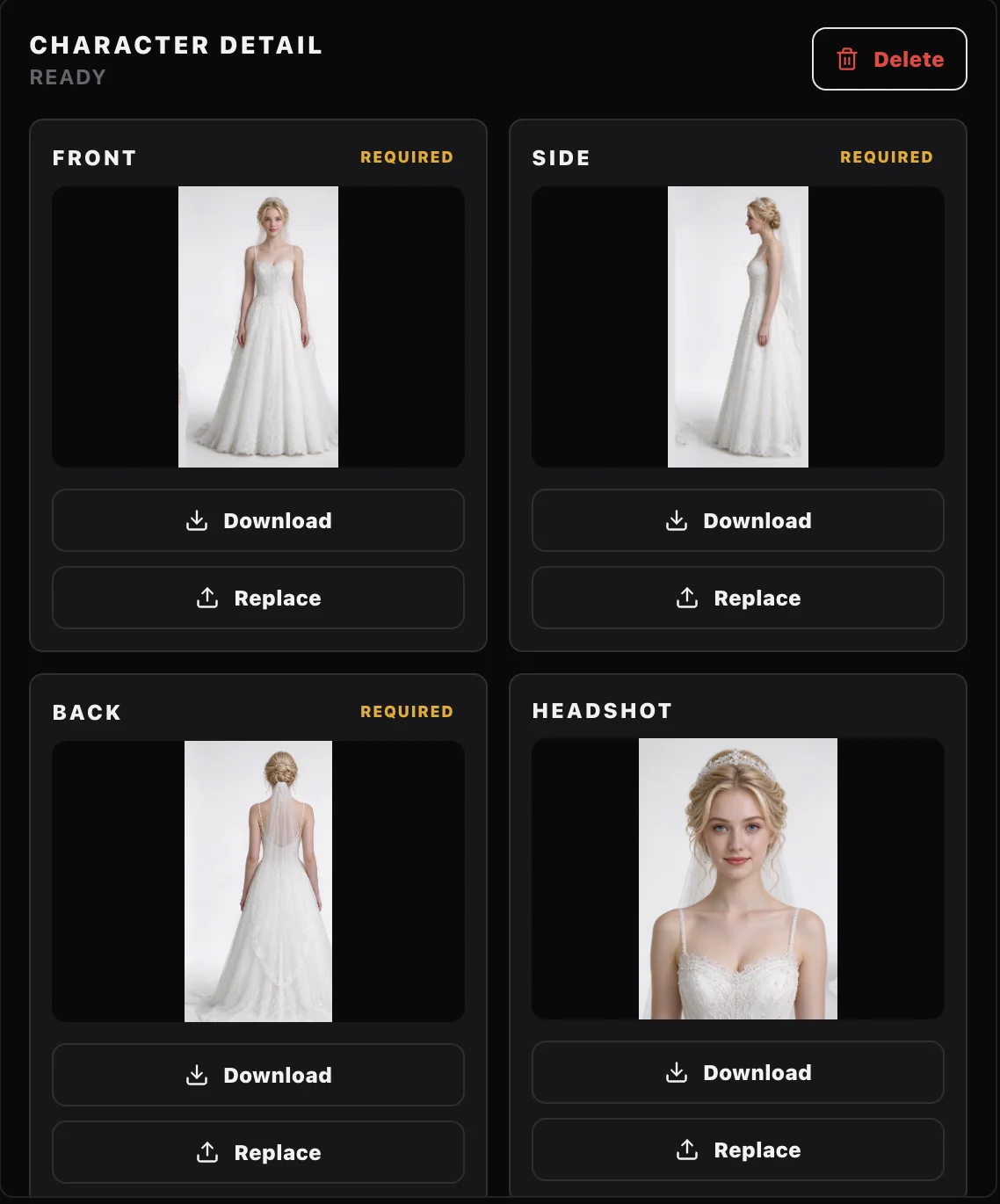
The Sky Studio Cinematic Canvas puts the story, the scenes and the videos on one canvas: you write the story in a chat, confirm it to get the Story Detail, split it into scenes, and every video is generated with the character's reference. You make the character on the Characters page: one image with a front close-up, a full-body front view, a side view and a back view, split automatically into single images and saved.
- One character for every shot: once it is saved, you tag it with @ in the story, and every shot gets the same references.
- Several video models: scenes can be generated with Grok Imagine, Seedance 2.0 Pro, MiniMax H3 or Gemini Omni Flash, and you can redo a shot with another model.
- Made to share: you can share the whole project, and others can clone it into their account and keep working; you can also clone projects others have shared.
- Billing: no subscription; you pay as you go, and your credits never expire.
- Your data: we never sell your data, and we never use your prompts, uploads or creations to train AI models.
-
2 Kling AI
Best for: Reusing the same characters, props and places
Kling's Element Library stores references of a character (or a prop, or a place) from several angles, 2 to 4 images per element, to reuse with one click in images and videos; in 3.0 Omni, character elements can also carry a bound voice.
- Pros: save it once and use it every time, with multi-angle references.
- Keep in mind: features such as video extension are for members only.
- Billing: subscription. The credits handed out each month last one month from when they are issued; credits bought separately last two years.
-
3 Vidu
Best for: Keeping several characters or props consistent at once
Vidu generates video from reference images of people, props or places, so the same subject appears in different shots; your most-used references can be saved.
- Pros: it takes several reference subjects in one shot, which helps when several people appear.
- Keep in mind: the number of new references per month is capped by plan.
- Billing: auto-renewing subscription, monthly or yearly. Plan credits last 30 days; credits bought separately last two years.
-
4 Runway
Best for: Using images, video and audio as references
With Runway's References you can use images, video and audio as references for a generation and save them for next time. It is good at keeping the same character under different lighting and in different places from a single reference image.
- Pros: many kinds of references, saved and reused.
- Keep in mind: only paid plans can buy extra credits.
- Billing: subscription. Monthly credits reset on the billing date and unused ones are forfeited (the Max plan rolls over up to one month); credits bought separately never expire.
-
5 Filmora
Best for: People who already edit in Filmora and want AI there
Filmora is a video editor; its AI Idea to Video feature lets you set a reference for each storyboard scene: generate a reference image, upload your own, use keyframes or use a reference video. The same reference images and prompts can be reused in later projects.
- Pros: you generate and edit in the same program.
- Keep in mind: the AI features use AI credits.
- Billing: subscription or one-time purchase. Subscription AI credits last 30 days from when they are issued; they are reissued every 30 days and unused ones are reclaimed. Separate credit packs last one year.
Make a story with a consistent character in Sky Studio: 4 steps
- Make the character on Characters: write a description or upload an image, generate the four-view sheet, check it and save it.
- Open the Cinematic Canvas, describe your idea in Chat Story and, once you confirm it, create the Story Detail.
- In the Story Detail, tag the character with @ and generate the scenes; each scene's video prompt carries the character's reference image.
- Generate the video for each shot, compare it with the sheet and, if something doesn't match, switch models or regenerate. Before you generate, you see how many credits it will use.
Frequently asked questions
Why does a character's face change in AI video?
The model redraws everything on each generation and only sees that moment's prompt and references. Text is read differently every time, and a front photo doesn't show the side or back, so when the shot changes, the face, hair or clothes can change. Using the same complete references in every shot reduces the problem.
Can I keep a character consistent with just one image?
Yes, though it is less stable than a full sheet. A front image doesn't show the side or back, so it is better to generate a character sheet from it first and use that as the reference. We cover it in AI character turnaround sheet: 5 tools compared.
What if several characters appear in the same shot?
Make a sheet for each character and name them separately in the prompt. Models that accept several reference images (for example, Seedance 2.0 Pro) can use several characters at once.
Which video model keeps a character most consistent?
There is no fixed answer; it depends on the shot. Generate the same shot with two models and keep the more consistent one. We compared two models on the same prompts in Gemini Omni Flash vs MiniMax H3.
Can a perfect match be guaranteed?
No, with any tool: AI results vary. The right method reduces drift, but it is worth comparing every shot with the character sheet.
Do I need a subscription to make story videos in Sky Studio?
No. Sky Studio has no subscription: credits are deducted for what you generate, and you see how many before you generate. Credits don't reset at the end of the month and never expire.
Can I use the videos commercially?
Under Sky Studio's Terms, the output is yours, subject to the rights of model providers and third parties. You need to make sure you have the right to use any people, brands and works in your references. We also never use what you upload or create to train AI models.