Best tools
Where can you use Veo 3.1, Seedance and Nano Banana Pro together? 6 multi-model platforms compared
To use Google's Veo 3.1 and Nano Banana Pro and ByteDance's Seedance in one place, pick a multi-model platform: you switch models in one account instead of paying for each service. Six platforms name all three models on their sites: Sky Studio, Higgsfield, OpenArt, Krea, Magnific (from Freepik) and Dreamina (from CapCut); they differ in versions, billing and tools. Sky Studio has Veo 3.1 Fast and Pro, Seedance 2.0 Pro, Nano Banana 2 and Pro and more image, video and music models, with no subscription and credits that never expire, plus the Cinematic Canvas, Characters and e-commerce tools. Higgsfield, OpenArt, Krea and Magnific are subscriptions whose credits reset monthly or each cycle.

Sky Studio wrote this page, and Sky Studio is one of the tools on it. What this page says about other tools is as of September 2026.
| Platform | Veo 3.1 | Seedance | Nano Banana | Billing |
|---|---|---|---|---|
| Sky Studio | Veo 3.1 Fast, Veo 3.1 Pro | Seedance 2.0 Pro | Nano Banana 2, Nano Banana Pro (plus 2 Lite) | No subscription: pay as you go, and credits never expire |
| Higgsfield | Veo 3.1, Veo 3.1 Fast | Seedance 2.0, 2.0 Fast, 1.5 | Nano Banana Pro, Nano Banana 2 | Subscription; subscription credits expire at the end of each cycle |
| OpenArt | Veo 3.1 | Seedance 2.5, 2.0, 2.0 Mini | Nano Banana Pro, Nano Banana 2, 2 Lite | Per-seat subscription; monthly credits don't carry over |
| Krea | Veo 3.1, Veo 3.1 Fast, Veo 3.1 Lite | Seedance 1.5 Pro, 2.0, 2.0 Fast, 2.0 Mini, 2.5 | Nano Banana Pro, Nano Banana 2, 2 Lite | Free plan; Pro and Max monthly allowances don't roll over |
| Magnific | Veo 3.1 (incl. 4K) | Seedance 2.5, 2.0 Fast | Nano Banana Pro, Nano Banana 2 | Subscription; monthly credits reset every month, annual credits every year |
| Dreamina | Veo 3.1 | Seedance 2.0, 2.0 Mini, 2.5 | Nano Banana Pro | Subscription that renews automatically; the free option gives daily credits |
Four things to check first
- Version: Veo 3.1 comes as Fast, Pro and Lite, and Seedance has several generations, such as 1.5, 2.0 and 2.5. Platforms offer different versions, so check that yours has the one you want.
- Billing: a subscription grants credits each month or year, and most reset when the period ends; pay as you go buys only what you use. Steady monthly use suits a subscription; if you work project by project and your use goes up and down, credits that never expire waste less.
- The tools around the models: for a single image or clip, any platform will do. To join dozens of shots into one story, keep the same character from start to finish, or make e-commerce product photos, check that the platform has tools for it.
- Data: each service treats your uploads and outputs differently. Sky Studio never uses your content to train AI models; Magnific's plans state no model training on your data; Higgsfield's privacy policy says it uses prompts, uploads and outputs to train its (and its affiliates') models, and its per-seat team plans state separately that they don't train on your data.
Prompt: “A red paper boat drifts down a rain-soaked city street at dusk, neon signs reflecting in the rippling water, slow tracking shot at street level, cinematic, gentle sound of rain”
Compare models in one account
The four clips above are what four of the video models in Sky Studio returned for the same prompt, one generation each, unedited (Veo 3.1 Fast runs 8 seconds; the other three, 5). With the same paper boat in the rain, Veo 3.1 Fast keeps the whole street sharp, Seedance 2.0 Pro spins the boat on the water, MiniMax H3 tracks it at water level down a realistic street with cars and people, and Gemini Omni 1.1 Flash holds the camera still and lets the boat come to it. Switching models shows the difference at once. Each clip is compared in detail in Best AI Video Generator? 4 Models, One Prompt; image models drawing a character sheet from the same reference are compared in AI character turnaround sheet tools.
6 platforms that offer Veo 3.1, Seedance and Nano Banana Pro together
-
1 Sky Studio Our tool
Best for: Several models in one account, plus story videos, characters and e-commerce images; no subscription
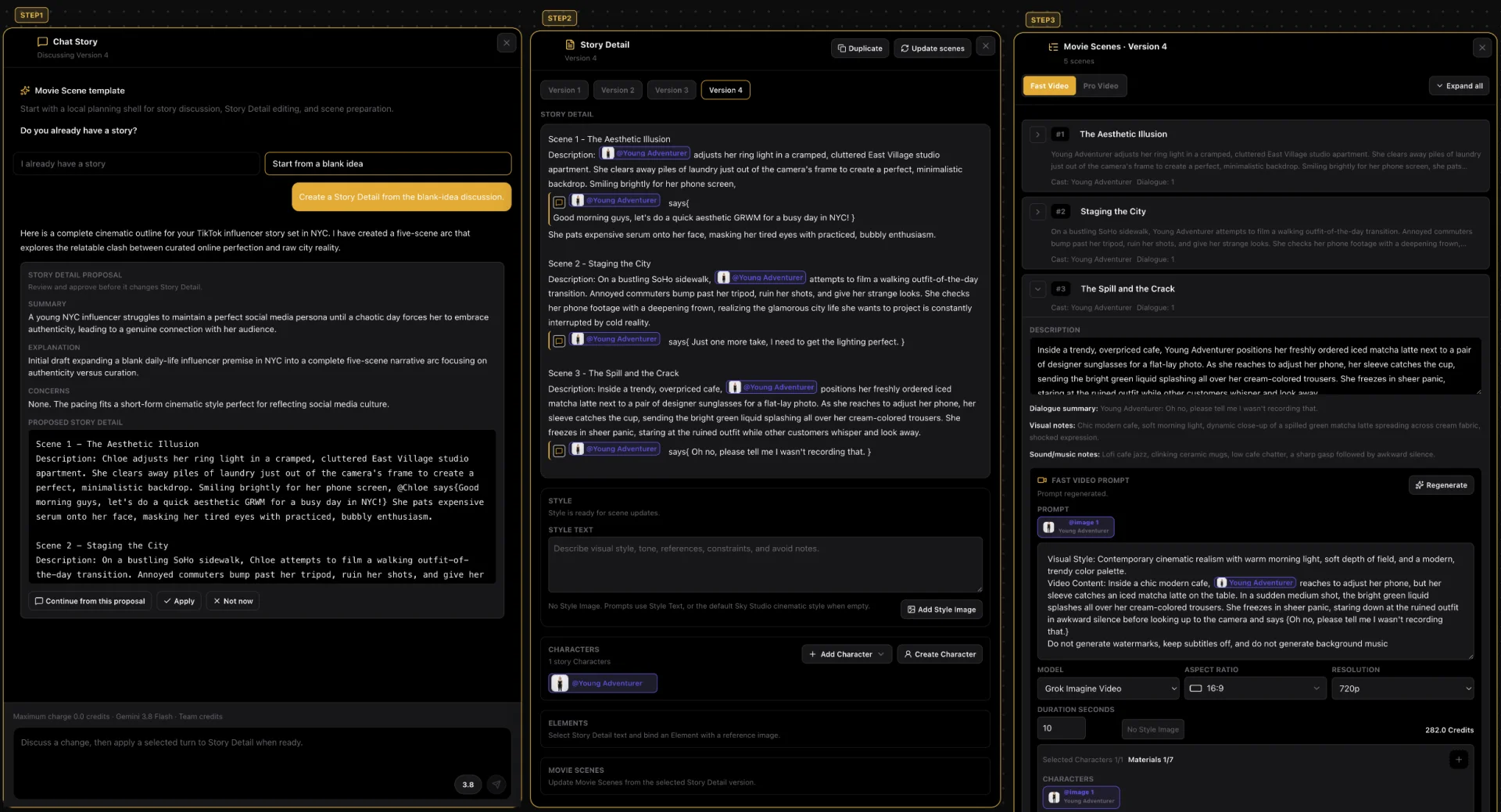
Sky Studio puts the leading image, video and music models in one workspace, together with the Cinematic Canvas for carrying a story to a finished video, the Characters page and e-commerce tools. It suits people who work project by project and don't want a subscription.
- Models: for video, Veo 3.1 Fast, Veo 3.1 Pro, Seedance 2.0 Pro, MiniMax H3, Grok Imagine and Gemini Omni Flash; for images, Nano Banana 2 Lite, Nano Banana 2, Nano Banana Pro, GPT Image 2 and Seedream 5.0 Flash and Pro; for music, ACE-Step 1.5.
- Compare models at once: image generation and the Characters page let you pick several models at once and compare one result from each; you can also redo the same scene with another model.
- From story to finished video: on the Cinematic Canvas you write the story in a chat, split it into Movie Scenes, and each shot is generated with the character references; scene videos can use Grok Imagine, Seedance 2.0 Pro, MiniMax H3 or Gemini Omni Flash.
- Characters: a short description such as "a man in his early 20s" is enough for the Characters page to draw a front close-up (so the model keeps the face right in video) and full-body front, side and back views, split them into single images and save them as a character you reuse in every shot.
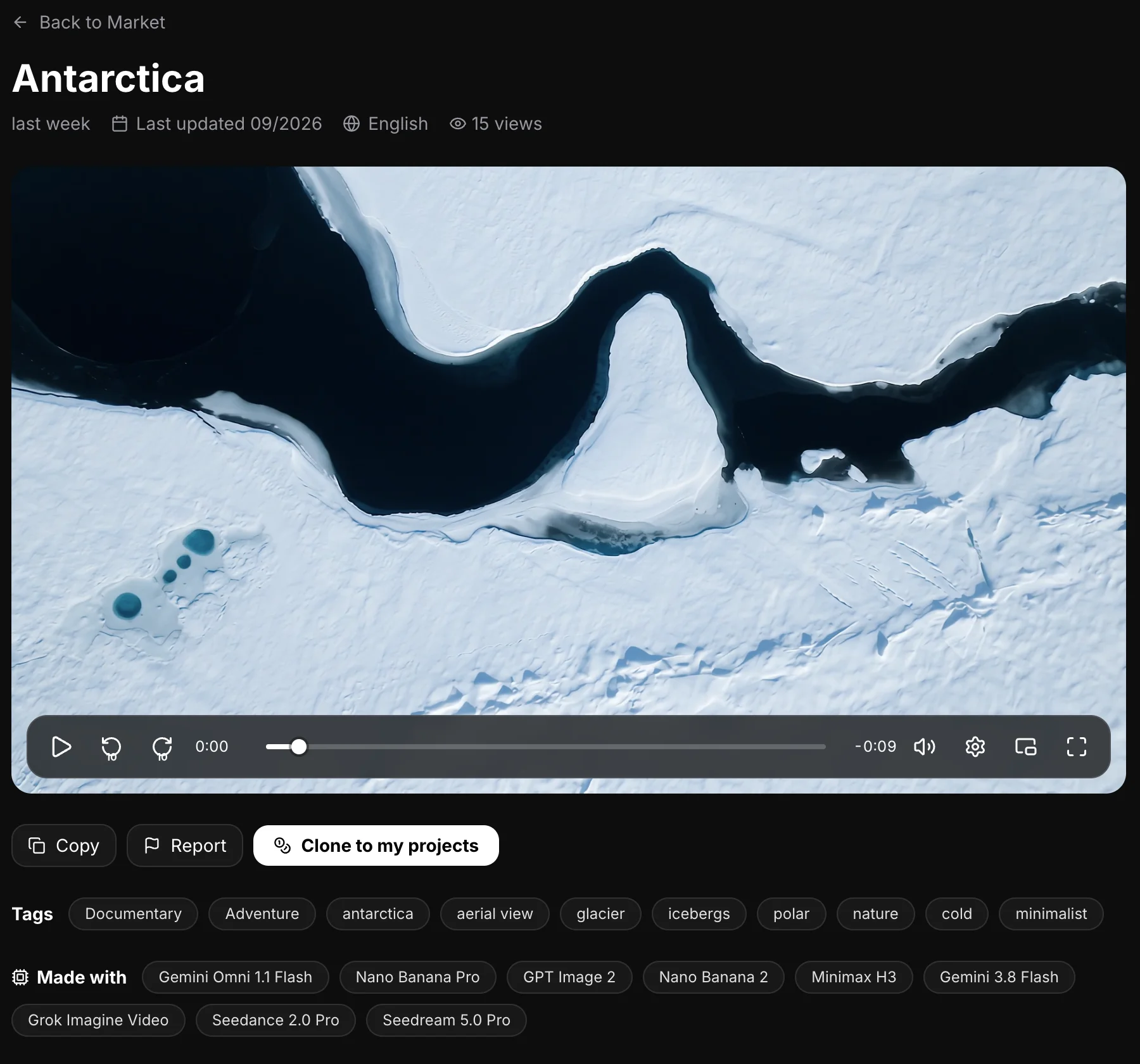
- Clone and share projects: on the Market you can clone a whole project someone shared (story, scenes and assets) into your account and keep working; you can share your own for free or at a price, and you earn credits when others clone it.
- E-commerce tools: White Background (several images or a ZIP at once), Change Product Color (in batches), Product Relight, Room Visualizer and a Background Remover that runs in your browser.
- Automatic social posting: AI writes the posts, adds images or video and posts to X on your schedule; more platforms are on the way.
- AI music: describe what you want and get original music, with lyrics or instrumental, from 10 seconds to 5 minutes, handy for scoring your videos. The music model runs on our own servers.
- Free teams: creating a team and adding members costs nothing, with no seat fees, for small teams and larger companies alike. The owner sets a credit cap for each member and can see their usage and what they generated.
- A clean interface: simple, with no ads; open it and start creating. Available in English, Spanish, Chinese and Japanese.
- Billing: no subscription; pay as you go, and credits never reset at month end or expire. A saved card is charged only when you click buy. If a generation fails on our side, or the model provider blocks it before a result, the credits come back automatically.
- Your data: we never sell your data or use it for ads, and we never use your prompts, uploads or creations to train AI models.
- Learn: founder Sky Lu teaches an AI filmmaking course, if you want to learn to make short films with AI step by step.
-
2 Higgsfield
Best for: Many models, plus camera-movement presets and marketing tools
Higgsfield is a full-featured AI image and video platform. Its pricing page lists Veo 3.1 and Veo 3.1 Fast; Seedance 2.0, 2.0 Fast and 1.5; and Nano Banana Pro and Nano Banana 2, along with models from many other makers, such as Kling, Sora 2 and Wan, and its own Soul models.
- Versus Sky Studio: Cinema Studio has dozens of camera-movement presets, and there are marketing tools such as Marketing Studio; Sky Studio focuses on carrying a story to a finished video, characters and e-commerce tools, with no subscription.
- Keep in mind: its privacy policy says it uses prompts, uploads and outputs to train its (and its affiliates') models; its per-seat team plans state separately that they don't train on your data.
- Billing: subscription that renews automatically; subscription credits don't roll over and expire at the end of each credit cycle; if you run short, you upgrade or buy credit packs.
-
3 OpenArt
Best for: A very large model list, plus characters and one-click stories
OpenArt's pricing page promises access to 100+ image, video and audio models, including Veo 3.1; Seedance 2.5, 2.0 and 2.0 Mini; and Nano Banana Pro, Nano Banana 2 and 2 Lite. It also has consistent characters, one-click story creation and an image editing suite.
- Versus Sky Studio: both have characters and stories; Sky Studio's Cinematic Canvas keeps the story, the scenes and each shot's video on one canvas, and adds e-commerce tools and the Market, with no subscription.
- Keep in mind: its pricing page puts commercial use rights from the Plus plan up, and buying extra credits also needs Plus or higher.
- Billing: per-seat subscription, monthly or yearly; subscription credits don't carry over, reset every 30 days, and paid credits are lost when the plan ends.
-
4 Krea
Best for: Image making, real-time generation and training your own style
Krea's models page lists Veo 3.1, Veo 3.1 Fast and Lite; Seedance 1.5 Pro, 2.0, 2.0 Fast, 2.0 Mini and 2.5; and Nano Banana Pro, Nano Banana 2 and 2 Lite. It also offers real-time generation, upscaling and LoRA training on your own images.
- Versus Sky Studio: Krea centers on image making and workflows; Sky Studio on carrying a story to a finished video, characters and e-commerce tools, with no subscription.
- Keep in mind: compute packs bought separately are valid for 90 days.
- Billing: a free plan with a daily allowance; Pro and Max are subscriptions whose monthly allowance doesn't roll over, while Business and Enterprise plans let unused credits roll over.
-
5 Magnific (Freepik)
Best for: Designers who want a stock library and AI generation in one place
Magnific is the creative platform of the company Freepik; Freepik's pricing page now leads to Magnific. It lists Veo 3.1 (incl. 4K), Seedance 2.5 and 2.0 Fast, and Nano Banana Pro and Nano Banana 2, alongside a huge stock library and upscaling tools.
- Versus Sky Studio: more stock assets and design tools; Sky Studio focuses on carrying a story to a finished video, characters and e-commerce tools, with no subscription.
- Keep in mind: extra credits last three years, but you need an active paid plan to use them.
- Billing: monthly or yearly subscription that renews automatically; monthly credits reset every month and don't roll over, while yearly credits come upfront and reset every year. Its plans state no model training on your data.
-
6 Dreamina (CapCut)
Best for: People who already use CapCut and want images and video on the side
Dreamina is CapCut's AI image and video platform. Its home page says it brings models such as Seedance 2.0 for video and Seedream 5.0 Lite and Nano Banana Pro for images together in one platform, and its video menu also lists Veo 3.1 and Sora 2; it also has a Marketing Studio and AI avatars.
- Versus Sky Studio: tied into the CapCut ecosystem and focused on marketing content; Sky Studio focuses on carrying a story to a finished video, characters and e-commerce tools, with no subscription.
- Keep in mind: its FAQ says commercial use depends on its terms, the content you create and the models or assets involved.
- Billing: subscription that renews automatically and can be cancelled anytime; the free option gives daily credits.
More in Sky Studio
One project can mix several models: the Market project below used Gemini Omni Flash, Nano Banana Pro, GPT Image 2, MiniMax H3, Grok Imagine, Seedance 2.0 Pro and Seedream 5.0 Pro. Projects other people share can be cloned whole into your account to keep working on.
Which to choose
- Beyond generating, you want to join shots into a story, keep a character or make e-commerce images, without a subscription: Sky Studio.
- You want camera presets and marketing templates, and your monthly use is steady: Higgsfield.
- You want a platform with a huge model list, characters and one-click stories: OpenArt.
- You mostly make images, generate in real time and train your own style: Krea.
- You want a stock library and AI generation together: Magnific.
- You already use CapCut: Dreamina.
Frequently asked questions
Is there one platform for Veo 3.1, Seedance and Nano Banana Pro?
Yes. Sky Studio, Higgsfield, OpenArt, Krea, Magnific and Dreamina all name the three models on their own sites. Sky Studio offers Veo 3.1 Fast and Pro, Seedance 2.0 Pro and Nano Banana 2 and Pro, with no subscription and credits that never expire.
Is Veo 3.1 the same on every platform?
Veo 3.1 comes in versions such as Fast, Pro and Lite, and each platform offers different versions, lengths and resolutions; the price also depends on the version and settings. Before you pick, check the platform's models or pricing page for the version you want.
Do all multi-model platforms need a subscription?
No. Higgsfield, OpenArt, Krea and Magnific are subscriptions whose credits reset monthly or each cycle. Sky Studio has no subscription: you spend credits only on what you generate, see the cost before you generate, and credits never reset at month end or expire.
How do I compare several models in Sky Studio?
Image generation and the Characters page let you pick several models at once and get one result from each for the same prompt. For video, run the same prompt again on another model; on the Cinematic Canvas you can redo the same scene with another model.
Can one project use several models?
Yes. In Sky Studio you can draw a character with one image model, generate the scene videos with another video model and score it with AI music. Each project page on the Market lists every model it used.
Do these platforms train AI on my work?
Sky Studio never uses your prompts, uploads or creations to train AI models, and never sells your data. Magnific's plans state no model training on your data. Higgsfield's privacy policy says it uses this content to train its (and its affiliates') models; its per-seat team plans state separately that they don't train on your data. For the others, check their own privacy policies.
What does it cost for a team?
In Sky Studio, creating a team and adding members is free, with no seat fees: the team shares credits and the owner can set a daily, weekly or monthly credit cap for each member. OpenArt charges per seat, and Higgsfield's team plans are also billed per seat each month.
Can I use what I generate commercially?
Under Sky Studio's Terms, what you generate is yours in every case (subject to the rights of model providers and third parties). Other platforms have their own rules: OpenArt's commercial use rights start at the Plus plan, Higgsfield's free plan doesn't include commercial use, and Dreamina says it depends on its terms, the content and the models.
Higgsfield or Sky Studio?
If you want camera presets and marketing templates and your monthly use is steady, Higgsfield. If you make story videos, characters and e-commerce images project by project, or don't want a subscription, Sky Studio. The point-by-point comparison is in Sky Studio or Higgsfield.