
Best tools
AI tools for product photos: background removal, white backgrounds, recoloring and scenes, and how to choose
Product photos usually need five jobs: a white background, lifestyle scenes, color variants, better lighting and, for furniture, a view in the customer's room. Sky Studio puts them on one page: White Background processes a batch or a ZIP at 1K, 2K or 4K; Change Product Color changes only the part you name; Product Relight lets you drag the lights; and the Background Remover runs in your browser, free and without an account. No subscription, and credits never expire. For big catalogs and Shopify, Photoroom; for bulk edits with many AI models, Pixelcut; for quick Amazon or eBay white backgrounds, PicWish; for themed backgrounds, Pebblely; for upscaling and fashion shots, Claid.ai.

Sky Studio wrote this page, and Sky Studio is one of the tools on it. What this page says about other tools is as of September 2026.
| Tool | Best for | Batch | Billing |
|---|---|---|---|
| Sky Studio | Background removal, white backgrounds, recolor, relight, room views and scenes in one place; no subscription | White Background (several images or a ZIP) and Change Product Color | No subscription: pay as you go, credits never expire |
| Photoroom | High-volume white backgrounds, new backgrounds and resizing, with Shopify | Up to 250 images at once on the web; also by API | Subscription; AI credits and exports renew each billing cycle; start for free |
| Pixelcut | Bulk edits plus many third-party AI image and video models | Up to 10,000 images in one batch on paid plans | Free version with basic tools; Pro and Business subscriptions with monthly AI credits |
| PicWish | Quick white backgrounds for Amazon or eBay listings | Up to 30 images at a time on the web; more in the desktop app | Pro subscription credits refresh weekly or monthly; pay-as-you-go credits never expire |
| Pebblely | Putting a product into 40+ background themes | Bulk generate on Basic and Pro | Subscription; unused monthly images don't roll over; no free trial |
| Claid.ai | Product scenes, upscaling and on-model fashion shots | Batch processing on Pro and Business | Subscription with monthly credits; free trial |
First, decide which job you need
- Background removal and white backgrounds: many marketplaces require or recommend a white background for the main image. Cutting the product out cleanly and putting it on pure white is the most common step, and with a large catalog you need it in batches.
- New backgrounds and lifestyle scenes: putting the product on a table, in a kitchen or outdoors, for product pages, ads and social media.
- Color variants: when a product comes in several colors, you don't have to shoot each one; change only the part you name and keep the texture and details.
- Lighting: a flat photo gains depth with a key light and a rim light.
- In the customer's room: for furniture and home goods, placing the product in a photo of the customer's own room helps them picture it at home.
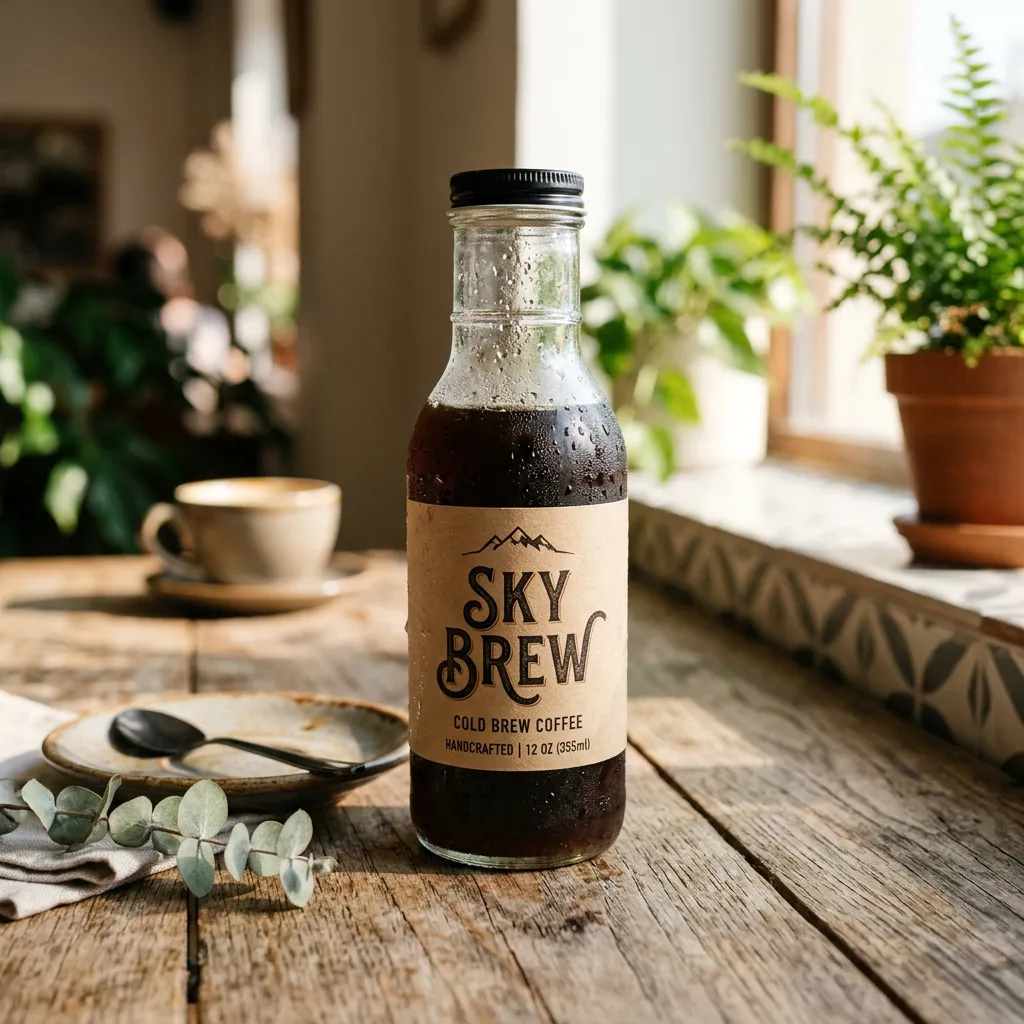
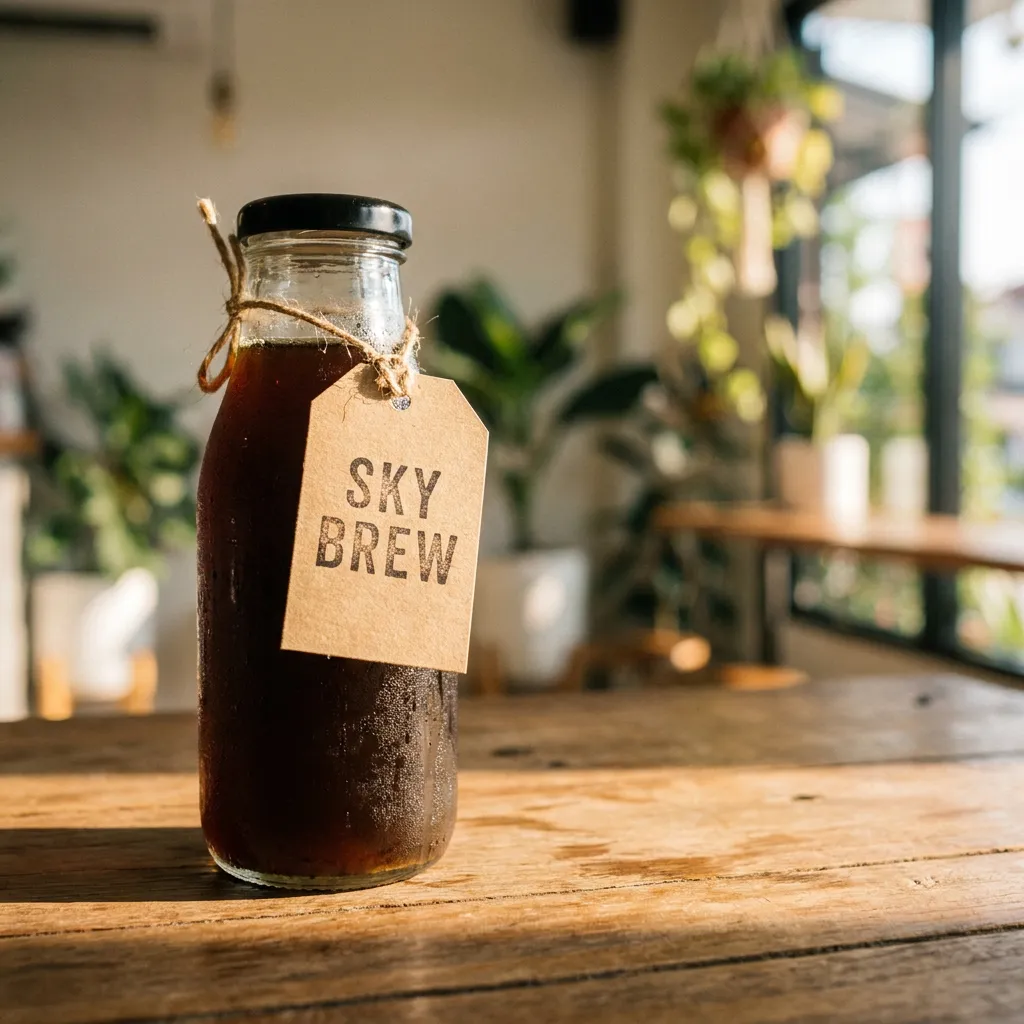
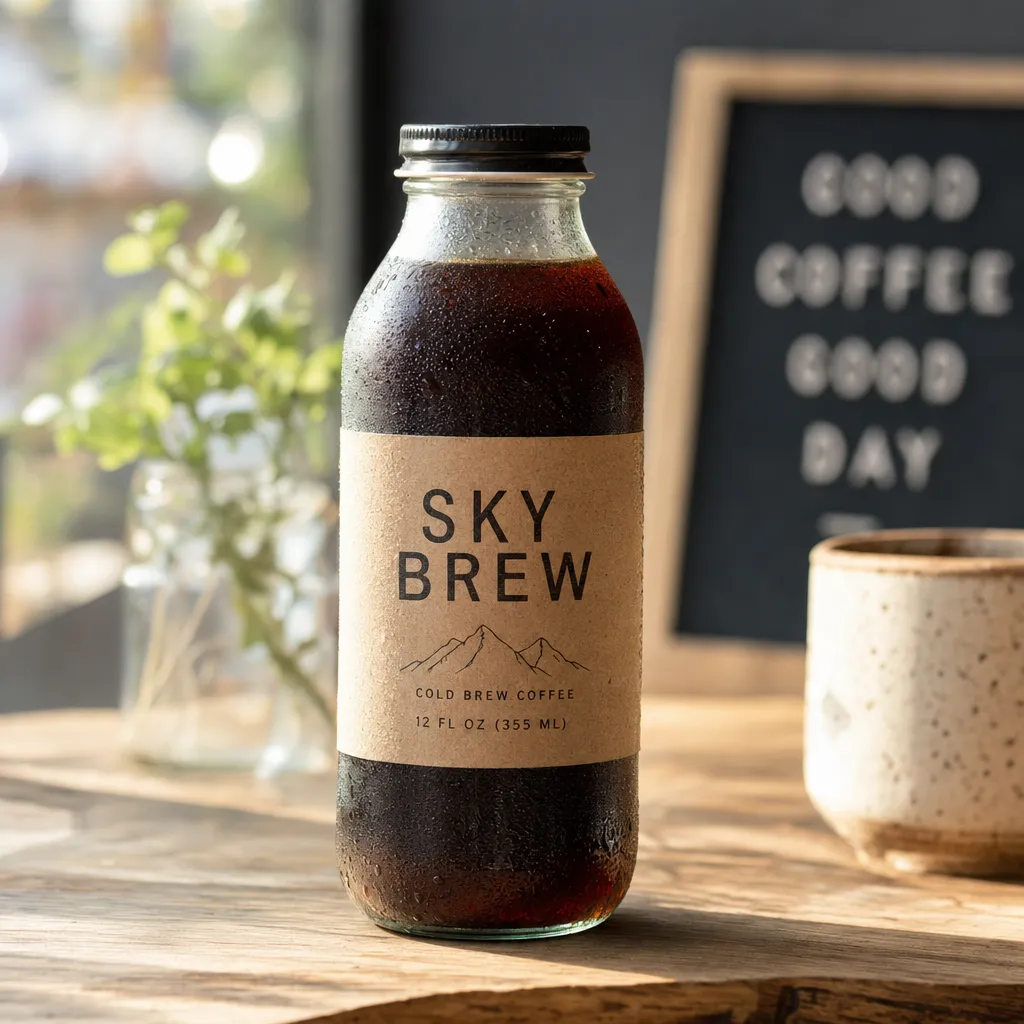
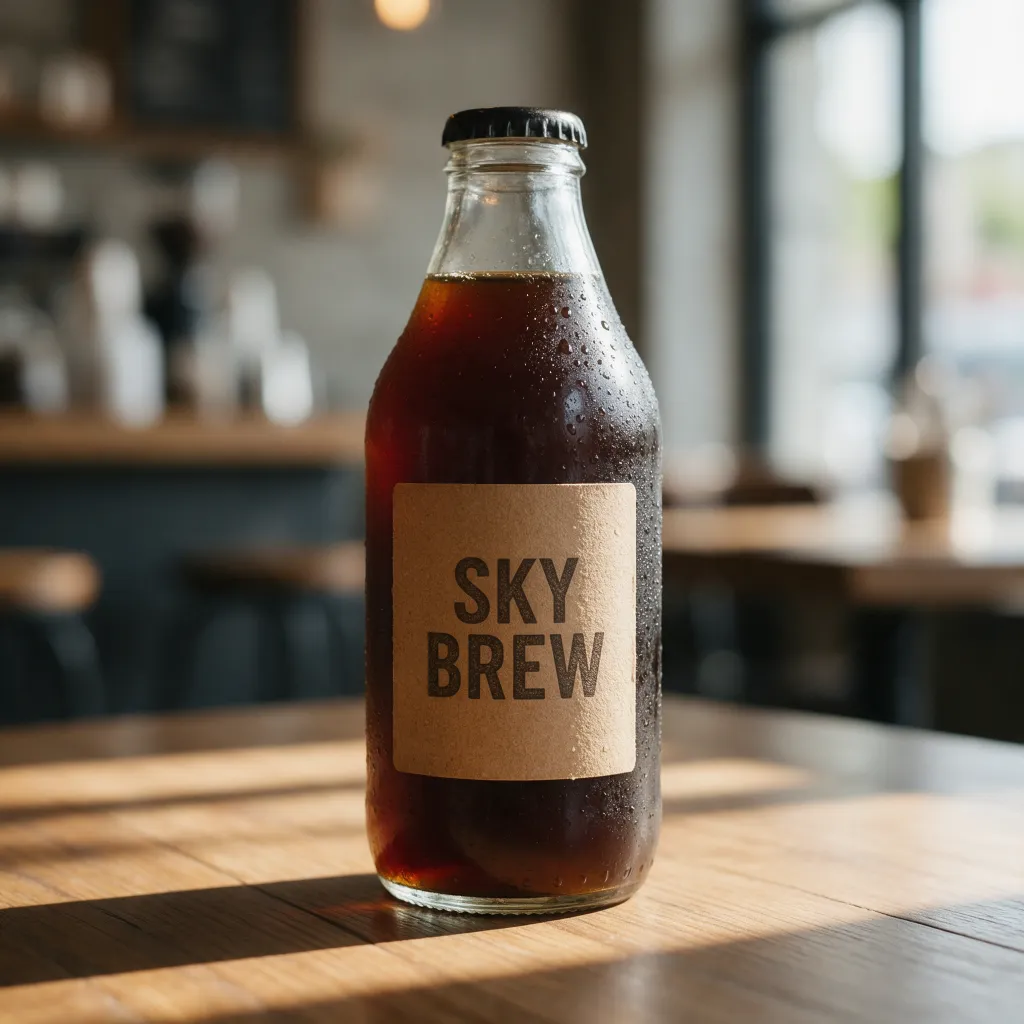
Prompt: “A glass bottle of cold brew coffee on a sunlit wooden cafe table, condensation on the glass, a kraft paper label that reads "SKY BREW", soft morning light, shallow depth of field, product photography”
One prompt, four models
These four images are the samples on Sky Studio's AI Image Generator page: the same prompt, word for word, sent to four image models, one image each, straight from the model.
- The label text: all four spelled "SKY BREW" correctly.
- Reading the prompt: the prompt asks for a "kraft paper label"; Nano Banana Pro made it a kraft paper tag tied around the neck of the bottle, while the other three put a label on the bottle.
- Details they added: Nano Banana 2 and GPT Image 2 added a mountain mark, "COLD BREW COFFEE" and the volume in small type, and GPT Image 2 also put a letter board in the background; Seedream 5.0 Pro kept the simplest label, with the brand name only.
If the image needs text, labels or a layout, try GPT Image 2 or Nano Banana Pro first; for edits guided by photos of your own product, Nano Banana 2 or Nano Banana Pro; for posters and stylized key visuals, Seedream 5.0 Pro; and for print-size detail, Nano Banana Pro, Nano Banana 2 and GPT Image 2 go up to 4K.
6 AI tools for product photos
-
1 Sky Studio Our tool
Best for: Background removal, white backgrounds, recolor, relight, room views and scenes in one place; no subscription
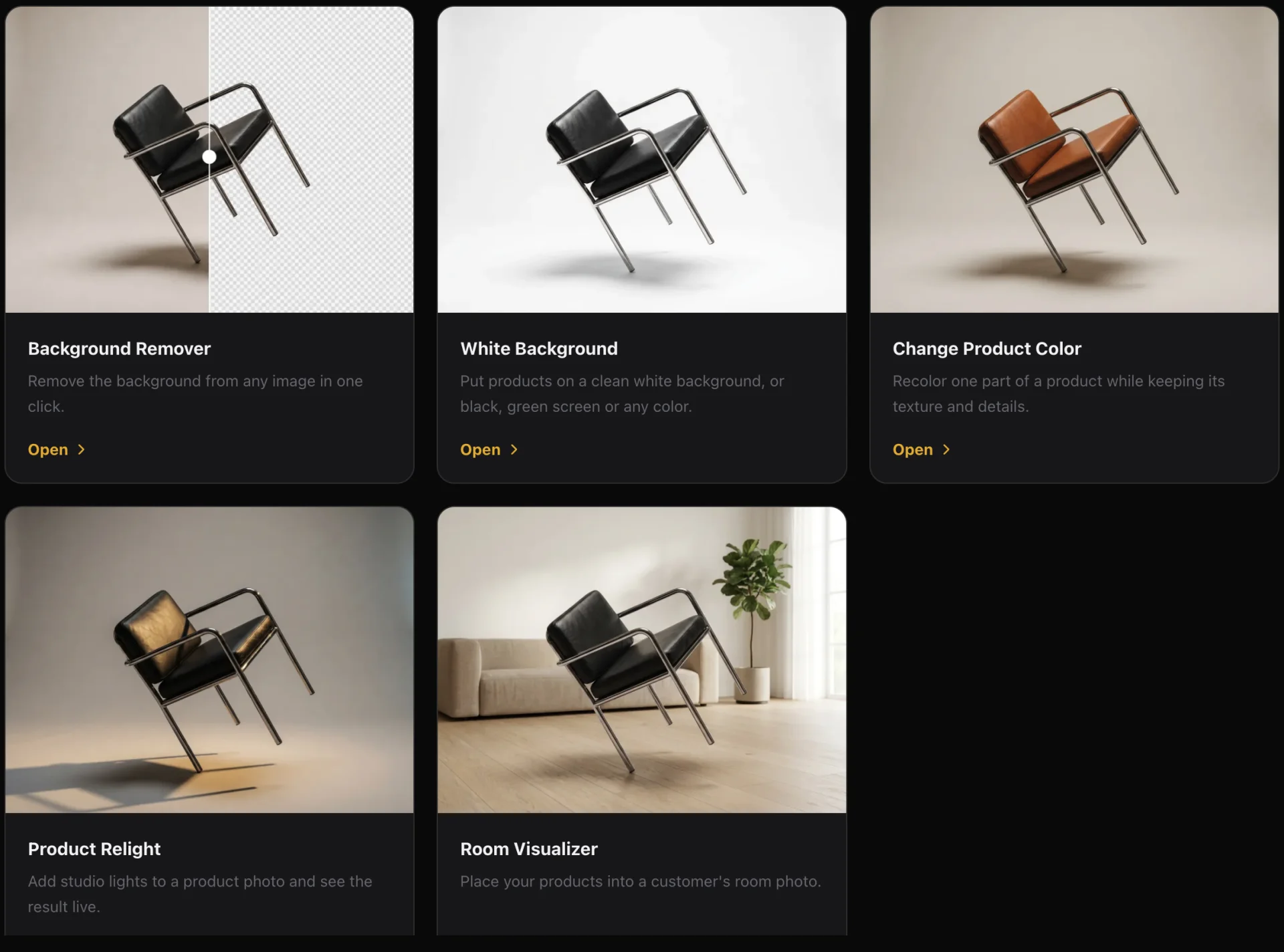
Sky Studio's Tools page gathers the common e-commerce steps, and the image models for product scenes are in the same account. It suits sellers and teams who make images when they need them and don't want a subscription.
- Background Remover: runs in your browser, so the picture is not uploaded to a server for this step. Removing the background is free, with or without an account; downloading a result uses credits. Compare before and after with a slider, refine the edges by hand and download a transparent PNG.
- White Background: white, black, green screen or any color. Upload images one by one or as a ZIP, keep each photo's aspect ratio or set one per image, and export the whole batch at 1K, 2K or 4K.
- Change Product Color: name the part you want to change (a strap or a cap, say), pick a preset or any color, and only that part changes, with its texture and details. It handles several photos in one batch, and you choose the image model and the output size.
- Product Relight: start from a preset such as White Studio or Window Glow, drag the key, fill, rim and ambient lights, tune angle, distance, height, intensity and softness, and see the result live in your browser. A luminance-preserving mode protects product colors, and you can send the result to Workspace to refine it with an AI image model.
- Room Visualizer: a team tool. Save a customer's room photo as a case, analyze the room type, colors, style, furniture and free zones, get proposals from your team's published products, swap, add or remove products before composing the room, and record the customer's reaction and whether it converted.
- Product scenes: Nano Banana 2, Nano Banana Pro, GPT Image 2 and Seedream 5.0 all take your product photos as references, and Nano Banana 2, Nano Banana Pro and GPT Image 2 go up to 4K. Pick several models at once and compare one image from each for the same prompt.
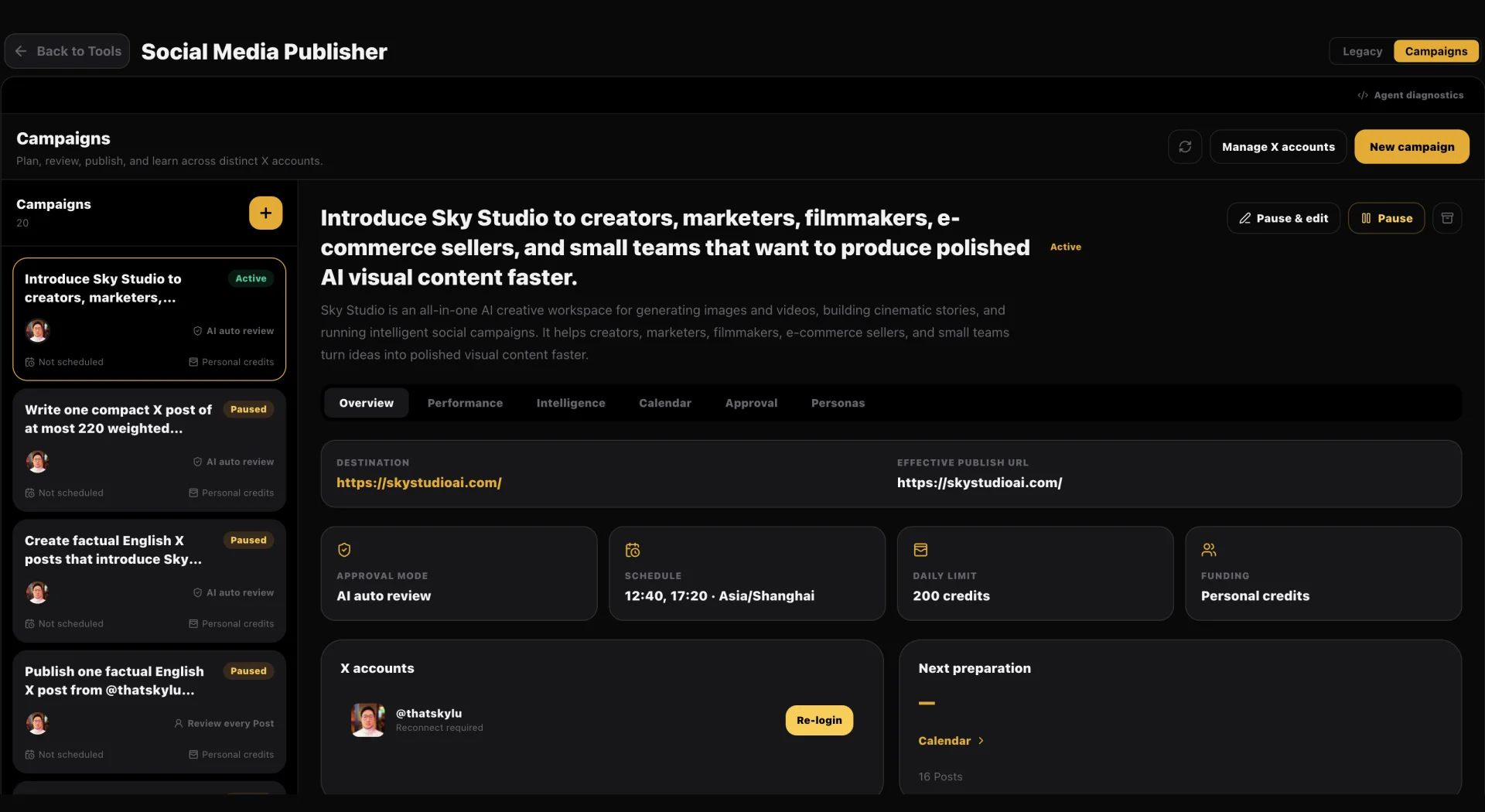
- From photo to video and social posts: a product photo can be the first frame for most video models, and the Cinematic Canvas strings several shots into a short with a story. The Social Media Publisher writes posts with AI, adds images or video and posts to X on your schedule; more platforms are on the way.
- Clone and share projects: on the Market you can clone a whole project someone shared (story, scenes and assets) into your account and keep working; you can share your own for free or at a price, and you earn credits when others clone it.
- AI music: describe what you want and get original music, with lyrics or instrumental, from 10 seconds to 5 minutes, handy for product videos. The music model runs on our own servers.
- Free teams: creating a team and adding members costs nothing, with no seat fees, for small teams and larger companies alike. The owner sets a credit cap for each member and can see their usage and what they generated.
- A clean interface: simple, with no ads; open it and start creating. Available in English, Spanish, Chinese and Japanese.
- Billing: no subscription; pay as you go, and credits never reset at month end or expire. A saved card is charged only when you click buy. If a generation fails on our side, or the model provider blocks it before a result, the credits come back automatically.
- Your data: we never sell your data or use it for ads, and we never use your prompts, uploads or creations to train AI models.
- Learn: founder Sky Lu teaches an AI filmmaking course, if you want to learn to make short films with AI step by step.
-
2 Photoroom
Best for: High-volume white backgrounds, new backgrounds and resizing, with Shopify
Photoroom is an AI photo editor built for e-commerce: Background Remover, White Background, Background Generator, Product Staging, AI Shadows, Recolor for clothing and products, Flat Lay, Ghost Mannequin and image resizing, plus a Shopify integration. On the web it edits up to 250 images at once, it also works by API, and its Product Video Generator turns product photos into video.
- Compared with Sky Studio: its editing, resizing and batch tools are very complete, a good fit for shops with large catalogs. Sky Studio needs no subscription, Product Relight lets you drag each light separately, and you can carry on in the Cinematic Canvas to turn the product into a short with a story.
- Keep in mind: exports have a monthly limit; when you hit it, exports pause until the next billing cycle unless you upgrade. 4K images and video are on Ultra and Enterprise only.
- Billing: subscription (Pro, Max, Ultra and Enterprise); AI credits and exports renew each billing cycle. You can start for free, Pro and Max have a free trial, and refunds are available up to a week after purchase.
-
3 Pixelcut
Best for: Bulk edits plus many third-party AI image and video models
Pixelcut is an AI image and video editor for sellers: background removal for images and video, upscaling, expand, retouching, shadows, AI product photos, UGC-style video ads and an AI video generator. Its bulk editor applies background removal, resizing, upscaling, shadows, watermarks or a new background to up to 10,000 images in one batch, and exports them as a ZIP. Paid plans use monthly AI credits for third-party models such as Nano Banana, GPT Image, Seedream, Veo and Kling.
- Compared with Sky Studio: strong at bulk edits and at mixing many third-party models in one editor. Sky Studio needs no subscription and adds Change Product Color, Product Relight with lights you drag, and Room Visualizer.
- Keep in mind: the free version covers basic tools; batch editing, all AI tools and HD exports come with Pro.
- Billing: a free version, then Pro and Business subscriptions, monthly or yearly, with monthly AI credits, unlimited background removal and upscaling, and a commercial license; you can cancel anytime. Each plan includes team seats (3 on Pro, 10 or more on Business) sharing the organization's credits.
-
4 PicWish
Best for: Quick white backgrounds for Amazon or eBay listings
PicWish is an AI photo editor. Its White Background tool removes the background and puts the product on white in one step, the look Amazon and eBay ask for; it has a batch mode and supports the standard sizes of the major e-commerce platforms. It also offers background removal, AI backgrounds, product retouching, photo enhancement and object removal, plus an API for developers.
- Compared with Sky Studio: focused on white backgrounds and quick to use. Sky Studio needs no subscription and adds Change Product Color, Product Relight and image and video models from several companies in the same account.
- Keep in mind: on the web a batch holds up to 30 images; for more, there is the desktop app. The Pro plan is for one person; to share credits with a team you use pay-as-you-go credits.
- Billing: there is a free plan. Pro is a subscription whose credits refresh every week or month without rolling over; pay-as-you-go credits never expire. A 7-day money-back guarantee applies.
-
5 Pebblely
Best for: Putting a product into 40+ background themes
Pebblely makes product scenes: upload a product photo, pick one of its 40+ background themes or write your own prompt, and it generates photos of the product in different settings.
- Compared with Sky Studio: focused on new backgrounds and scenes. Sky Studio needs no subscription and has Background Remover, White Background, Change Product Color, Product Relight and Room Visualizer on one Tools page.
- Keep in mind: there is no free trial, and bulk generation is on the Basic and Pro plans.
- Billing: subscription (Lite, Basic and Pro) that renews automatically and can be cancelled anytime; unused monthly images don't roll over. It says you own the photos you generate and that uploaded and generated images are not used for AI training.
-
6 Claid.ai
Best for: Product scenes, upscaling and on-model fashion shots
Claid.ai is an AI product photo platform: product scenes (AI Photoshoot), background removal, upscaling and enhancement, and on-model fashion photos. It also turns product photos into video and offers an API for developers.
- Compared with Sky Studio: beyond scenes, it upscales images and makes fashion shots, a good fit for teams that process images through an API. Sky Studio needs no subscription and has Change Product Color, Product Relight and Room Visualizer on one Tools page.
- Keep in mind: batch processing and 4K are on the Pro and Business plans.
- Billing: subscription (Essentials, Pro and Business) with a monthly credit allocation you can spend on any operation; there is a free trial. It says images generated with Claid are not subject to Claid copyright.
Five steps to a full set of product photos in Sky Studio
- Upload all your product photos to White Background (a ZIP works too), pick white, the aspect ratio and the output size, and process the batch. If you only need a transparent background, use the Background Remover, which runs in your browser.
- For products that come in several colors, name the part to change in Change Product Color and make every color at once.
- To give the main image more depth, open Product Relight, start from a preset, drag the lights and export when you like the result.
- For scenes on product pages and in ads, add your product photo as a reference in Workspace, pick several image models, make one image with each and keep the best.
- For furniture and home goods, your team can use the Room Visualizer to place products in the customer's room photo. With the images ready, the Social Media Publisher writes the posts and publishes them to X on your schedule.
More you can do in Sky Studio
- Product videos: a product photo can be the first frame for most video models, and some also take an end frame or reference images. For a short with a story, write it in a chat on the Cinematic Canvas, split it into Movie Scenes, generate each shot and add original music made with AI music.
- Social posting: connect your X account, let AI write posts with images or video, set up a campaign, and it publishes on your schedule.
- Teamwork: creating a team is free; the owner sets a credit cap for each member and sees their usage and what they generated, which suits a few people preparing store assets together.
How to choose
- You want background removal, white backgrounds, recoloring, relighting, scenes and room views in one place, or no subscription: Sky Studio.
- You only need a transparent background and don't want to upload the image to a server: Sky Studio's Background Remover, which runs in your browser and removes backgrounds for free.
- You have a big catalog and want batch white backgrounds and resizing, connected to Shopify: Photoroom.
- You want bulk edits and many third-party AI models in one editor: Pixelcut.
- You want quick white backgrounds for Amazon or eBay: PicWish.
- You only want themed backgrounds for your product: Pebblely.
- You also need upscaling, fashion shots or an API: Claid.ai.
Frequently asked questions
What is the easiest tool for white-background product photos?
With many products, pick a tool that works in batches. Sky Studio's White Background takes several images or a ZIP; you pick white, the aspect ratio and a 1K, 2K or 4K output, and it processes the whole batch. Photoroom edits up to 250 images at once on the web and also by API, Pixelcut's bulk editor handles up to 10,000 images in one batch on paid plans, and PicWish processes up to 30 images at a time on the web.
Is there a free AI background remover?
Yes. In Sky Studio's Background Remover, removing the background is free, with or without an account; downloading the result uses credits. Photoroom lets you start for free, Pixelcut has a free version with limited background removal, PicWish has a free plan and Claid.ai a free trial; Pebblely has no free trial.
Does removing the background upload my image to a server?
Not in Sky Studio: the Background Remover runs in the browser on your own device (with WebGPU when your device supports it, otherwise on the CPU), so the picture is not uploaded for this step, and the cutout stays in your browser.
Can I change the color of just one part of a product?
Yes. In Sky Studio's Change Product Color you name the part to change, such as a strap or a cap, pick a preset or any color, and only that part changes, with its texture and details; several photos can be processed in one batch. Photoroom also has a Recolor tool for clothing and products.
Which AI model is best for product scenes?
It depends on the use. If the image needs text, labels or a layout, try GPT Image 2 or Nano Banana Pro first; for edits guided by photos of your own product, Nano Banana 2 or Nano Banana Pro; for posters and stylized key visuals, Seedream 5.0 Pro. In Sky Studio you can pick several models at once and compare one image from each for the same prompt, and the AI Image Generator page shows the same prompt on each model.
Can I place furniture in a photo of the customer's room?
Yes. Sky Studio's Room Visualizer is a team tool: save the customer's room photo as a case, analyze the room type, colors, style, furniture and free zones, get proposals from your team's published products, swap, add or remove products before composing the room, and record the customer's reaction and whether it converted.
Do I need a subscription for product photos?
It depends on the tool. Photoroom, Pebblely and Claid.ai are subscriptions; Pixelcut and PicWish have free plans and paid subscriptions, and PicWish also sells pay-as-you-go credits that never expire. Sky Studio has no subscription: each generation uses credits, you see how many before you generate, and credits never reset at month end or expire.
Do these tools train AI on my product photos?
Sky Studio never uses your prompts, uploads or creations to train AI models, and never sells your data. Pebblely says uploaded and generated images are not used for AI training. For the others, check their own privacy policies.
Can I use AI product photos commercially?
Under Sky Studio's Terms, the outputs are yours (except for rights held by model providers and third parties). Pebblely says you own the photos you generate, Claid.ai says images generated with Claid are not subject to Claid copyright, and Pixelcut includes a commercial license on its Pro and Business plans. With any tool, make sure you have the right to use the brands, people and works in your photos.
Can I turn product photos into video?
Yes. In Sky Studio a product photo can be the first frame for most video models, and some also take an end frame or reference images; the Cinematic Canvas strings several shots into a short with a story. Photoroom, Pixelcut and Claid.ai also turn product photos into video.