Best tools
AI story to video: how to turn a script into shots with the same character, and which tool to use
Turning a story into video takes four steps: write it, split it into shots, generate each shot and check the character stays the same. Sky Studio does all four in one place: on the Cinematic Canvas you write the story in a chat, it is split into scenes, and every shot carries the character's reference automatically; one short description gives you the character. No subscription, credits never expire, and it never sells your data or trains AI on it. For teams going from script to storyboard to edit, LTX Studio; for narrated stories on a canvas, Morphic; for shot-by-shot generation with references, Kling or Dreamina; Higgsfield builds a storyboard with Popcorn first, then generates by scene.
Sky Studio wrote this page, and Sky Studio is one of the tools on it. What this page says about other tools is as of September 2026.
| Tool | Best for | Billing | How it works |
|---|---|---|---|
| Sky Studio | A story carried to a finished video with the same character in every shot | No subscription: pay as you go, and credits never expire | Cinematic Canvas: Chat Story → Story Detail → Movie Scenes; every shot carries the character reference automatically |
| LTX Studio | Teams going from script to storyboard to timeline editing | Subscription; the free plan gives credits once, paid plans every month | Upload a script to generate scenes and storyboards; Elements saves characters, objects and locations |
| Morphic | Narrated story videos on a canvas, from a premise or a script | Monthly or yearly subscription with monthly credits; free plan | Copilot storyboards the script into frames, then generates narrated scenes with a reference sheet per character |
| Kling AI | Shot-by-shot generation that reuses the same characters | Subscription; monthly credits last one month | Element Library: multi-angle references added to each shot in one click |
| Dreamina | Script to video and multi-reference shots in CapCut's platform | Auto-renewing subscription; free option with daily credits | Script to video with a character reference image; Seedance 2.0 takes up to 12 references per prompt |
| Higgsfield | Seeing a storyboard before generating, with camera presets | Auto-renewing subscription; credits expire at the end of each cycle | Popcorn builds storyboard images; in Cinema Studio you add characters and places with @ and generate by scene |
What makes a story hard to turn into video
Today's video models generate one shot of a few seconds at a time, and a story takes dozens of shots. Three things make it hard:
- Breaking it into shots: the story has to be split into shots first, each with its characters, action, framing and lines, so the model knows what to film.
- Keeping the character: the model redraws everything each time, so in the next shot the face, hair or clothes can change. Every shot needs the same references.
- Switching between tools: when the story, the characters, the generation and the editing live in different tools, moving files between them is where most mistakes happen.
So when you pick a tool, check whether it keeps these steps together, especially whether the shots and the character references connect on their own. Why faces change and how to prevent it is covered in Consistent Characters in AI Video.
How Sky Studio does it: from one conversation to a finished video
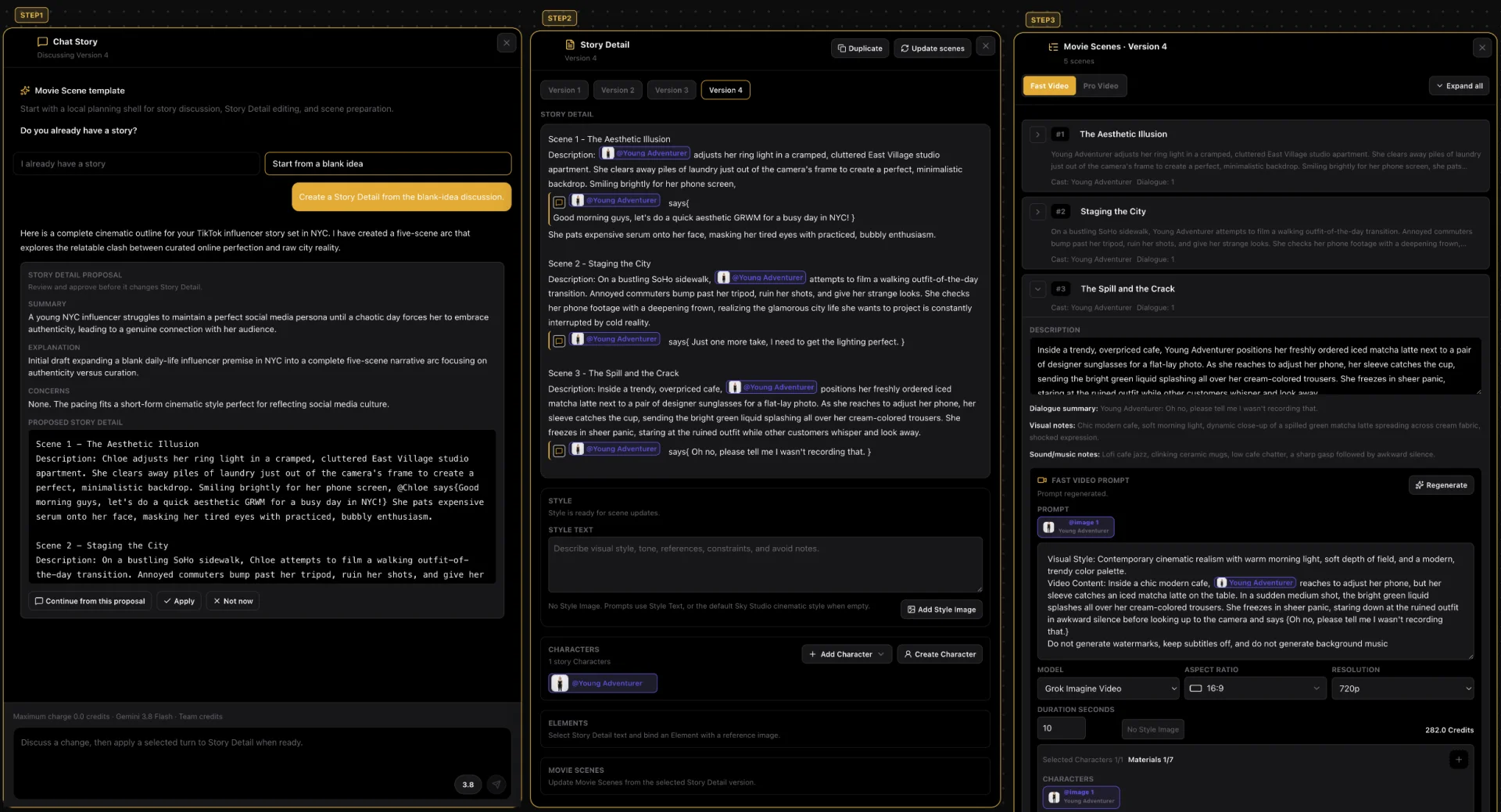
This is a short story made in the Sky Studio Cinematic Canvas: a New York influencer tries to film a perfect life, and everything goes wrong.
- Chat Story: the conversation starts from a blank idea, and the AI writes an outline of a few scenes.
- Story Detail: once you confirm, it writes out each scene with its characters, actions and dialogue; the character is tagged with @.
- Movie Scenes: then it is split into scenes; each one has its own video prompt and carries the character's reference image automatically.
- Generate the video: shots are generated one by one; when a scene needs to run longer, Gemini Omni Flash extends the clip up to 40 seconds in total.
Both shots were generated with MiniMax H3 and the same character references; these are the original videos, not retouched. The face, the long blonde hair with a middle part and the thin gold necklace match, and the clothes change as the story says.
6 AI tools that turn a story into video
-
1 Sky Studio Our tool
Best for: A story carried to a finished video with the same character in every shot
Sky Studio puts the story, the characters, the scenes and the video generation on one Cinematic Canvas, for people who want to go from an idea to a finished video.
- From story to finished video: you write the story in a chat in Chat Story, create the Story Detail and split it into Movie Scenes; every shot carries the character reference automatically and is generated with Grok Imagine, Seedance 2.0 Pro, MiniMax H3 or Gemini Omni Flash.
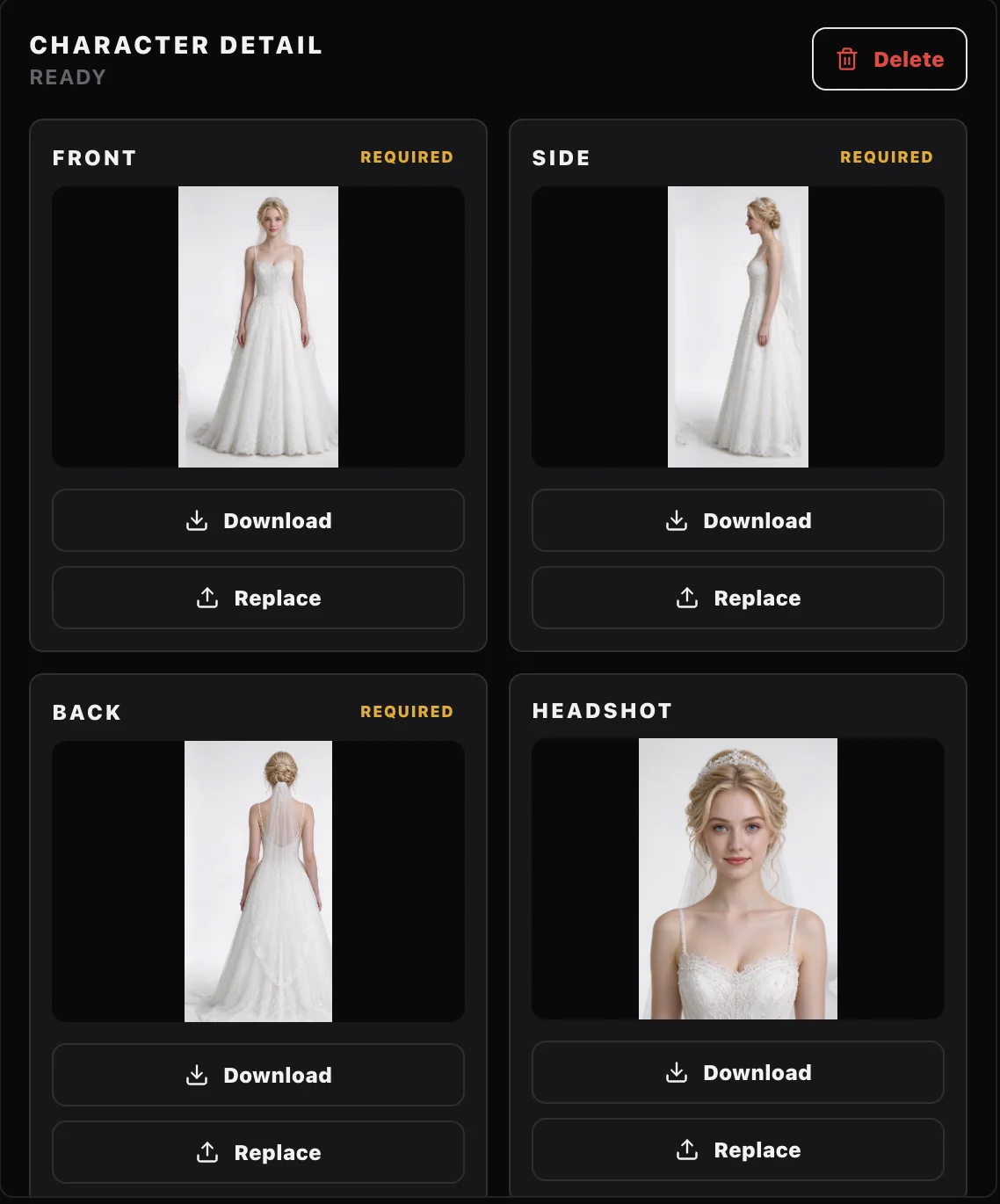
- Characters: a short description such as "a man in his early 20s" is enough for the Characters page to draw a front close-up (so the model keeps the face right in video) and full-body front, side and back views, split them into single images and save them as a character; tag it with @ in the story and every shot uses the same references.
- Clone and share projects: on the Market you can clone a whole project someone shared (story, scenes and assets) into your account and keep working; you can share your own for free or at a price, and you earn credits when others clone it.
- AI music: describe what you want and get original music, with lyrics or instrumental, from 10 seconds to 5 minutes, handy for scoring your shorts. The music model runs on our own servers.
- Free teams: creating a team and adding members costs nothing, with no seat fees. The owner sets a credit cap for each member and can see their usage and what they generated.
- A clean interface: simple, with no ads; open it and start creating. Available in English, Spanish, Chinese and Japanese.
- Billing: no subscription; pay as you go, and credits never reset at month end or expire. You see the credit cost before you generate. If a generation fails on our side, or the model provider blocks it before a result, the credits come back automatically.
- Your data: we never sell your data or use it for ads, and we never use your prompts, uploads or creations to train AI models.
- Learn: founder Sky Lu teaches an AI filmmaking course, if you want to learn to make short films with AI step by step.
-
2 LTX Studio
Best for: Teams going from script to storyboard to timeline editing
LTX Studio is Lightricks' web-based AI video production platform. Upload a script and it generates scenes and storyboards; Elements saves characters, objects and locations so they stay consistent across scenes, and there is a timeline editor and sound design too.
- Versus Sky Studio: both take a script all the way to video; LTX organizes a project by scenes and storyboards, while Sky Studio starts in Chat Story and keeps the story, the scenes and each shot's video on one canvas.
- Keep in mind: AI storyboards and saving Elements start on the Standard plan; it is built for desktop and has no mobile version.
- Billing: subscription, monthly or yearly. The free plan gives credits once and comes with a personal-use license only; paid plans add credits every month, and the commercial license starts on Standard.
-
3 Morphic
Best for: Narrated story videos on a canvas, from a premise or a script
Morphic is an AI video platform built around an infinite visual canvas. Its story video generator starts from a premise or a script: Copilot first storyboards the beats into frames, then Morphic generates the scenes as video and adds narration you can direct line by line, with music and effects. To keep characters consistent, you build a reference sheet for each recurring character and location and pass it into every scene. Its video models include MiniMax H3 Max, Seedance 2.5 and Wan 3.0.
- Versus Sky Studio: both go from a story to each scene's video on a canvas; Morphic adds narration, while in Sky Studio the scenes come from the Story Detail and every shot carries the saved character's references automatically.
- Keep in mind: the free plan has limited models, and the plan comparison lists commercial use and no watermark for Standard, Pro and Max.
- Billing: a monthly or yearly subscription with monthly credits that you can cancel anytime, plus a free plan to try it. Credit packs last 180 days and need a paid plan.
-
4 Kling AI
Best for: Shot-by-shot generation that reuses the same characters
Kling is Kuaishou's video model and creation platform. Its Element Library stores a character (or prop, or location) from several angles, 2 to 4 reference images per element, and reuses it in one click for images and video; in 3.0 Omni, a character element can also carry a voice.
- Versus Sky Studio: in Kling you generate shot by shot and organize the story and shots yourself; in Sky Studio the Cinematic Canvas splits the story into scenes and adds the character reference to each one.
- Keep in mind: features such as video extension are for members only.
- Billing: membership subscription. Credits issued each month are valid for one month from issue; credits bought separately last two years.
-
5 Dreamina
Best for: Script to video and multi-reference shots in CapCut's platform
Dreamina is CapCut's AI image and video platform, with models such as Seedance 2.0 and 2.5, Seedream 5.0 and Nano Banana Pro. Its script-to-video tool turns a pasted script into video scenes, and you can add a reference image of the character for consistency. With Seedance 2.0, one prompt can carry up to 12 references (photos, videos and audio clips) to hold a character's look, motion and camera work; there is also an AI Agent for planning scenes.
- Versus Sky Studio: Dreamina generates shot by shot and you add the references yourself; in Sky Studio the scenes come from the Story Detail and the character references are attached automatically.
- Keep in mind: its own FAQ says commercial use depends on its terms, the content you create and the models or assets involved, so check before you publish.
- Billing: a subscription (Basic, Standard and Advanced) that renews automatically and can be cancelled anytime; a free option gives daily credits.
-
6 Higgsfield
Best for: Seeing a storyboard before generating, with camera presets
Higgsfield's Popcorn builds storyboard images before you generate video, and you can upload up to 4 images to guide or extend the storyboard. Then, in Cinema Studio, you describe the scene, add characters and locations with @ and generate; there are dozens of camera movement presets.
- Versus Sky Studio: Higgsfield builds storyboard images first and generates by scene; Sky Studio starts in Chat Story and keeps the story, the scenes and each shot's video on one canvas.
- Keep in mind: the free plan doesn't include commercial use.
- Billing: a subscription that renews automatically; subscription credits don't roll over and expire at the end of each credit cycle.
How to choose
- You want to go from an idea to a finished video, with the character in every shot handled for you: Sky Studio.
- Your team goes from script to storyboard, then edits on a timeline with sound: LTX Studio.
- You want narrated story videos on a canvas: Morphic.
- You only need shot-by-shot generation, with Elements or references holding the character: Kling or Dreamina.
- You want to see a storyboard first and use camera presets: Higgsfield.
Turn a story into video in Sky Studio: 4 steps
- Make the character on Characters: generate the four-view sheet from a description, or import front, side and back images you already have, check it and save it. We compare how each tool makes character sheets in AI Character Turnaround Sheet: 5 Tools Compared.
- Open the Cinematic Canvas, describe your idea in Chat Story and, once you confirm it, create the Story Detail.
- In the Story Detail, tag the character with @ and split the story into Movie Scenes; each scene's video prompt carries the character's reference image.
- Generate the video for each shot, compare it with the sheet and, if something doesn't match, switch models or regenerate. Before you generate, you see how many credits it will use.
Frequently asked questions
Which AI tools turn a story or script into video with consistent characters?
To go from story to finished video in one place, use the Sky Studio Cinematic Canvas: you write the story, it is split into scenes, and each shot is generated with the character's reference. LTX Studio generates scenes and storyboards from a script and keeps characters with Elements; Morphic turns a premise into a narrated story with a reference sheet per character; Kling's Element Library and Dreamina's references suit shot-by-shot generation; Higgsfield builds a storyboard with Popcorn first, then generates by scene in Cinema Studio.
How many steps does it take to turn a script into video?
Usually four: write the story or script, split it into shots (with each shot's characters, action and lines), generate each shot with the character reference, and finally review and edit. In Sky Studio the first three happen on the Cinematic Canvas: Chat Story, Story Detail and Movie Scenes, then you generate shot by shot.
Can I start with just an idea, without a script?
Yes. In Chat Story on the Sky Studio Cinematic Canvas you can start from a blank idea, and the AI writes the outline; once you confirm it, it creates the Story Detail and splits it into scenes.
What if the character's face changes between shots?
Make a complete character sheet first (front, side and back, plus a close-up of the face) and use the same references in every shot. The Sky Studio Characters page makes that sheet from a description; save it as a character and tag it with @ in the story so every scene carries it. We cover it in Consistent Characters in AI Video.
How long can one shot be?
In Sky Studio, scene videos run up to 15 seconds with Seedance 2.0 Pro and Grok Imagine, 5 to 15 seconds with MiniMax H3 and 3 to 10 seconds per generation with Gemini Omni Flash, which can also extend a clip up to 40 seconds in total.
Do I need a subscription to make story videos?
Not in Sky Studio: credits are deducted for what you generate, you see how many before you generate, and they never reset at month end or expire. LTX Studio, Morphic, Kling, Dreamina and Higgsfield run on subscriptions (LTX Studio, Morphic and Dreamina also have free plans); Kling's and Higgsfield's subscription credits only last for their period.
Can I keep working on someone else's story project?
Yes. On the Sky Studio Market you can clone a whole project someone shared (story, scenes and assets) into your account and keep working. You can share your own for free or at a price; when someone clones it with credits, you receive the credits minus the platform fee.
What does it cost to make story shorts as a team?
In Sky Studio, creating a team and adding members is free, with no seat fees; members share team credits, charged per generation. The owner sets daily, weekly or monthly credit caps for each member and sees their usage and what they generated.
Can I use the videos commercially?
Under Sky Studio's Terms, the outputs are yours (except for rights held by model providers and third parties); make sure you have the right to use any people, brands and works in what you upload. We also never use your uploads or creations to train AI models.