Comparison
What is the best AI image generator right now? We tested 4 models with the same prompts
No single model wins every job; it depends on the image you need. We sent the same prompts, unchanged, to Nano Banana Pro, Nano Banana 2, GPT Image 2 and Seedream 5.0 Pro, one image per model per group. GPT Image 2 followed the prompt most closely, getting every anime detail and every word right, but took 80 to 105 seconds an image. Nano Banana 2 was the fastest, at about 13 seconds, with good text and edits and few credits. Seedream 5.0 Pro had the finest photo texture. Nano Banana Pro made the poster closest to the flat retro style asked for, but missed several anime details. All four wrote the poster's Chinese and Japanese correctly, and all four are in Sky Studio.
Sky Studio wrote this page, and Sky Studio is one of the tools on it. What this page says about other tools is as of October 2026.
How we ran the test
We picked five common jobs: portraits, text, product shots, anime characters and edits with reference images. In each group we sent the same English prompt, unchanged, to all four models, without tuning it for any of them. Each group's prompt is below, exactly as we sent it, ready to copy.
- Resolution: Nano Banana Pro, Nano Banana 2 and GPT Image 2 at 1K; Seedream 5.0 Pro only has 2K in Sky Studio, so it ran at 2K. Images on this page are only scaled down, never up, to at most 1200 pixels on the long side.
- Aspect ratio: portraits, text and anime at 3:4, product at 1:1, edits at 16:9.
- One run each: every model generated once per group, and these are the raw results, not picked and not retouched. The product shots are the samples we made for the AI Image Generator page.
- Time: from submitting to getting the image, measured by calling each model's API directly. In Sky Studio, queueing and saving add a little.
- Checking the text: we zoomed in on every line of text in the images and read it letter by letter, and had another AI model transcribe the text as well; both matched.
| Model | Best this time | What went wrong | Time per image |
|---|---|---|---|
| Nano Banana Pro | The poster closest to the flat retro style asked for; kept the original camera angle in the edit | Gloves on both of the anime character's hands, the orb in her left hand, and not full-body | 18–37 s |
| Nano Banana 2 | Fastest; every line on the poster correct; kept the camera angle and the person in the edit | Garbled neon sign behind the anime character; the portrait is framed too wide | 13–14 s |
| GPT Image 2 | Every listed detail of the anime character; every text in the images correct | Pushed the camera in and recomposed the edit; slow | 79–105 s |
| Seedream 5.0 Pro | The most detailed portrait; kept the camera angle and the person in the edit | Only one bun on the anime character | 43–119 s (2K) |
Portraits: which looks most like a real photo
Here we look at skin, hands, steam and the rain on the window: a woman in her late sixties laughing with a hot drink by her kitchen window on a rainy day, with natural, unretouched skin.
Close-up portrait photo of a woman in her late sixties with short silver hair, deep laugh lines and light freckles, laughing as she holds a steaming ceramic mug in both hands. She wears a chunky mustard-yellow knit sweater and sits by a rain-streaked kitchen window. Soft window light from the left, 85mm lens, shallow depth of field, natural skin texture, no retouching.
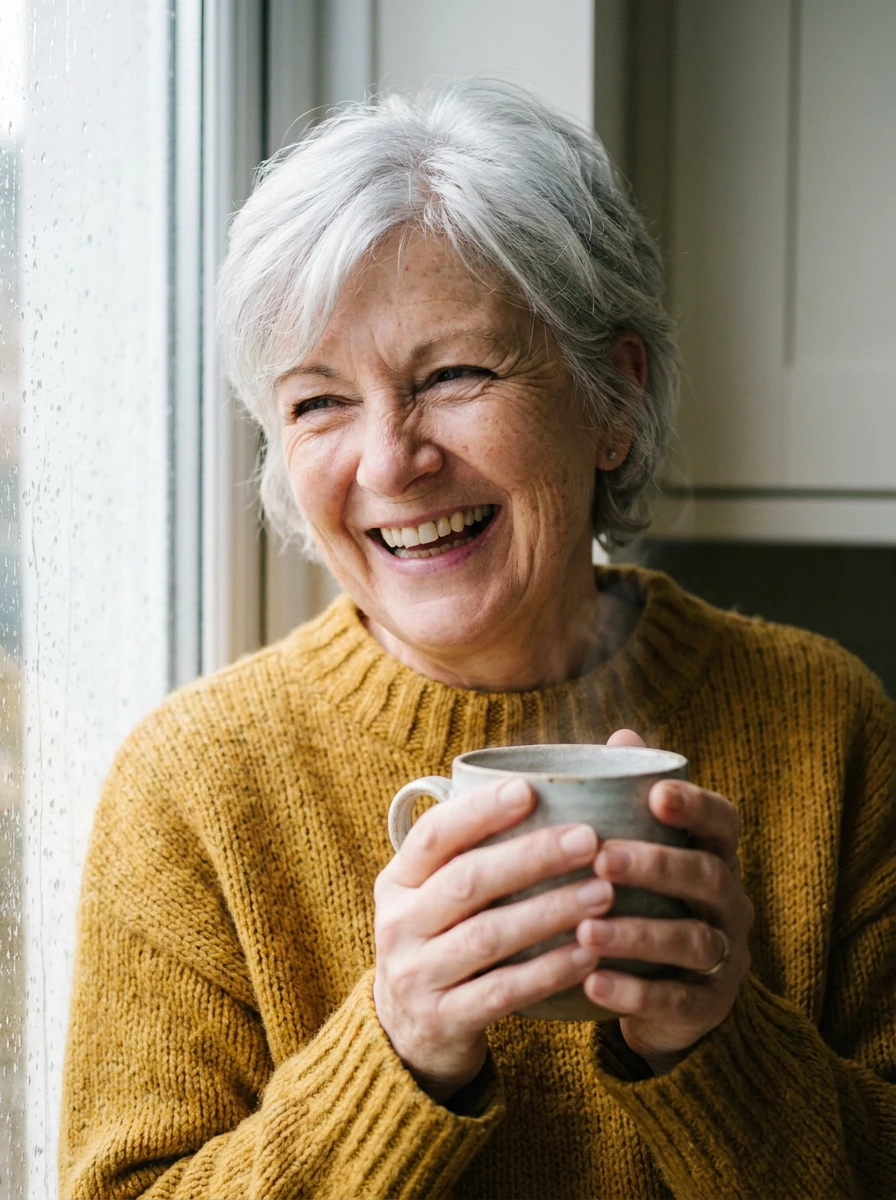
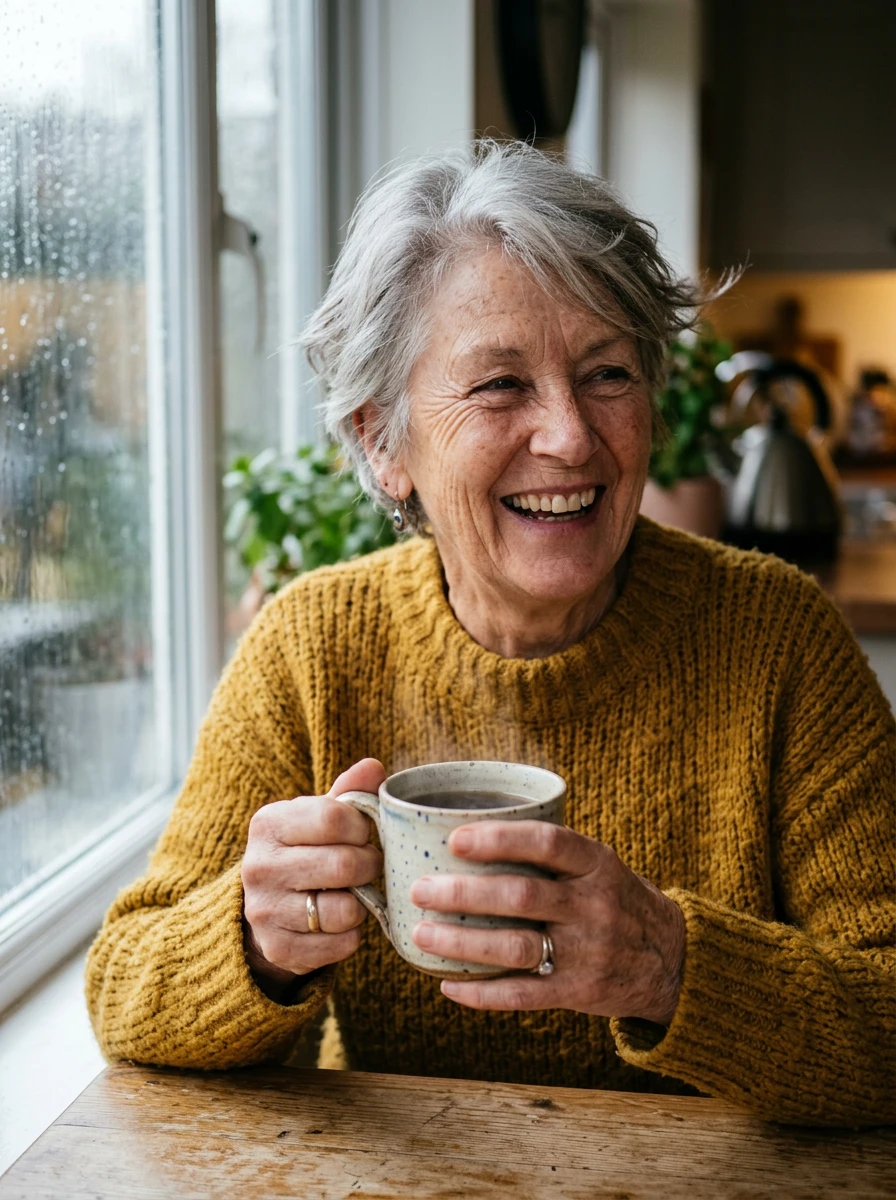
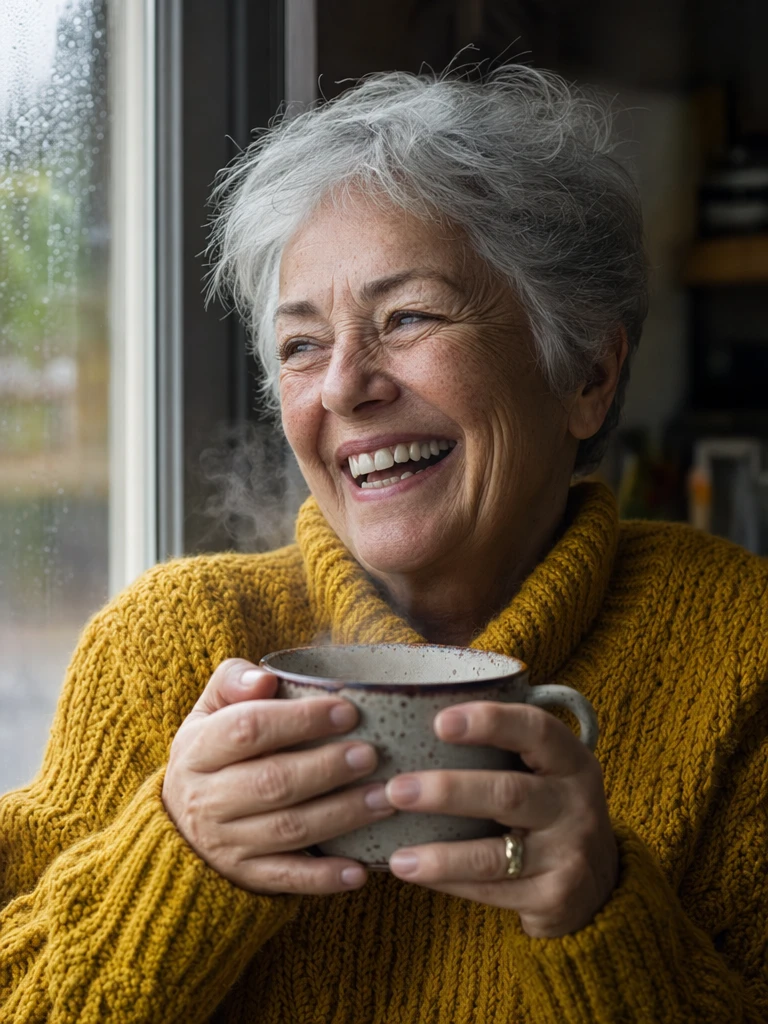
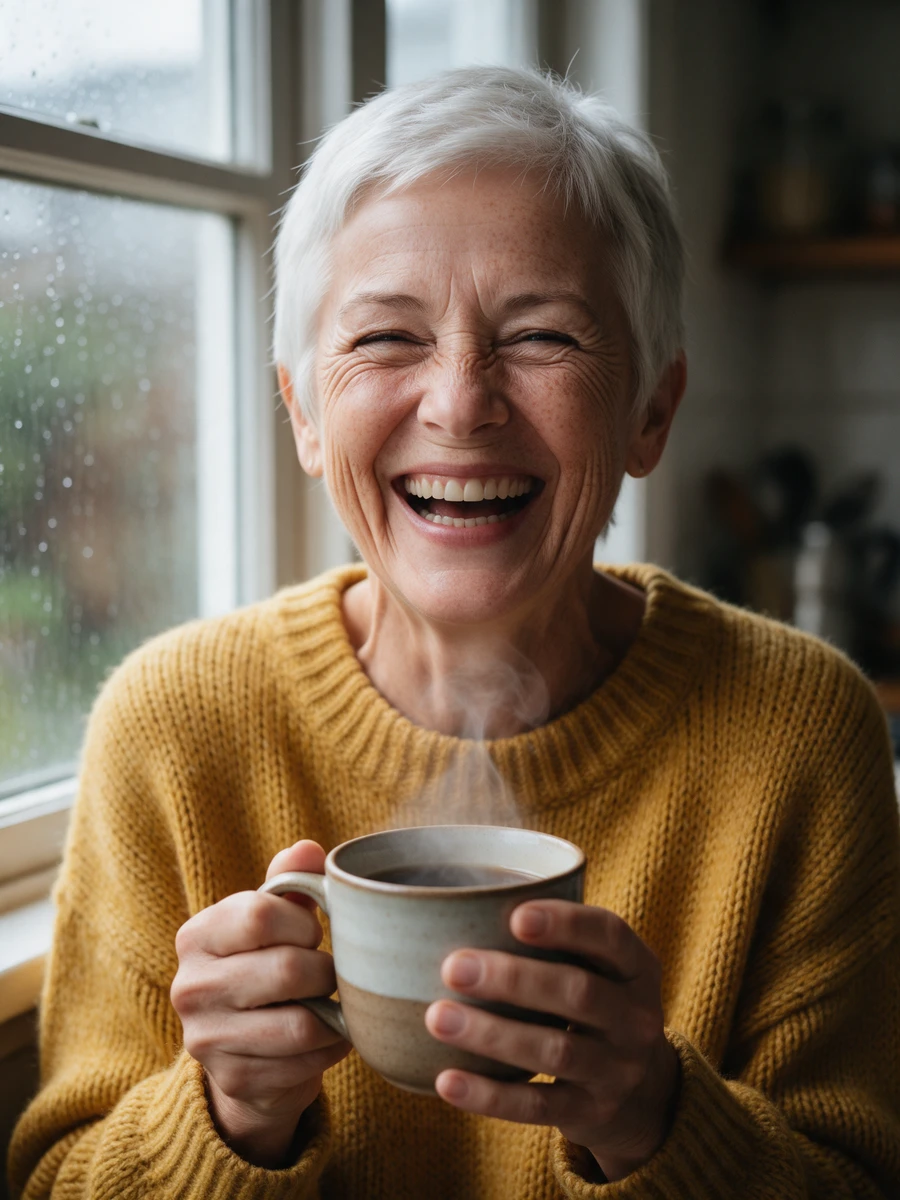
All four look like real photos: the skin has texture and freckles, the fingers around the mug are right, every window has raindrops, and the light comes from the left. The framing and the detail differ:
- Seedream 5.0 Pro: the sharpest wrinkles, freckles and knit stitches (it generated at 2K). She laughs with her eyes shut, has the shortest hair, and the steam is clear.
- GPT Image 2: the most candid shot. She laughs while looking out of the window, and her mug steams the most.
- Nano Banana Pro: the most classic close-up portrait, with soft light and only a faint wisp of steam.
- Nano Banana 2: the widest framing, with the wooden table, a kettle and the kitchen in view; it reads more like a medium shot than the close-up the prompt asked for, and the steam is faint too.
Text: which gets Chinese and Japanese right
Here we look at text inside the image: a retro poster for a fictional night train, with an English title at the top, one line of Chinese and one of Japanese in the middle, and a small English line at the very bottom.
A vintage travel poster for a fictional night train. At the top, large bold letters read "STARLIGHT LINE". Below it, a line in Chinese reads "星光夜行列车", and under that a line in Japanese reads "星降る夜の旅へ". The illustration shows a blue night train crossing a stone arch bridge under a starry sky, with mountains and a crescent moon. At the very bottom, a small line of text reads "Departs nightly at 23:45 from Platform 4". Flat mid-century illustration style with a limited palette of navy, cream and gold.
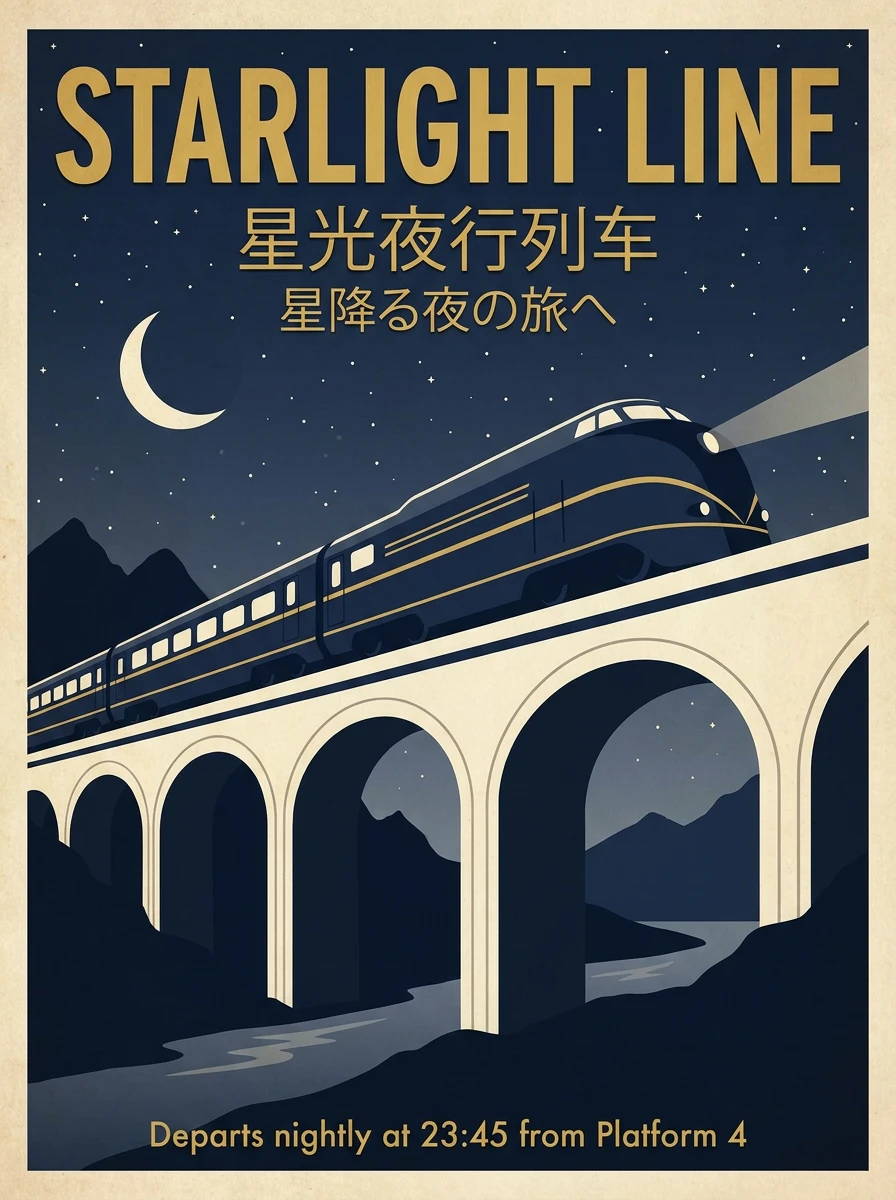
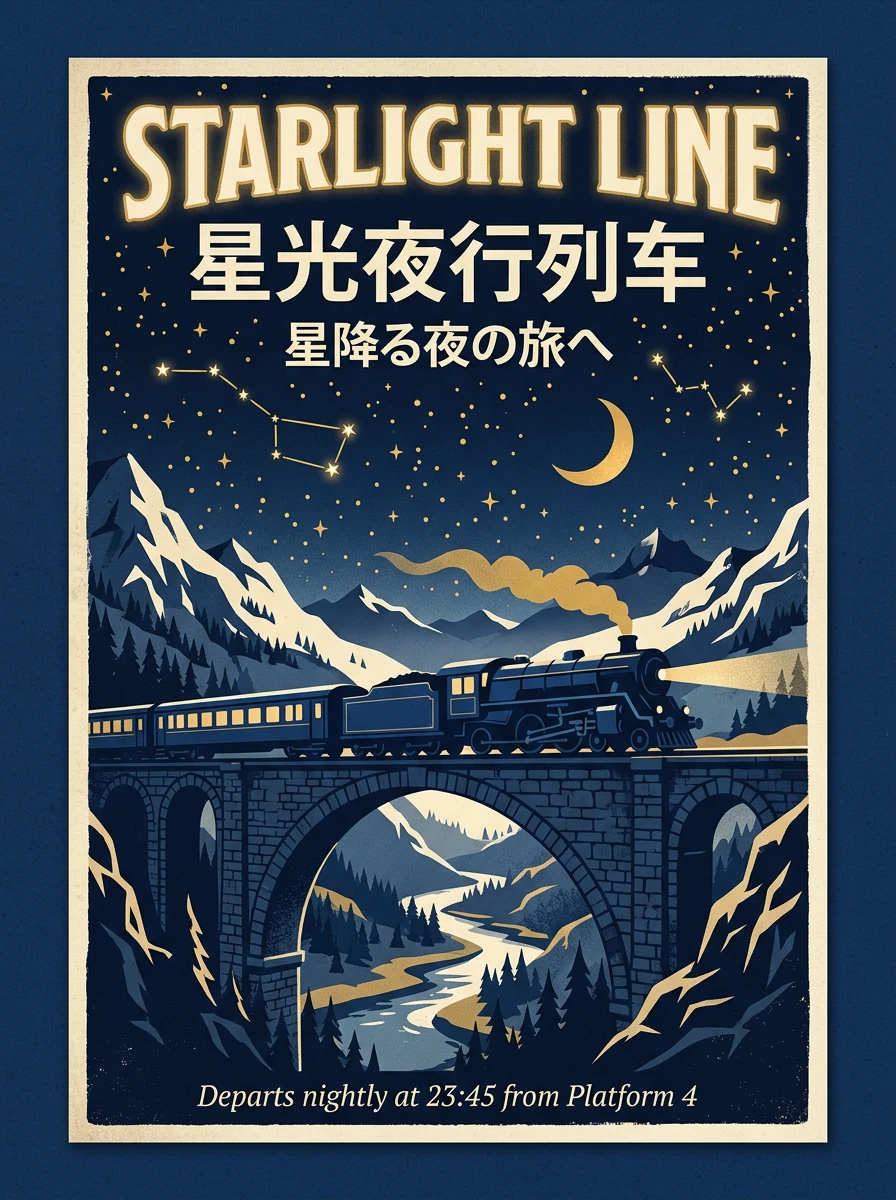
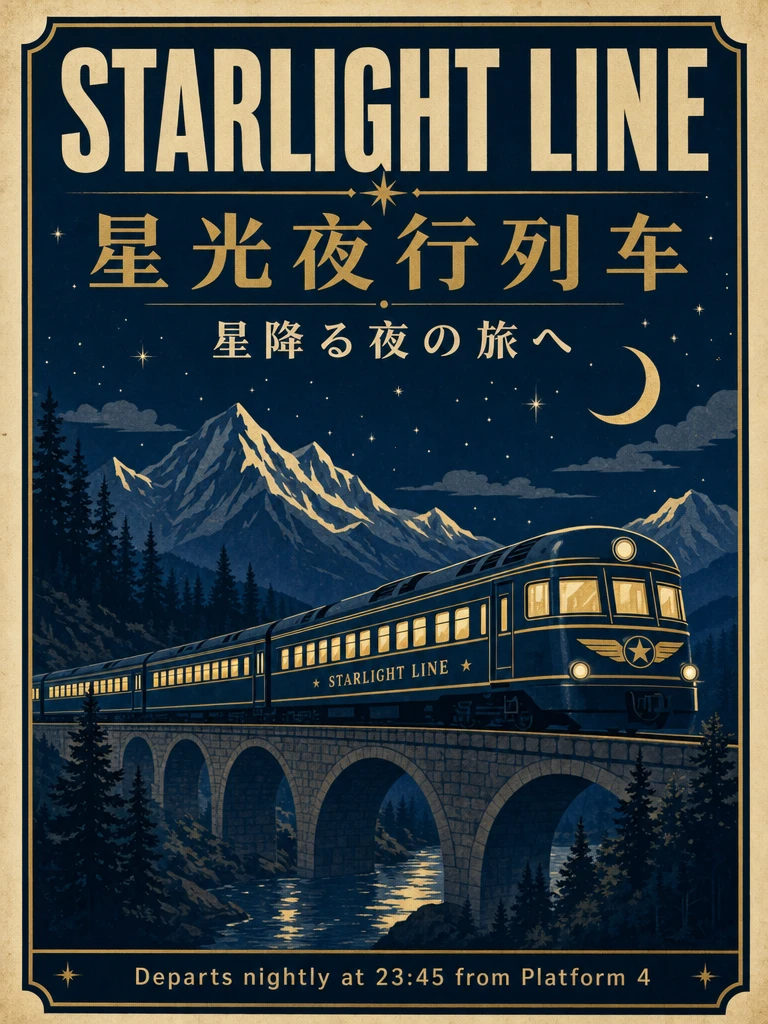
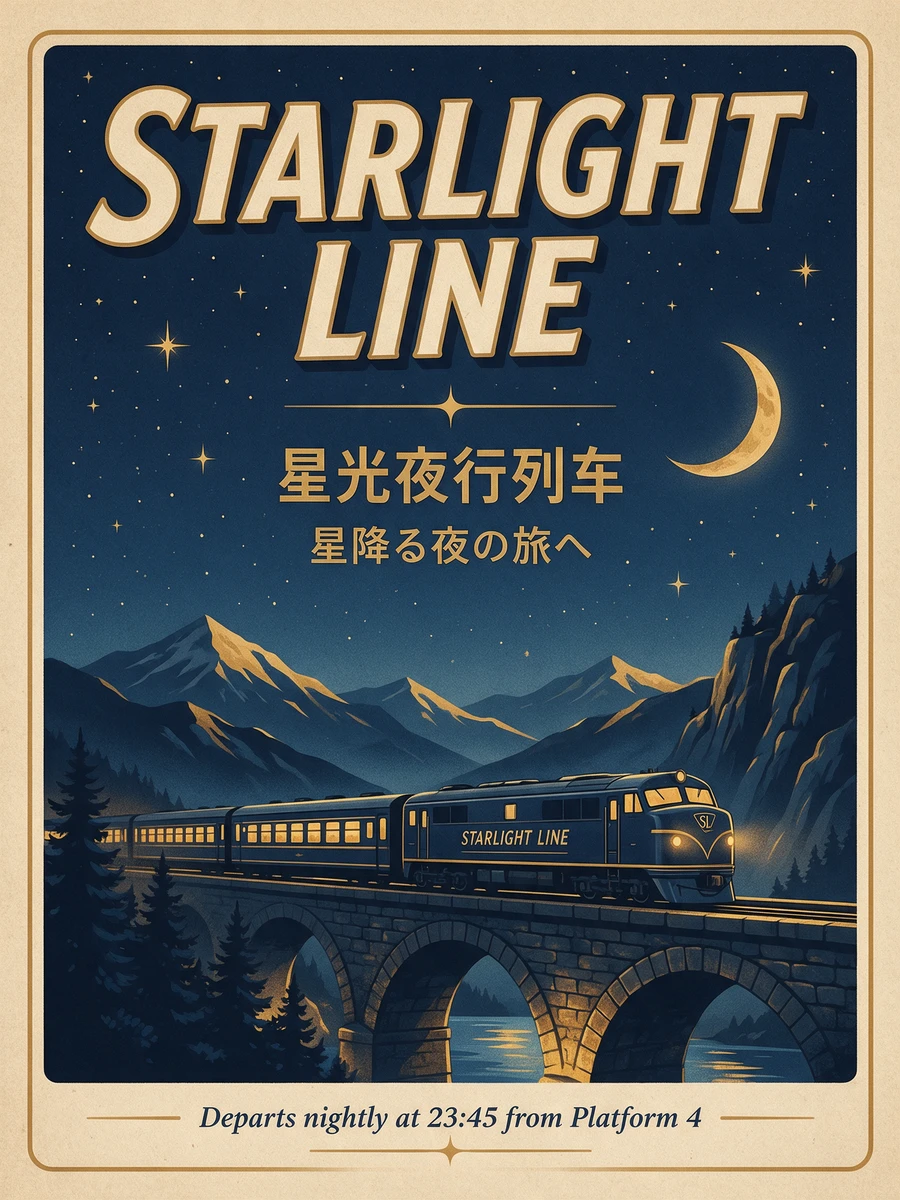
All four posters got all four required lines right, down to the small bottom line and the "23:45".
- Nano Banana Pro: the closest to the flat style the prompt asked for, with big blocks of color and clean lines, like a designed retro poster. Its bridge, though, is a cream arch bridge that doesn't look like stone.
- Nano Banana 2: lots of detail, with constellations, a steam train and the valley under the stone bridge; the whole poster sits on a navy background with a cream border.
- GPT Image 2: the most complete layout, with decorative rules between the title, the Chinese and the Japanese, and the small line in a band of its own. It also wrote "STARLIGHT LINE" on the side of the train, correctly.
- Seedream 5.0 Pro: set the title in italics on two lines, and also added "STARLIGHT LINE" to the train; every word is right.
The text the prompt spelled out came out right on all four this time; the difference is in the text a model adds on its own, as the anime group shows.
Product shots: which looks most like an ad
This group uses the samples from the AI Image Generator page, made with one prompt for all four models too: a bottle of cold brew on a wooden cafe table, with "SKY BREW" on the label.
A glass bottle of cold brew coffee on a sunlit wooden cafe table, condensation on the glass, a kraft paper label that reads "SKY BREW", soft morning light, shallow depth of field, product photography
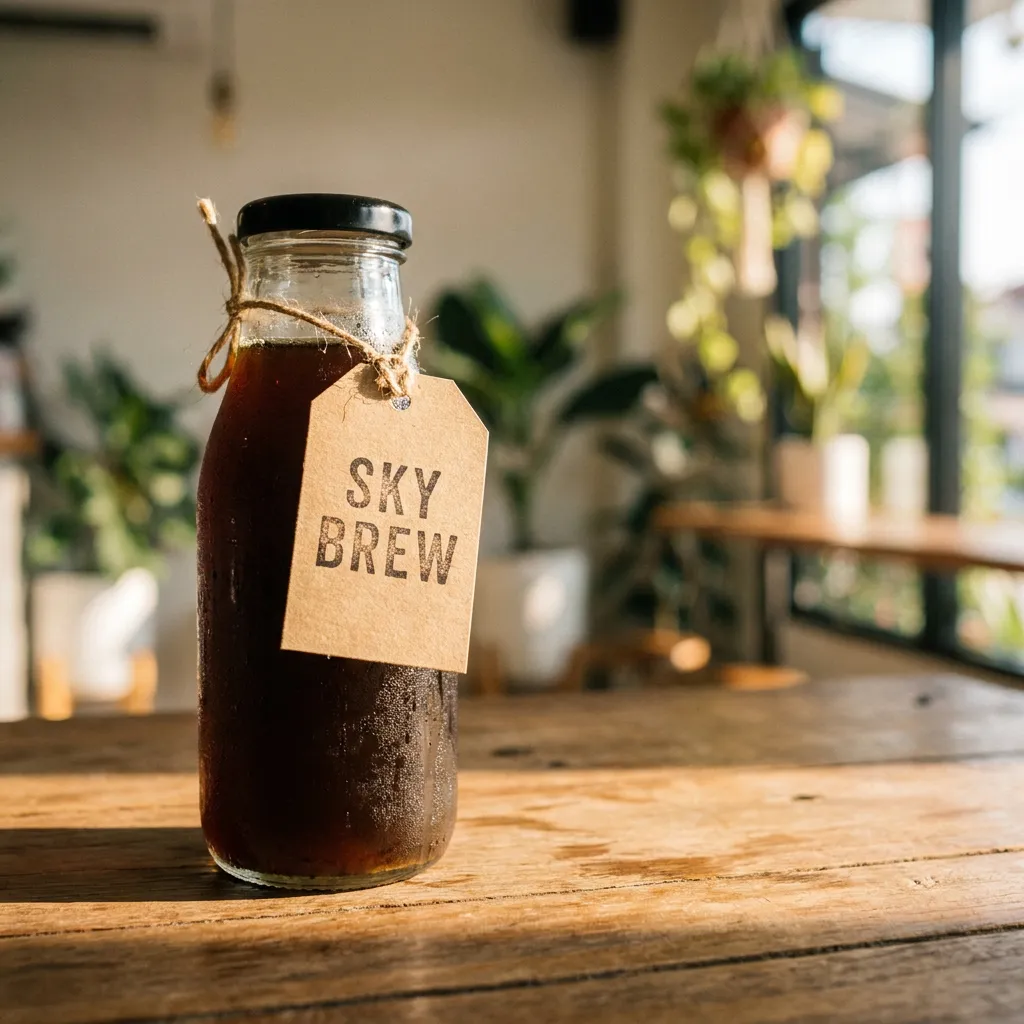
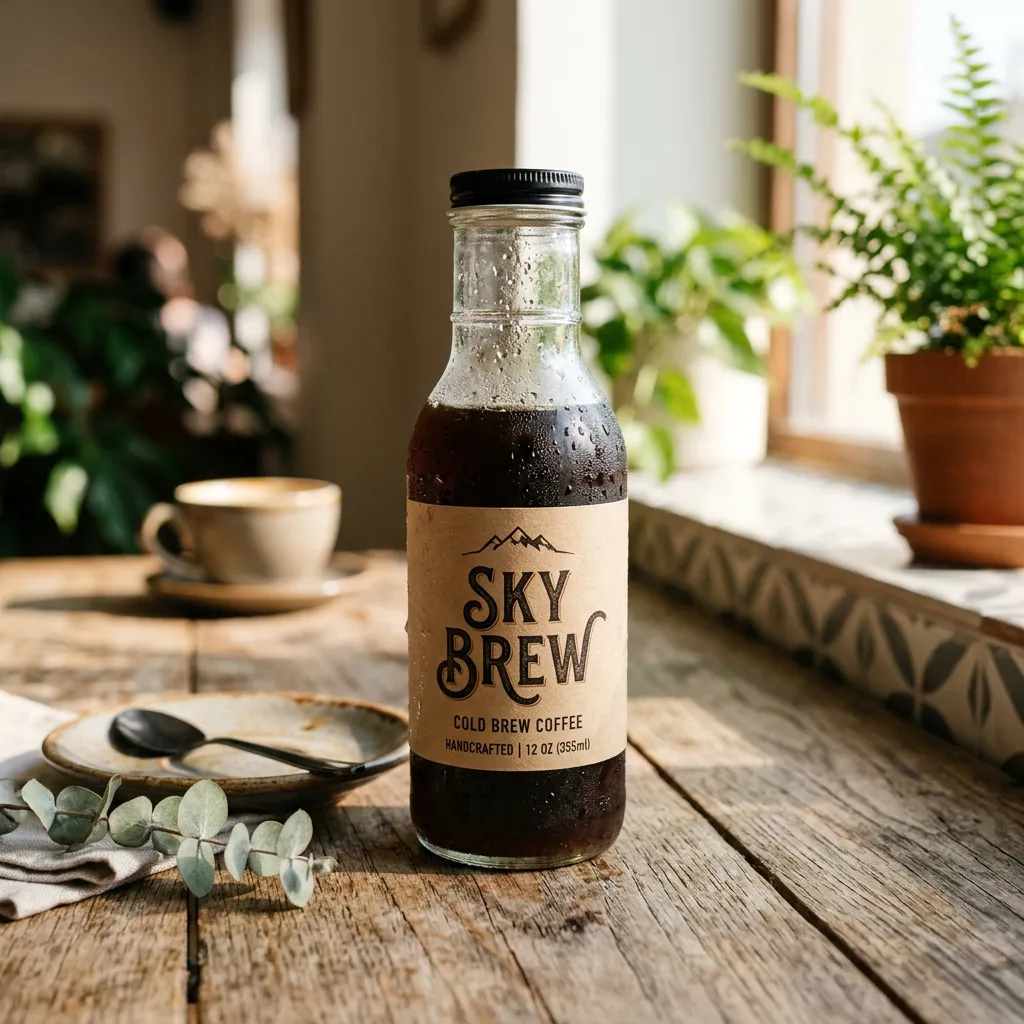
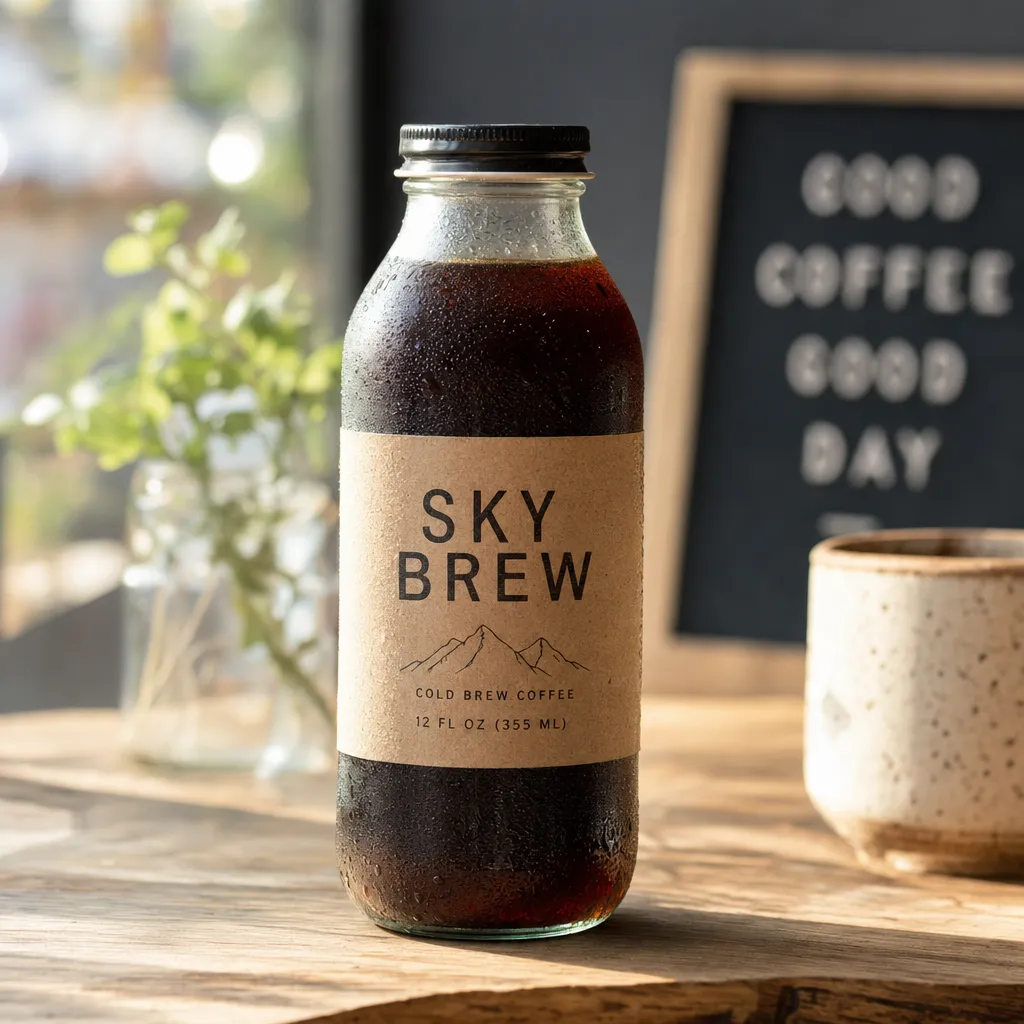
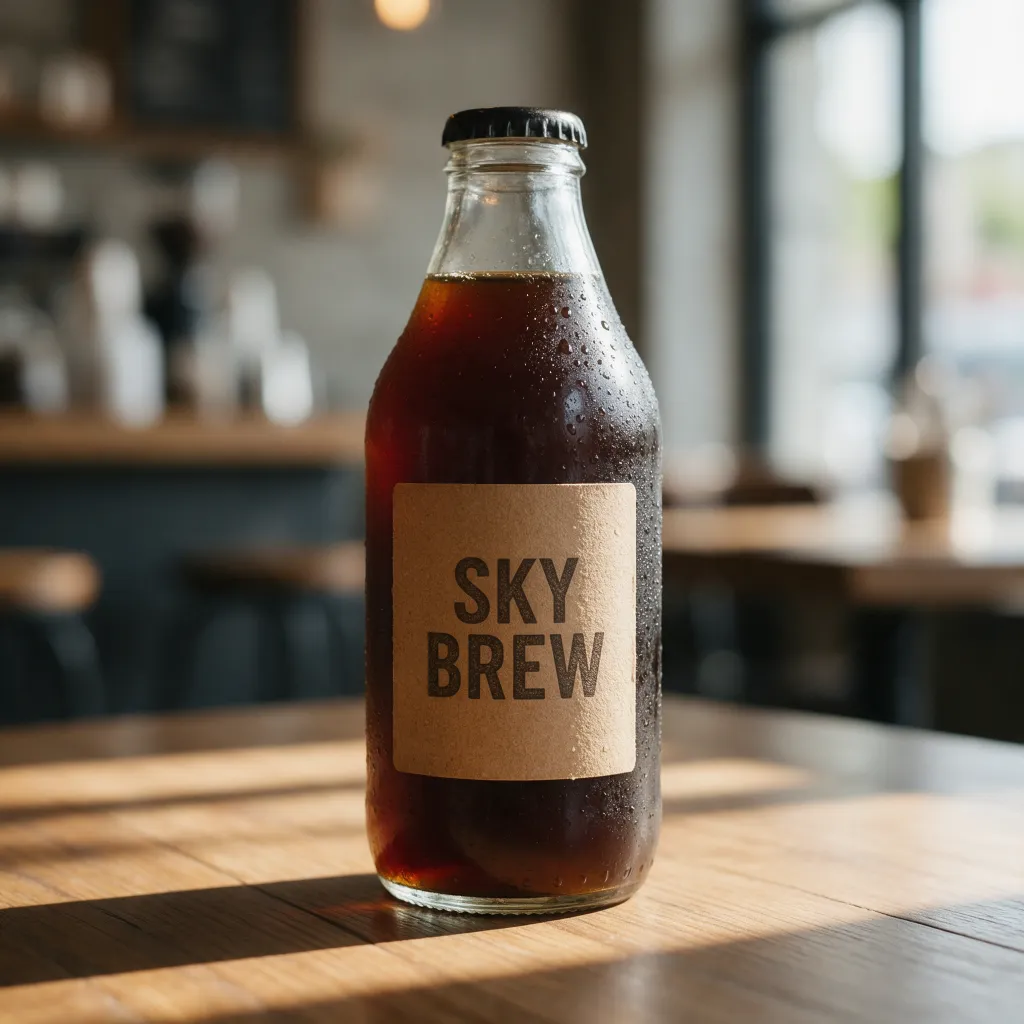
All four have condensation, a shallow depth of field and morning light in a cafe, and all four spell "SKY BREW" right.
- Nano Banana 2 and GPT Image 2: turned the label into a full package design, with mountains, "COLD BREW COFFEE" and the volume, all spelled right. GPT Image 2 also put a letter board reading "GOOD COFFEE GOOD DAY" in the background.
- Nano Banana Pro: instead of a label on the bottle, it wrote "SKY BREW" on a kraft paper tag tied to the neck with twine.
- Seedream 5.0 Pro: the simplest, with just the words "SKY BREW" on the label and the strongest side light and shadows.
To make images from your own product photos, see Best AI Product Photo Tools.
Anime characters: which follows the details
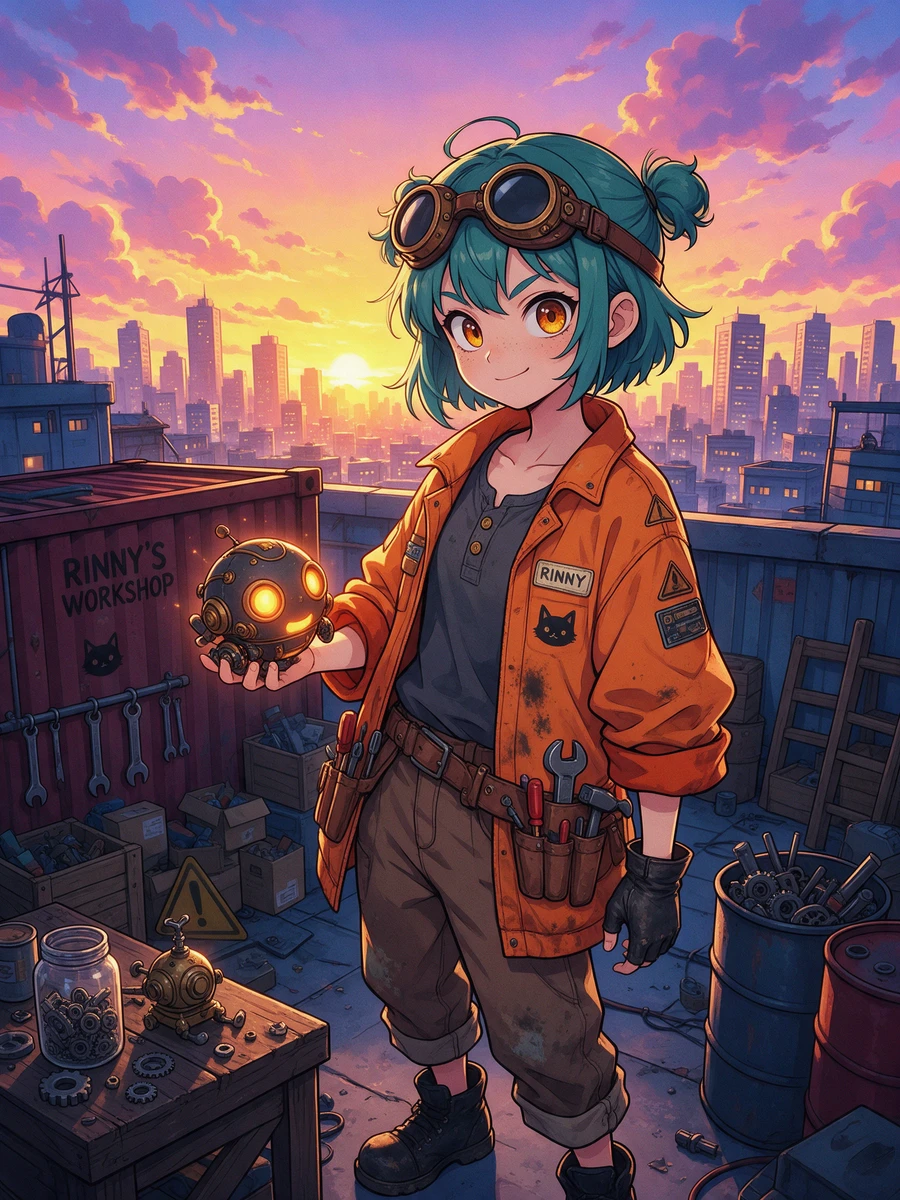
Here we look at whether a model can draw a long list of details right, especially the hands: the fingerless glove on the left hand only, a small glowing robot in the right hand, the wrench in the tool belt, and the character full-body.
Full-body illustration of an original anime character: a teenage girl inventor with short teal hair tied in two small buns and brass goggles pushed up on her forehead. She wears an oversized orange work jacket with rolled-up sleeves and patches, has one fingerless black glove on her left hand only, and holds a small glowing round robot in her right hand. A wrench is tucked into her tool belt. She stands in a cluttered rooftop workshop at sunset, with city lights in the background. Clean cel-shaded anime style, vibrant colors.
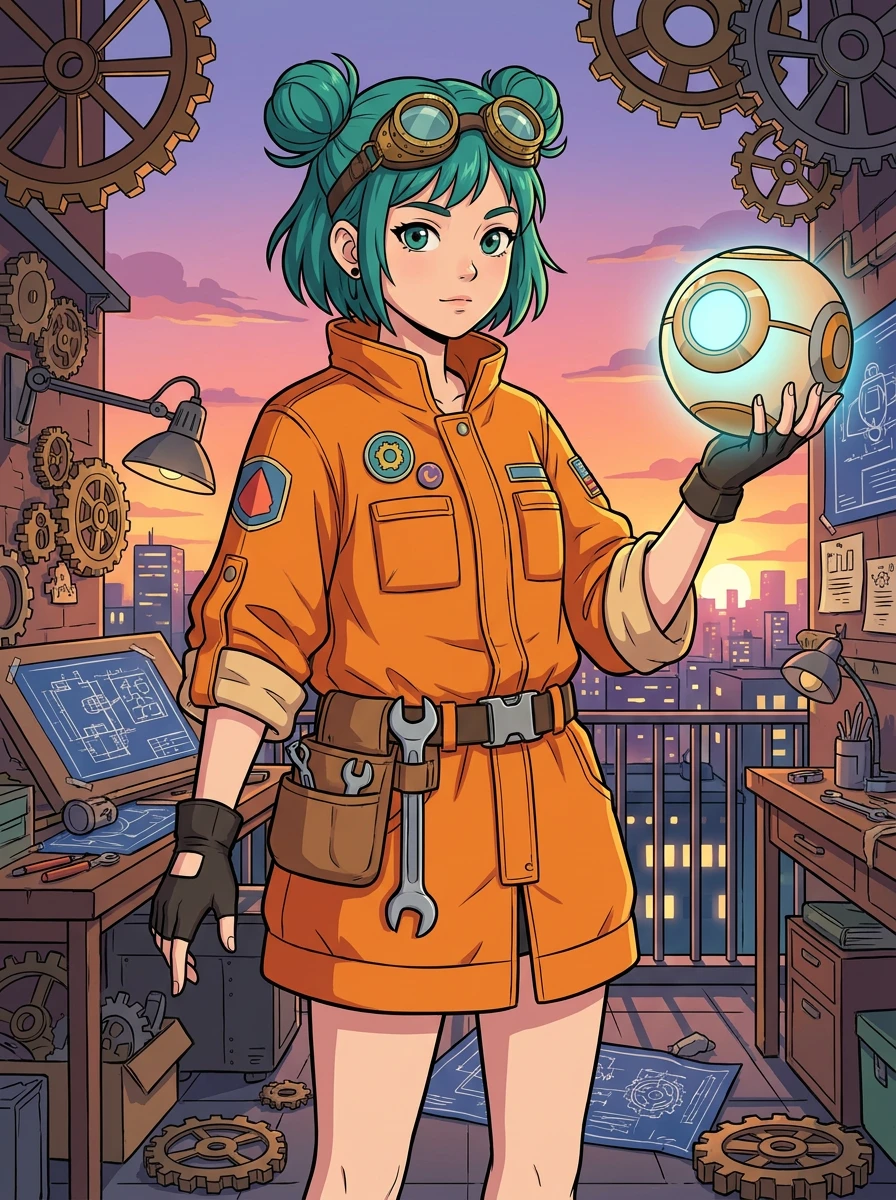
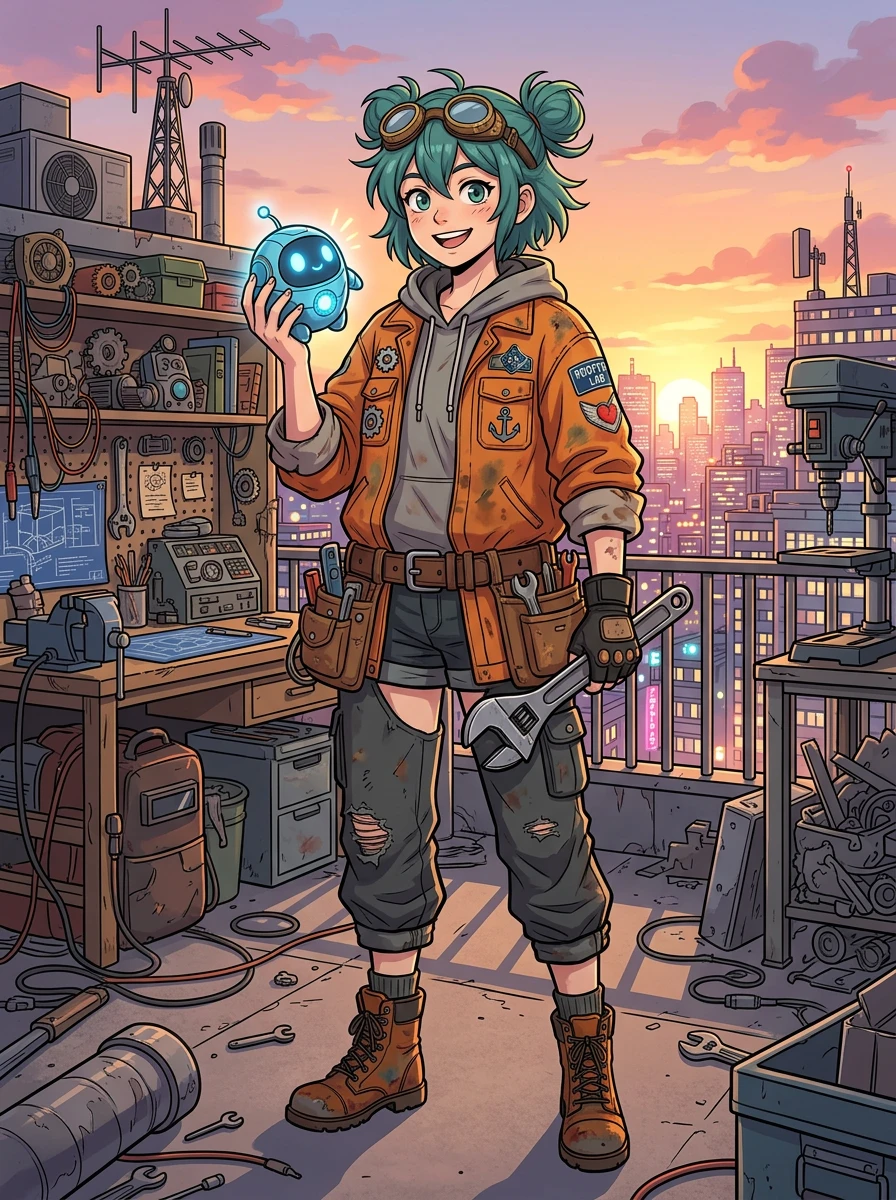
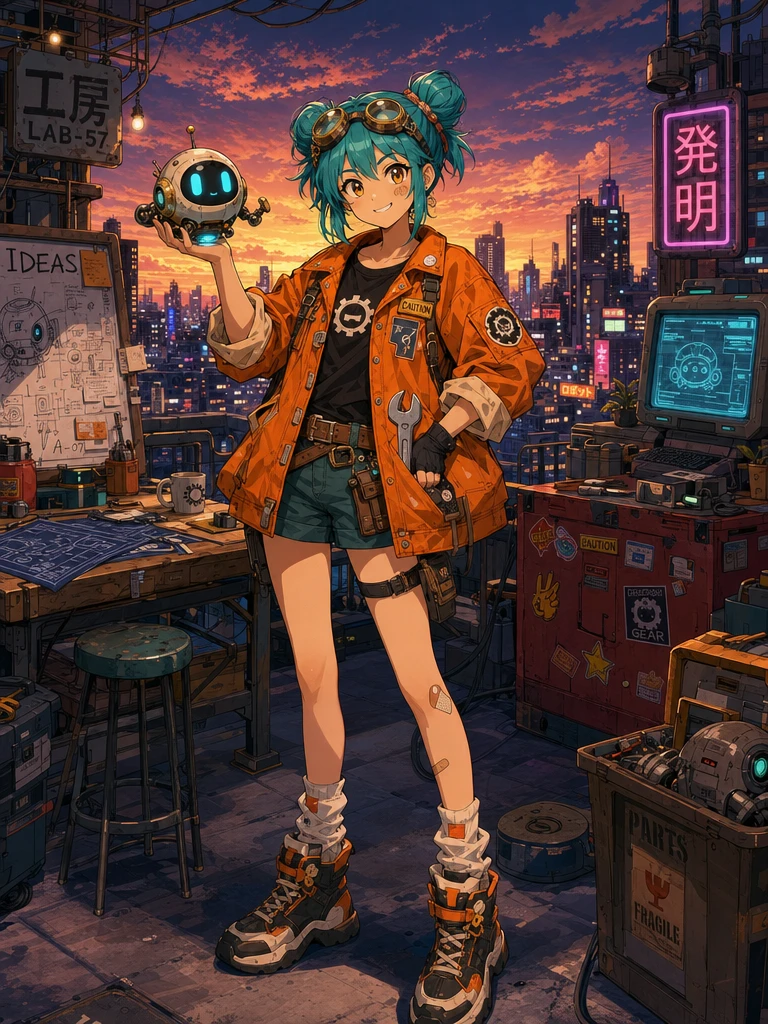
- GPT Image 2: got every listed detail right: two buns, goggles, the fingerless glove on the left hand only, the robot in the right, the wrench in the belt, and full-body. It also added signs such as "工房", "発明", "IDEAS" and "PARTS" in the background, all spelled right.
- Seedream 5.0 Pro: the glove, the robot and the wrench are right, but she has only one bun. It also gave the character a name, writing "RINNY" on her jacket and on a container.
- Nano Banana 2: the glove, the robot and the belt wrench are right, but it also put a big wrench in her left hand. The text on the jacket patch and on the neon sign behind her is garbled.
- Nano Banana Pro: put gloves on both hands, the glowing orb in her left hand, and drew her only down to the knees, not full-body.
The longer and more detailed the prompt, the more the models differ. In this group, only GPT Image 2 missed nothing.
Reference edits: putting a person into another scene
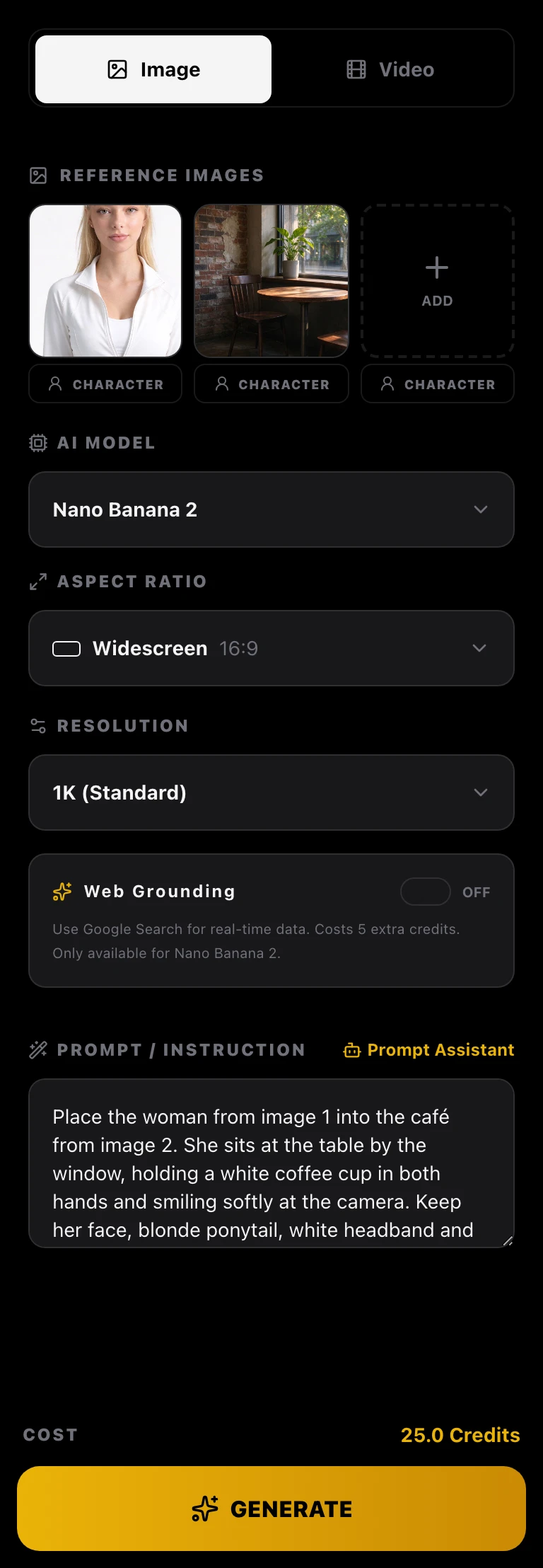
Here we look at whether a model can respect two reference images at once: the person should look like image 1, and the scene like image 2. Image 1 is a close-up of an AI person made with Sky Studio's character system; image 2 is an empty corner of a cafe. Both were generated beforehand (with Seedream 5.0 Flash, which is not one of the four models in the test), and all four models got the same two images.
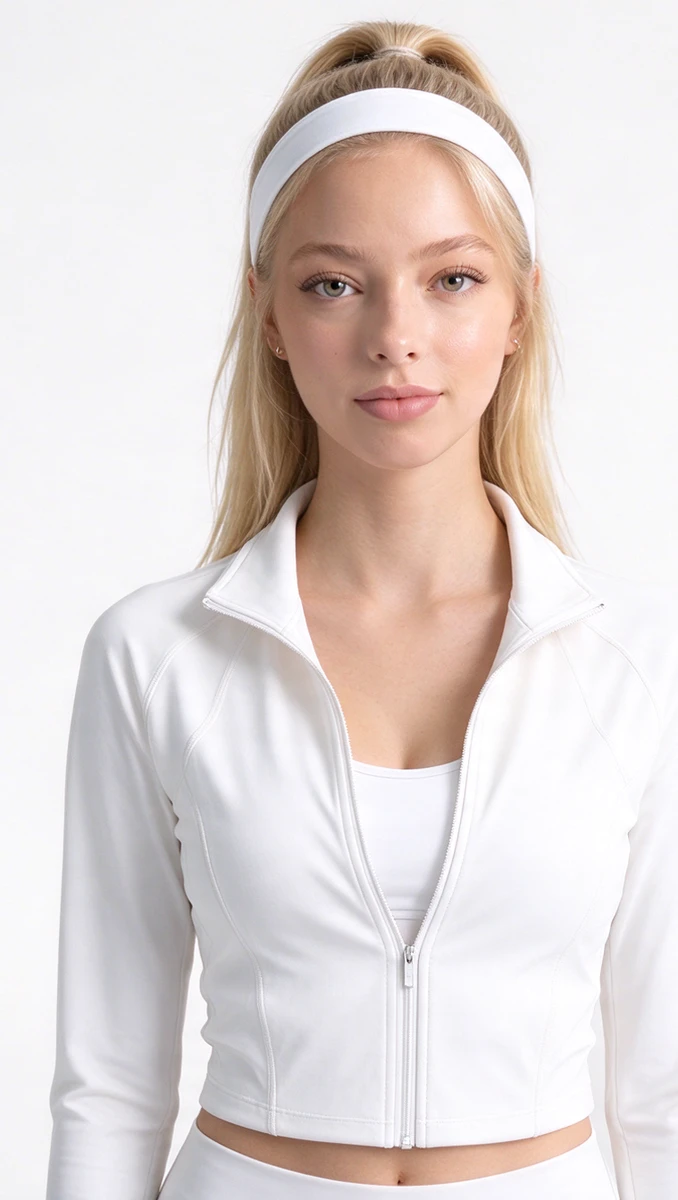
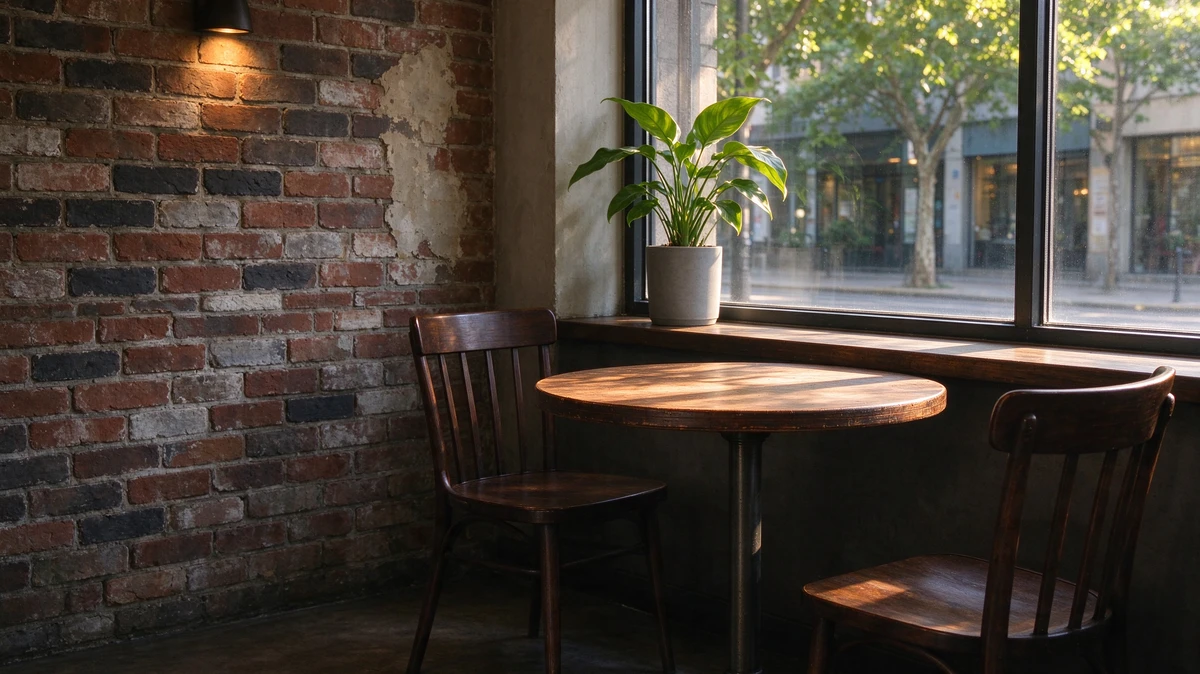
Place the woman from image 1 into the café from image 2. She sits at the table by the window, holding a white coffee cup in both hands and smiling softly at the camera. Keep her face, blonde ponytail, white headband and white zip-up jacket exactly as in image 1, and keep the café, the window light and the camera angle from image 2. Photorealistic.
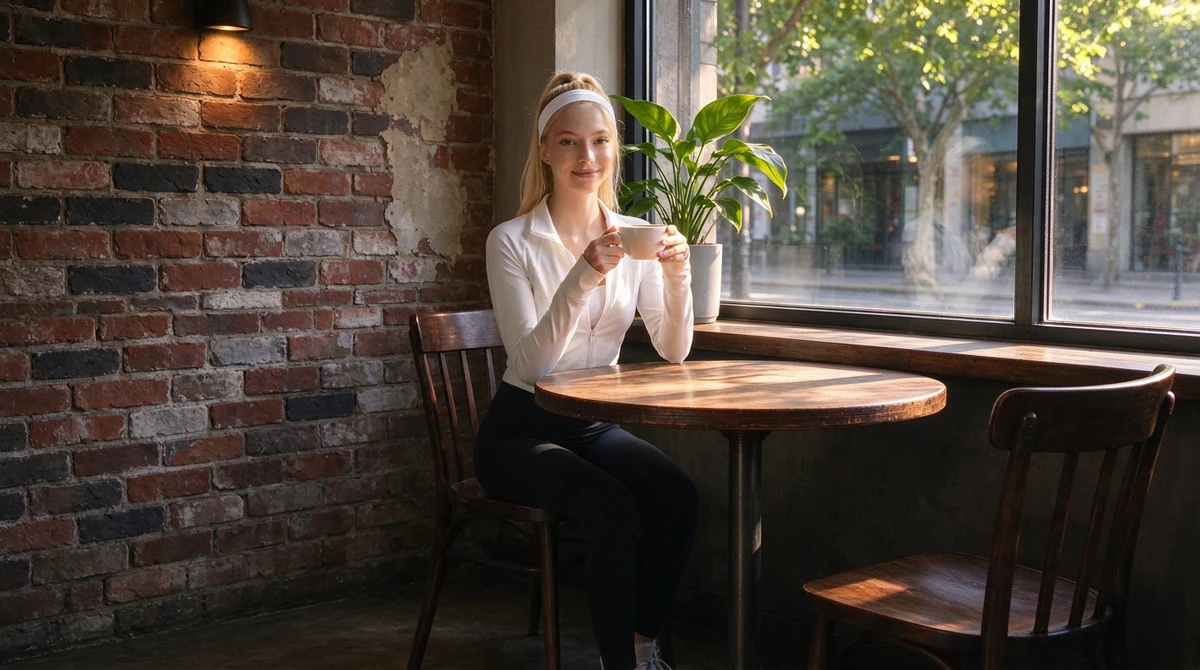
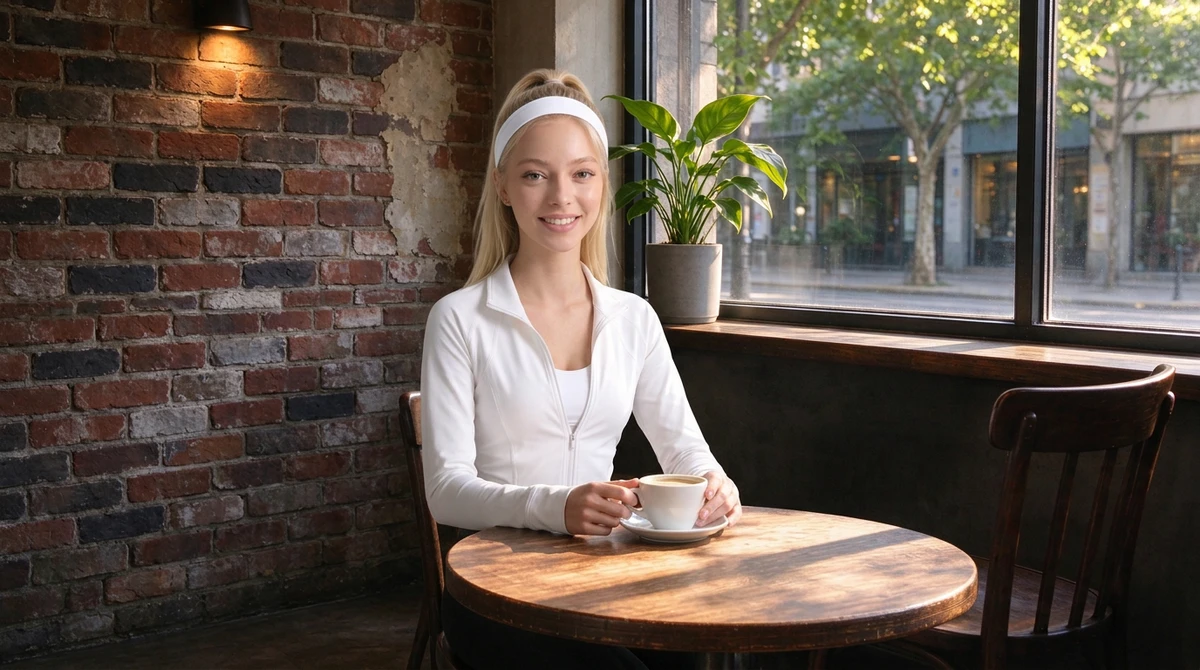
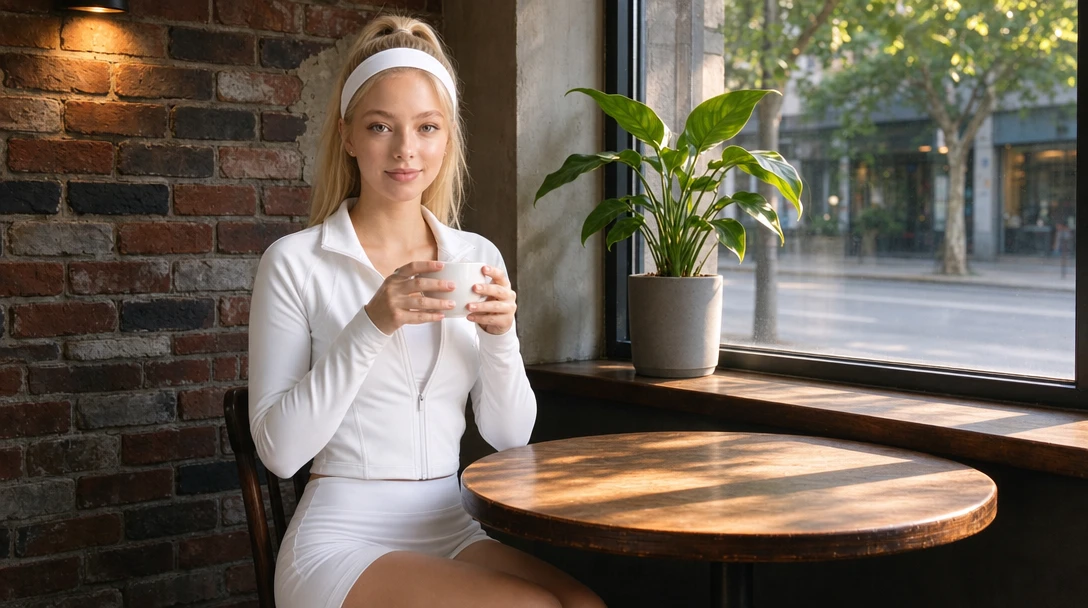
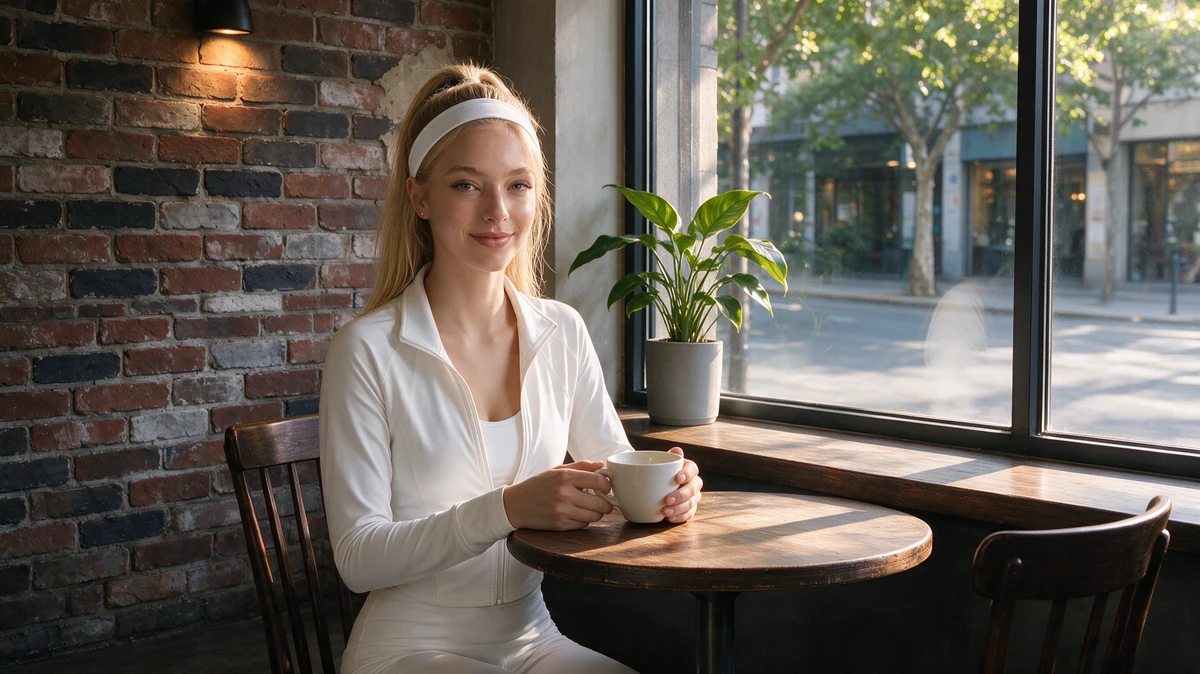
All four kept her blonde ponytail, white headband and white jacket, and every face looks a lot like image 1.
- Nano Banana 2, Nano Banana Pro and Seedream 5.0 Pro: kept image 2's camera angle; the brick wall, the wall lamp, the plant on the sill and both chairs stay where they were.
- GPT Image 2: pushed the camera in and recomposed the shot, so the plant and the table look bigger. The face and the two-handed hold on the cup are very good.
- Nano Banana 2: took just 14 seconds. But she grins with her teeth showing instead of "smiling softly", and the cup stays on its saucer on the table.
- Nano Banana Pro: sat her a little further from the camera, holding the cup at her chest with both hands; a faint white reflection appears on the window glass.
- Seedream 5.0 Pro: the sharpest person (it generated at 2K), also with a faint white reflection on the glass; the slowest, at about 2 minutes.
In Sky Studio's Workspace, upload the reference images in order and call them "image 1" and "image 2" in your prompt to say which is which, just like the prompt above.
Nano Banana Pro vs Nano Banana 2: what's the difference
Both are Google image models: Nano Banana Pro is Gemini 3 Pro Image, and Nano Banana 2 is Gemini 3.1 Flash Image. In this test:
- Speed: Nano Banana 2 took 13–14 s an image; Nano Banana Pro took 18–37 s, with the edit the slowest.
- Credits: in Sky Studio, at the same resolution, Nano Banana 2 uses fewer credits per image than Pro.
- Text: both wrote the poster's English, Chinese and Japanese correctly.
- Details: on the anime character, Nano Banana 2 got the glove, the robot and the wrench right; Nano Banana Pro put gloves on both hands, the orb in the wrong hand, and didn't draw her full-body.
- Style: Nano Banana Pro's poster is closer to flat graphic design; Nano Banana 2 draws more detail.
- Edits: both kept the person and the original camera angle.
- Aspect ratios: both offer 1:1, 3:4, 4:3, 9:16, 16:9 and 21:9; Nano Banana 2 adds 3:2, 2:3, 5:4, 4:5 and long formats such as 4:1 and 8:1.
In this test, Nano Banana 2 was no worse than Pro on speed, credits or following details. If you're unsure, start with Nano Banana 2, and run the same prompt on Pro when you want a different style.
| Model | Developer | Resolution | Aspect ratios | References |
|---|---|---|---|---|
| Nano Banana Pro | 1K, 2K, 4K | 1:1, 3:4, 4:3, 9:16, 16:9, 21:9 | Up to 14 | |
| Nano Banana 2 | 1K, 2K, 4K | The 6 above plus 3:2, 2:3, 5:4, 4:5, 4:1 and 8:1 | Up to 14 | |
| GPT Image 2 | OpenAI | 1K, 2K, 4K | 1:1, 3:4, 4:3, 9:16, 16:9, 21:9 | Up to 16 |
| Seedream 5.0 Pro | ByteDance | 2K | 1:1, 4:3, 3:2, 16:9, 9:16, 21:9 | Up to 10 |
Which to choose
- No detail can be missed, or there's a lot of text in the image (posters, packaging, signs): GPT Image 2, though each image takes longer.
- Fast and light on credits, for everyday images: Nano Banana 2.
- Real photo texture (portraits, products): Seedream 5.0 Pro, which comes out at 2K in Sky Studio.
- A clean graphic-design look: Nano Banana Pro.
- Putting a person into a new scene without changing the camera angle: Nano Banana 2, Nano Banana Pro or Seedream 5.0 Pro.
- Not sure: run the same prompt on two or three models and keep the best.
In Sky Studio, Nano Banana 2 and Seedream 5.0 Pro use the fewest credits; Nano Banana Pro and GPT Image 2 use the same, a little more than the other two. You see the cost before you generate.
This is the result of one test: each model generated once per group. AI images change every time, so this shows each model's tendencies, not a guarantee. The same four models compared on character sheets are in AI Character Turnaround Sheet: 5 Tools Compared, and video models in Best AI Video Generator? 4 Models, One Prompt.
How to use them in Sky Studio
- Open Sky Studio and switch the Workspace to Image.
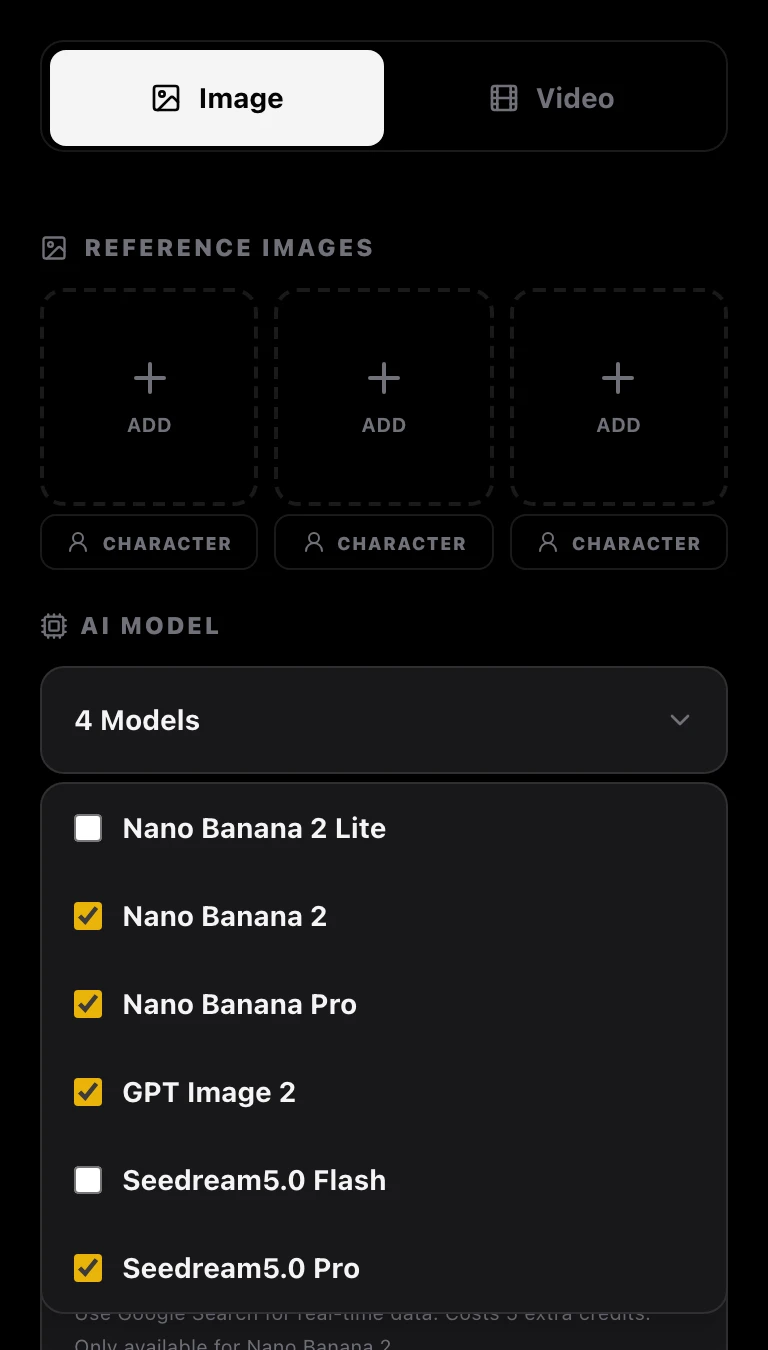
- Pick a model under AI Model: clicking a name uses just that one; ticking the box in front lets you pick several. One click on Generate then makes one image on each model, which makes comparing easy.
- To edit, upload your images in order under Reference images, and call them "image 1" and "image 2" in the prompt to say which is which.
- Choose the aspect ratio and resolution and write your prompt (you can paste the ones above). The cost of this run shows at the bottom; then click Generate.
- The results stay in your Workspace. To turn them into a storyboard or a video, carry on in the Cinematic Canvas.
Frequently asked questions
What is the best AI image generator right now?
No single model wins everything. In this test, GPT Image 2 followed prompt details and in-image text most accurately, though it is slow; Nano Banana 2 was the fastest and lightest on credits; Seedream 5.0 Pro had the finest photo texture; and Nano Banana Pro had the best graphic-design look. All four are in Sky Studio, so the safest bet is to run the same prompt on a few and pick.
Nano Banana Pro vs Nano Banana 2: what's the difference, and which is better?
Both are Google image models: Nano Banana Pro is Gemini 3 Pro Image and Nano Banana 2 is Gemini 3.1 Flash Image. In this test, Nano Banana 2 took 13–14 s an image and Pro 18–37 s, and in Sky Studio Nano Banana 2 also uses fewer credits. Both wrote the poster's English, Chinese and Japanese correctly, and both kept the person and the scene in the edit. On the anime character Nano Banana 2 was more accurate, while Pro's poster has more of a graphic-design look. If you're unsure, start with Nano Banana 2.
GPT Image 2 vs Nano Banana Pro: which is better?
If no detail can be missed or the image carries a lot of text, GPT Image 2: in this test it was the only model to get every detail of the anime character right, and the text it added on its own was correct too, but each image took 80 to 105 seconds. If you want speed or a flat graphic-design style, Nano Banana Pro, at 18–37 s an image. In Sky Studio, both use the same credits.
Which AI image generator writes Chinese and Japanese text best?
This time all four models wrote the poster's required Chinese "星光夜行列车" and Japanese "星降る夜の旅へ" correctly. The difference was in the text each model added on its own: the "工房" and "発明" signs GPT Image 2 put in the anime image are correct, while the neon sign Nano Banana 2 added in the same group is garbled. When an image carries a lot of text, zoom in and check it afterwards.
Which model is the fastest?
Nano Banana 2, at 13–14 s an image. Nano Banana Pro took 18–37 s, Seedream 5.0 Pro 43–119 s (it generates at 2K) and GPT Image 2 79–105 s. That is the time from submitting to getting the image, calling each model's API directly; in Sky Studio, queueing and saving add a little.
Which model uses the fewest credits in Sky Studio?
Nano Banana 2 and Seedream 5.0 Pro use the fewest; Nano Banana Pro and GPT Image 2 use the same, a little more than the other two. Credits also depend on resolution and references, and you see the cost of each run before you generate.
Can I use my own photos as references?
Yes. In Sky Studio, GPT Image 2 takes up to 16 reference images, Nano Banana Pro and Nano Banana 2 up to 14, and Seedream 5.0 Pro up to 10; in the prompt, call them "image 1", "image 2" in the order you uploaded them. Make sure you have the right to use any people, brands and works in the photos.
Do prompts have to be in English?
No, you can write them in any language the model understands. We used English so all four models got exactly the same text; when you compare models yourself, use the same prompt on each one too.
Will the same prompt give the same result next time?
No. AI image generation is random every time: run the same prompt on the same model again and the framing and details change. Each model generated only once per group here, which shows its tendencies; for real work, generate a few images and pick one.
Do I need a subscription to use these models in Sky Studio?
No. Sky Studio has no subscription: credits are deducted for what you generate, and you see how many before you generate. Credits don't reset at the end of the month and never expire.
Can I use the images commercially?
Under Sky Studio's Terms, the output is yours, subject to the rights of model providers and third parties. You need to make sure you have the right to use any people, brands and works in your prompts and references. We also never use what you upload or create to train AI models.