Comparison
How to use Seedance 2.5: one character, three models on the same prompts, and how to write them
Seedance 2.5 is ByteDance's video model: in Sky Studio 4 to 30 seconds per clip, up to 1080p, with up to 30 reference images, 10 videos and 10 audio clips. We made a 3D animated character from one description on the Characters page and gave its headshot, front, side and back to Seedance 2.5, Seedance 2.0 Pro and MiniMax H3 with the same prompt, one take each. All three kept the character in every shot and spoke "It works. It finally works." word for word; Seedance 2.5 also added music nobody asked for. Reference video works on all three: given the first clip as video 1 and told to change only the hair, all three repeated camera, action and lighting with long copper hair.

Sky Studio wrote this page, and Sky Studio is one of the tools on it. What this page says about other tools is as of October 2026.
| Item | Seedance 2.5 | Seedance 2.0 Pro | MiniMax H3 |
|---|---|---|---|
| Developer | ByteDance | ByteDance | MiniMax |
| Length per generation | 4–30 seconds, whole numbers | 4–15 seconds, whole numbers | 5–15 seconds, whole numbers |
| Resolution | 480p, 720p, 1080p | 480p, 720p, 1080p | 480p, 768p; Multimodal mode adds 2K and 4K |
| Aspect ratio | 16:9, 9:16, 21:9, 4:3, 1:1, 3:4, plus Adaptive | 16:9, 9:16, 21:9 | 16:9, 9:16, 21:9, 4:3, 1:1, 3:4 |
| Sound | Switchable, dialogue included | Switchable, dialogue included | Always generated, no switch |
| Inputs | Text, first and last frame, reference images, videos and audio | Text, first and last frame, reference images, videos and audio | Text, first and last frame, reference images, videos and audio |
| Reference limits | 30 images, 10 videos, 10 audio clips, 50 files in total | 9 images, 3 videos, 3 audio clips, 12 files in total | 9 images, 3 videos, 3 audio clips, 12 files in total |
| Strength in these tests | Longest clips and the most references (10 videos and 10 audio clips) | Boldest camera move and expressions, exact line with no added music | Fastest, same character recognition, the cleanest soundtrack |
How we tested
First we generated a 3D animated-film style character on Sky Studio's Characters page from an English description. The page cuts out the front, side and back views automatically and generates a headshot. Then, in the video workspace's Multimodal mode, we passed those four images as image 1 to image 4 in that order (headshot, front, side, back) and gave the three models the same English prompt, one take each, in 16:9.
- Dialogue close-up tests speech, expression and light. Seedance 2.5 and Seedance 2.0 Pro at 720p, 5 seconds, sound on; MiniMax H3 at 768p, 5 seconds (its sound is always generated, there is no switch).
- Market walk tests full-body motion, a tracking camera and a sidekick. All three at 480p; the two Seedance models 4 seconds, MiniMax H3 its 5-second minimum.
- Hairstyle change from a reference video tests editing with the reference video as the base. All three get only the first workshop clip as video 1, no character images, at 480p; the two Seedance models 4 seconds with sound off, MiniMax H3 its 5-second minimum.
Each model generated each prompt once. The clips below are the originals, with no selection and no editing. On this page clips of 720p and above play compressed to 720p; the 480p clips are untouched.
Step 1: make a character on the Characters page first
Character consistency is decided less by the video model than by the references: four views of the same character are far more stable than one image. That is what Sky Studio's Characters page does. You write a description and pick an image model; it generates a four-view design sheet, cuts it automatically into front, side and back role images, and finally generates a headshot from the front view.
This article's character is Maya, a young inventor in 3D animated-film style, generated with Nano Banana 2 at 2K from the description below. The style follows your words: write "animated film" and you get animation, write "watercolour" and you get watercolour, write nothing and it leans toward a realistic photo.
We chose an animated style on purpose rather than a realistic person. The provider behind the Seedance family checks reference images for the likeness of a real person and refuses the generation when it finds one (see the FAQ). An animated character has no such limit, and its four images can be used as they are.
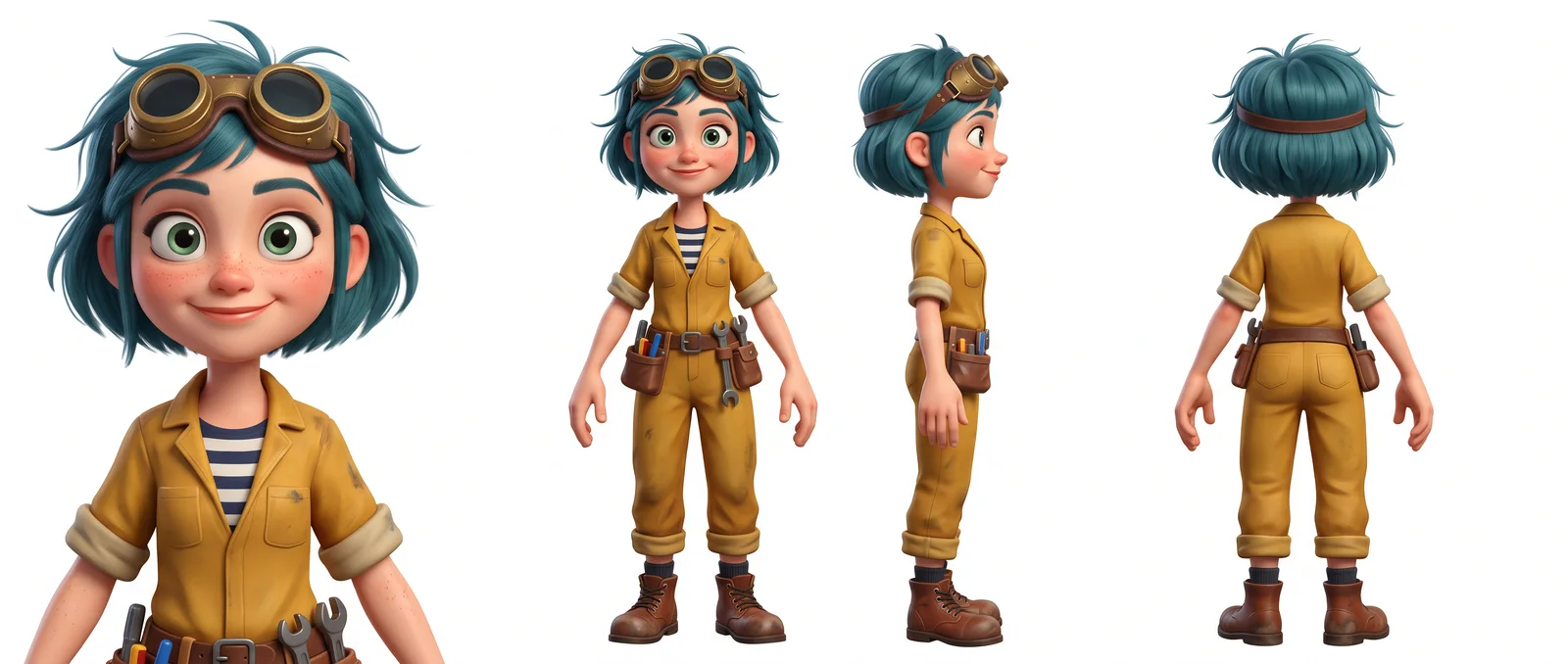
3D animated feature film style, stylized cartoon character, not photorealistic: a young woman inventor in her mid-twenties with clearly exaggerated animation proportions, a slightly oversized head, big round expressive green eyes, a small button nose, soft rounded cheeks with freckles, smooth stylized skin shading. Short messy teal-blue bob haircut with a pair of brass welding goggles pushed up on her head. She wears a mustard-yellow work jumpsuit with the sleeves rolled up over a navy-and-white striped shirt, a small leather tool belt, and scuffed brown boots. Friendly confident expression. Clean soft studio lighting.
Test 1: dialogue close-up (speech, expression and light)
All three models followed the action: she studies the little brass gadget, looks up and talks while smiling. Hair, goggles, freckles, jumpsuit and striped shirt match the character images in all three clips.
- Seedance 2.5: a slow push-in; she looks up at about 2.5 seconds, the mouth follows the line, and she grins at the end. The warm desk lamp and the blue window light split the face as the prompt asked. The line is word for word, one female voice. But it added an orchestral music bed across the whole clip that the prompt never asked for, and the ticking clock and the whirring gadget it did ask for were not heard in either listening test.
- Seedance 2.0 Pro: the strongest push-in, ending on a close-up of just the face. She looks up earlier, eyebrows and smile are the most exaggerated, and the window is blue bokeh. Line word for word, with an excited gasp before speaking, no music.
- MiniMax H3: she opens her mouth in surprise as she looks up and lifts the gadget to the camera at the end. The push-in is very light, the lamp warm, the window moonlit. Line word for word, a breath in before speaking, no music.
Prompt: “Cinematic close-up of @image 1, the same character as @image 2, @image 3 and @image 4, at her cluttered workshop bench late at night. A warm desk lamp lights one side of her face, cool blue moonlight from a window lights the other. Slow push-in. She looks up from the small brass gadget in her hands, grins and says: "It works. It finally works." 3D animated feature film look, shallow depth of field, soft stylized skin shading. Ambient sound: a ticking clock, the gadget whirring softly.”
Cinematic close-up of @image 1, the same character as @image 2, @image 3 and @image 4, at her cluttered workshop bench late at night. A warm desk lamp lights one side of her face, cool blue moonlight from a window lights the other. Slow push-in. She looks up from the small brass gadget in her hands, grins and says: "It works. It finally works." 3D animated feature film look, shallow depth of field, soft stylized skin shading. Ambient sound: a ticking clock, the gadget whirring softly.
Test 2: market walk (full-body motion, tracking camera and a sidekick)
In all three clips she walks toward the camera, the camera tracks backward at her pace, a brass bird keeps her company and sunlit market stalls fill the background. All three recognised the character. The differences are framing and light.
- Seedance 2.5: a medium-long shot, the bird hovers at her left, sunlight pours from above and the vendors behind her move. The soundtrack is mostly footsteps with a clear rhythm; of the two listening tests one heard voices in the background and the other a light melody, and neither heard the bird's mechanical chirps.
- Seedance 2.0 Pro: closest to the prompt's wide shot, full body in frame, the bird flies on the right and crosses over her head, with a strong backlit flare. The loudest clip with a busy background; one listening test heard fountain water and the other footsteps, and neither heard the bird.
- MiniMax H3: the tightest framing, waist up, the bird flapping on the left, backlight with lens flares and a warm market. The sound is very quiet, footsteps only, no market voices and no bird.
Prompt: “Wide cinematic shot of @image 1, the same character as @image 2, @image 3 and @image 4, walking toward the camera through a sunlit cobblestone market street in the morning, goggles on her head, tool belt bouncing at her hip, a small brass clockwork bird hovering beside her. Slow tracking shot moving backward at her pace, warm golden light, gentle lens flare, 3D animated feature film look. Ambient sound: market chatter, the bird's soft mechanical chirps.”
Wide cinematic shot of @image 1, the same character as @image 2, @image 3 and @image 4, walking toward the camera through a sunlit cobblestone market street in the morning, goggles on her head, tool belt bouncing at her hip, a small brass clockwork bird hovering beside her. Slow tracking shot moving backward at her pace, warm golden light, gentle lens flare, 3D animated feature film look. Ambient sound: market chatter, the bird's soft mechanical chirps.
Test 3: hairstyle change from a reference video (the clip stays, only the hair changes)
All three models take reference videos: you hand over an existing video as video 1 and describe in words how the new shot relates to it. Seedance 2.5 takes up to 10, Seedance 2.0 Pro and MiniMax H3 up to 3. The clearest use is as a video edit: the original clip stays and one thing changes. We used the first 480p workshop clip (she studies the gadget, closes her eyes for a moment, looks up and smiles) as video 1, this time with no character images, and asked in words only: keep the camera, action, lighting and timing, and swap the short teal hair for long wavy copper hair past her shoulders.
All three did it. The hair is now long copper waves, the goggles, jumpsuit and striped shirt remain, and the push-in, the look at the gadget, the blink and the smile line up with the original almost frame for frame. The differences are in the background: Seedance 2.5 paints the window on the right brighter and adds blue outlines outside it; Seedance 2.0 Pro and MiniMax H3 keep the original's gear wall.
Two tips: write only what should change and say the rest is "the same as the original", and the model treats the reference video as its base; and do not attach the character images at the same time, because they pull the hair back to its original colour. With a reference video attached, Seedance locks the aspect ratio to Adaptive and the output follows the reference, which is why these two clips are also 16:9; MiniMax H3 still lets you pick a ratio with a reference video.
Prompt: “Recreate @video 1 shot for shot: the same workshop, the same warm desk lamp and cool window light, the same camera push-in, the same timing and the same expression as she looks up from the brass gadget and smiles. Change only her hair: long wavy copper-red hair falling past her shoulders instead of the short teal bob. Keep the brass goggles on her head, the mustard jumpsuit and the striped shirt. 3D animated feature film look.”
Recreate @video 1 shot for shot: the same workshop, the same warm desk lamp and cool window light, the same camera push-in, the same timing and the same expression as she looks up from the brass gadget and smiles. Change only her hair: long wavy copper-red hair falling past her shoulders instead of the short teal bob. Keep the brass goggles on her head, the mustard jumpsuit and the striped shirt. 3D animated feature film look.
| Shot | Seedance 2.5 | Seedance 2.0 Pro | MiniMax H3 |
|---|---|---|---|
| Dialogue close-up | Exact line; medium push-in; added music on its own | Exact line; strongest push-in and most exaggerated expression | Exact line; lightest push-in, lifts the gadget to the camera at the end |
| Market walk | Medium-long shot, bird hovering on the left | Full-body wide shot, bird crossing overhead | Waist-up medium shot, backlit flares |
| Hairstyle change from a reference video | Hair changed, action and light kept; brighter window | Hair changed; action, light and background kept | Hair changed; action, light and background kept |
| Character consistency | Recognised all four images | Recognised all four images | Recognised all four images |
How to prompt Seedance 2.5
- Write in English. Every prompt in this article is the English original that was run.
- Name references by order. In Multimodal mode, after uploading material or picking a Character from the library, refer to it in the prompt by order as @image 1, @image 2, @video 1, @audio 1. Put the character's four images in together and write that "@image 1 is the same character as @image 2, @image 3 and @image 4"; the model then treats them as angles of one person.
- Camera first, then subject, action, setting and style. Close-up or wide, push-in or tracking: say it up front. For an animated finish write "3D animated feature film look"; leave it out and the model follows the style of the references.
- Dialogue goes in quotes, preceded by who says it and how; ambient sound gets its own sentence starting with "Ambient sound:". You only get sound with the sound switch on; off, the picture is the same without audio.
- Reference video: put the existing video in as @video 1. For an edit, write "everything the same as the original, change only…"; for a new shot, make the new action the main sentence and say only what to keep from the reference. On Seedance the ratio locks to Adaptive and follows the reference video.
- Small gestures need their own emphasis. In these tests "turn it slowly" and "nod once" came out faint on all three models. To make one show, make it the subject of the sentence or ask for fewer actions.
- Pick the length for the action. 4 seconds covers one gesture; dialogue needs time to be said, and 5 seconds was just enough for one short line.
Which one to pick
- Long shots and many references: Seedance 2.5. Up to 30 seconds per clip, 30 reference images, and 10 reference videos and 10 audio clips; the other two stop at 15 seconds, 9 images and 3 videos and 3 audio clips.
- Bolder acting and a more dynamic camera: in these tests Seedance 2.0 Pro let go the most in push-in and expressions. Up to 15 seconds per clip and 9 reference images.
- Fast and cheap iterations: MiniMax H3 delivered fastest and recognised the character just as well. Use it to try framing and performance, then switch to Seedance 2.5 for the final take.
- All three accept the four images from the Characters page. If in doubt, run the same prompt once on each; everything stays in your workspace.
How to do it in Sky Studio
- Open Sky Studio, go to the Characters page, write a character description (or upload one reference image), pick the image model and resolution and press "Create Character". A few minutes later you have front, side, back and headshot.
- Back in the workspace, switch to video, pick Seedance 2.5 as the model and Multimodal as the mode, and add the character from the library; its four images become the references, in order.
- Write the prompt, pick length, resolution, aspect ratio and the sound switch; the credits it will cost show before you generate. To compare, run the same prompt again with Seedance 2.0 Pro or MiniMax H3.
- To continue with the next shot, add this clip from the workspace as a reference video and describe the new action.
- In the Cinematic canvas, when you build a story scene by scene, video generation offers the same three models and the character binds straight into the story.
The Characters page step by step is in How to Make an AI Character Sheet in 5 Steps; why characters "change face" and three ways to keep them is in Consistent Characters in AI Video: 5 Tools; and Seedance 2.0 Pro against Veo, Omni and MiniMax H3 on the same paper-boat prompt is in Best AI Video Generator? 4 Models, One Prompt.
Frequently asked questions
What is Seedance 2.5 and how long can a clip be?
Seedance 2.5 is ByteDance's video generation model. In Sky Studio it generates 4 to 30 seconds per clip at 480p, 720p or 1080p, in 16:9, 9:16, 21:9, 4:3, 1:1, 3:4 or Adaptive (which follows the references), with sound you can switch on or off, from text, first and last frames, and reference images, videos and audio.
What is the difference between Seedance 2.5 and Seedance 2.0 Pro?
2.5 goes up to 30 seconds per clip, 2.0 Pro up to 15; 2.5 takes 30 reference images, 10 videos and 10 audio clips, 2.0 Pro 9, 3 and 3; 2.5 has more aspect ratios plus Adaptive. In these tests both recognised the character: 2.0 Pro was bolder in camera and expression, 2.5 steadier. Both are in Sky Studio.
Why did Seedance refuse the photo of a real person I uploaded, and which models accept real people?
The provider behind Seedance 2.5 and Seedance 2.0 Pro checks reference images and videos for the likeness of a real person and refuses the generation when it suspects one; Sky Studio refunds that attempt's credits automatically. A realistic AI-generated portrait counts as a real person too. Two ways out: build an animated or stylised character on the Characters page, as in this article, or switch to a model that accepts real people. In Sky Studio, Gemini Omni 1.1 Flash and Grok Imagine Video do.
How do reference images work and how many can I use?
In the video Multimodal mode, upload images or add a Character from the library, then refer to them by order in the prompt as @image 1, @image 2. Seedance 2.5 takes up to 30, Seedance 2.0 Pro and MiniMax H3 up to 9. For a consistent character the most stable choice is the four images from the Characters page together: headshot, front, side and back.
How does a reference video work, and why does the aspect ratio become Adaptive?
All three models take reference videos: Seedance 2.5 up to 10, Seedance 2.0 Pro and MiniMax H3 up to 3. Add a video from the workspace or an upload as a reference, refer to it as @video 1 in the prompt and say what to keep, what to change, or what happens in the new shot; test 3 in this article changes only the hairstyle and keeps the rest. With a reference video, Seedance makes the output follow the video's ratio, so the selector locks to Adaptive; MiniMax H3 still lets you choose.
Can Seedance 2.5 generate dialogue?
Yes. Switch sound on, put the line in quotes in the prompt, say who speaks and how, and put ambient sound in its own sentence. In these tests all three models spoke the line and the mouth followed it; details are in test 1. With sound off the picture is the same, just silent.
How do I keep the same character across several shots?
Build the character on the Characters page first to get front, side, back and headshot, then attach those four images to every shot and say in the prompt that they are the same character. All three sets of shots in this article were made this way and all three models recognised her. The steps are under "How to do it in Sky Studio".
How is the price calculated?
Seedance 2.5 and Seedance 2.0 Pro are charged by the seconds generated and the resolution: the higher the resolution, the more each second costs. The sound switch does not change the price, reference images and audio are free, and with a reference video its seconds count too. MiniMax H3 is charged by seconds and resolution as well. Before every generation Sky Studio shows the credits it will cost.
Do I need a subscription to use these models in Sky Studio?
No. Sky Studio has no subscription: it deducts credits for what you actually generate, shows the cost before you generate, and credits neither reset at month end nor expire.
Can I use the videos commercially, and is my material used for training?
Under Sky Studio's terms of service the results are yours (apart from the rights of model providers and third parties). You need the right to use the people, brands and works in your prompts and references. We do not use the material you upload or the work you generate to train AI models.